How to Set Up Medical ID on Your iPhone - MacRumorsOpen MenuShow RoundupsShow Forums menuVisit ForumsOpen Sidebar
Skip to Content

How to Set Up Medical ID on Your iPhone

by

ios10 medical id custom e1521017583630Medical ID is a built-in feature of your iPhone's Health app that gives ambulance crews and other emergency first responders fast access to potentially life-saving information about any allergies or medical conditions you have, even if your iPhone is locked.

Even if you don't suffer from any health conditions, it's still worth enabling Medical ID, because it can also provide other vital information about you to emergency services, such as your blood type and who to contact in an emergency. This article shows you how to set up Medical ID in iOS 11.

How to Set Up Your Medical ID in iOS 11

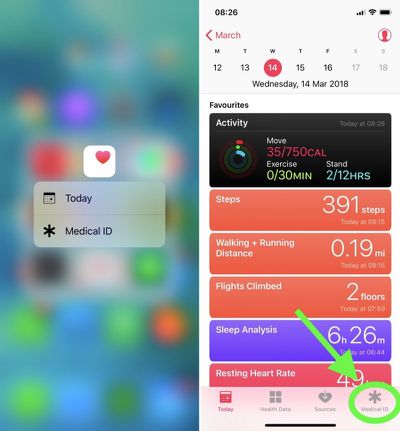
  1. Launch the Health app on your iPhone. (If you're using an iPhone 6s or later, firmly press the Health app icon to jump straight to the Medical ID via 3D Touch and skip the next step.)
    medical id health app

  2. Tap Medical ID at the bottom of the screen.

  3. If you're in the U.S., you can opt to register as an organ donor with Donate Life America by tapping the option at the bottom of the Medical ID screen. If you don't want to register, or you're outside the U.S., simply skip this step.

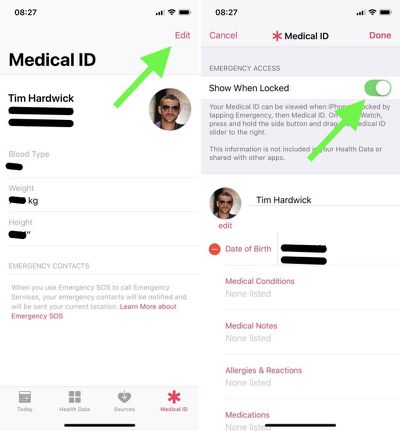
  4. Tap the Edit button at the top right of the screen.
    apple medical id edit

  5. Under Emergency Access, toggle the Show When Locked switch to the On position. Make sure you perform this step, otherwise emergency services won't be able to access your Medical ID.

  6. Start adding information to your Medical ID card. Apart from your name and date of birth, the other types of information you can add in this section include medical conditions and medical notes, allergies and reactions, medications, blood type, organ donor status, weight, and height. (Note that information added to your Medical ID isn't included in your Health Data or shared with other apps.)

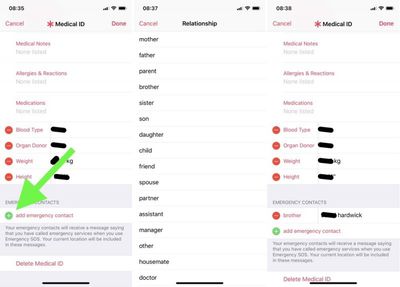
  7. Under Emergency Contacts, tap the green plus sign to add someone from your Contacts list. (You can add several people, but bear in mind that if you use the Emergency SOS feature on your iPhone's lock screen, all emergency contacts receive a message alerting them of the SOS and your location.)
    apple medical id emergency contact

  8. For each emergency contact you add, select an option from the list that best describes your relationship to that person, e.g. "father" or "doctor".

  9. Tap Done in the top right of the screen when you're finished.
If you decide against keeping a Medical ID record, the Edit mode includes a Delete Medical ID option at the very bottom of the screen.

Accessing Medical ID on a Locked iPhone 8 or Earlier

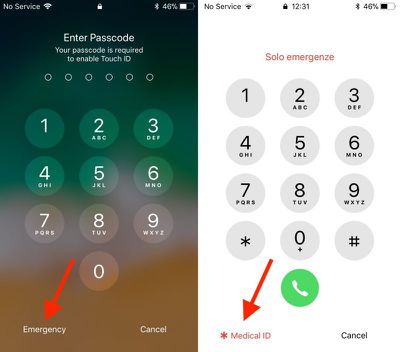
  1. Press the Home button on the iPhone to activate the passcode screen.

  2. Tap Emergency in the bottom left corner of the passcode screen.

  3. Tap Medical ID in the bottom left corner of the Emergency keypad screen.
medical ID lock screen access
Note: If the Apple handset doesn't have a Home button, swipe up with your finger from the bottom of the screen to trigger the passcode screen, or use the alternative method for accessing Medical ID below.

Accessing Medical ID on a Locked iPhone X or Later

  1. Simultaneously press and hold the Side (power) button on the right and the Volume Up button on the left of the handset.

  2. Swipe rightwards across the Medical ID slider.

You can also access the Medical ID on Apple Watch: Press and hold the side button and drag the Medical ID slider to the right.


Tag: Health
Related Forum: iOS 11

Top Rated Comments

kemperman Avatar
112 months ago
As a Paramedic, I can confidently say, NOT ENOUGH PEOPLE DO THIS. If you are unconscious and you have an iPhone, the first thing I will do when trying to ascertain a history, is find out if you have the medical ID set up. It needs to be something you can't skip during setup if Apple are serious about their health ambitions
Score: 7 Votes (Like | Disagree)
112 months ago
It’s not intuitive at all to access the medical ID on an iPhone 10.
Score: 2 Votes (Like | Disagree)
RootBeerMan Avatar
112 months ago
Glad to see this posted. I frankly had no idea it even existed. It was easy to set up and I did it immediately. Now to get everyone else in the family on board!
Score: 1 Votes (Like | Disagree)
112 months ago
Do yourself, and your loved ones, a favor. Do this with them. Make sure they use a picture so that ID information can be matched to the right person it situations so warranted. Tell them this replaces In Case of Emergency (ICE) which no longer applies. And tell the to not get so crazy about making this information "public" - when was the last time their phone was out of their possession (other than at home...).
Score: 1 Votes (Like | Disagree)
112 months ago
I could be wrong but I believe the universal donor blood type is O+ (NOT O-).
Generally, it is O Negative in the civilian world. From what I've heard, the military uses O Positive, as it is more common and the risks of an Rh reaction is not as risky for men, rather than fertile women and men (historically) are more likely going to be the recipients in the military... a factor that may change with more and more women being in forward locations.

When I was working as an emergency nurse in a trauma center, we would use O Negative for emergencies with no time to crossmatch. By knowing the blood type in advance, we can possibly reduce the time to crossmatch, but we still crossmatch before administering blood. I haven't observed the process, but they essentially mix patient blood with donor blood in the lab and look for reactions before releasing the unit to be administered.

When I have donated blood, I let them know that my blood type is AB Negative. This is one of the rarest blood types (there are rarer types but most people don't know about them). When I was donating blood during the height of the battles in Afganistan and Iraq, the nurses in the mobile donation bus called for a courier to rush my blood and the blood of another AB Negative donor in the bus at the same time, saying it would be in a cargo plane and probably in the Middle East in about 24 hours (we're an hour away from Travis AFB). Despite the military using O Positive for unmatched, they still prefer to give crossmatched blood if available.
Score: 1 Votes (Like | Disagree)
112 months ago
Not sure paramedics seeing your blood type on your phone is going to do anything.
We used to write it on our kit in Afghanistan but were later told we would get the generic type (o-) until a test could be done as they wouldn’t trust it to be right.

Score: 1 Votes (Like | Disagree)

Popular Stories

Home Hub Command Center with Dome Base Feature

Apple Smart Home Hub to Feature iMac G4-Style Design

Wednesday September 30, 2026 4:36 am PDT by
Apple's long-rumored smart home hub will have an iMac G4-style design and a host of unique features, Bloomberg's Mark Gurman reports. The smart home hub is said to feature a square 6-inch display, with variants that can be placed on a countertop or mounted on a wall. It features a single FaceTime camera on the front, with microphones and speakers in its connected base. Gurman described the...

HomePod minis on gradient feature 1 1

Three New Apple Smart Home Products Coming on October 13

Wednesday September 30, 2026 4:04 am PDT by
Apple plans to introduce a series of new smart home products on Tuesday, October 13, according to Bloomberg's Mark Gurman. Apple reportedly plans to debut its long-awaited smart home hub device, a new HomePod mini, and a new Apple TV on the date. The new HomePod mini and Apple TV are set to retain their existing designs, but tout faster chips to support Siri AI. The new HomePod mini will...
Apple TV Sans Remote Feature

New Apple TV 4K Leaked

Friday September 25, 2026 8:16 am PDT by
MacRumors contributor Aaron Perris has uncovered an image file from Apple for an unreleased Apple TV 4K, suggesting that a new model will finally be released soon. The image is specifically for an "Apple TV 4K (4th generation)" model. Apple TV 4K (4th generation) image (on a gradient) The image reveals that the Apple TV will have the same external design as the current model, with all of its...
Latest Stories
iPhone 18 Pro Aperture Control Goes Fully Manual in Halide 3.2
59 minutes ago
Apple Stores Receive 'Do Not Open' Boxes Ahead of Smart Home Products Launch
2 hours ago
iPhone 18 Pro Sales Jump in China Ahead of iPhone Duo Launch
2 hours ago
Apple TV Still Down for Some Users Following Apple Services Outage
3 hours ago
PSA: Apple Mail on Mac May Stop Syncing Microsoft 365 Accounts Today
3 hours ago
Apple's Smart Home Hub: Everything We Know So Far
14 hours ago
Apple's Home Hub Borrows From the iPhone Duo's StandBy Mode
15 hours ago
Apple Invites App Updated With Three New Features
19 hours ago
Apple Event on October 13?
20 hours ago
Apple Watch SE 3 vs. Series 12 Buyer's Guide: Which Should You Buy?
22 hours ago
iPad Mini 8 to Offer These 10 New Features
22 hours ago
DoorDash Unveils AI Food Ordering Through Apple's Messages App
23 hours ago
Amazon Takes Up to $150 Off Select M5 MacBook Air Models
23 hours ago
Apple Still Plans to Release a New Full-Sized HomePod
1 day ago
Apple Working to Expand HomeKit
1 day ago
Apple Smart Home Hub to Feature iMac G4-Style Design
1 day ago
Three New Apple Smart Home Products Coming on October 13
1 day ago
Apple Pay Now Available in India With Axis Bank Cards
2 days ago
OpenAI Launches Always-On 'Dots' Agents to Rival Meta's Muse
2 days ago
AirPods 5 Teardown: Batteries Removable, Case Still Tough
2 days ago
iPhone 18 Pro Owners Complain of Speaker Crackling or Popping
2 days ago
You Can 'Get Ready' for iPhone Duo Pre-Orders on October 12
2 days ago
Apple Pay Reportedly Launching in India Today
2 days ago
Apple Releases New AirPods Beta Firmware
2 days ago
Apple Shares New Guide for Using iOS 27 Parental Controls
2 days ago
Apple Creator Studio and Final Cut Camera Get New Features
2 days ago
Apple Explains Why It Removed ICE Tracking Apps Last Year
2 days ago
Amazon Expands $779.99 Apple Watch Ultra 4 Deal to More Models
2 days ago
Switch Siri AI for ChatGPT on Your Mac
2 days ago
Apple Says Emergency SOS via Satellite Now Available in Norway
2 days ago

🔗 Related Apple News & Rumors

Stay updated with the latest Apple ecosystem news and verified rumors