

How to Set Up and Manage Notifications on Apple Watch - MacRumorsOpen MenuShow RoundupsShow Forums menuVisit ForumsOpen Sidebar
Skip to Content

How to Set Up and Manage Notifications on Apple Watch

by

One of the Apple Watch's most important features is the ability to keep you connected to your notifications without needing to have your iPhone in your hand or even in your pocket all of the time. I often miss important text messages because my iPhone is too far away from me to hear my alerts.

But with Apple Watch, all of your notifications are at your fingertips, as if someone is next to you, tapping you on the wrist whenever you get an alert. We've got a tutorial for you today that will explain how to set up and manage notifications so that you get the alerts you want and aren't distracted by the ones you don't want.
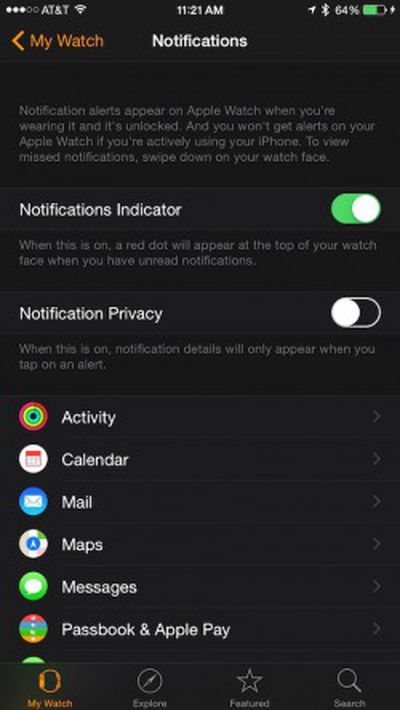
Notification Indicator Apple Watch

Set Up Notifications

Notifications on Apple Watch are actually mirrored from your iPhone by default, so any app you have notifications enabled for on your iPhone will also appear on your Apple Watch. To make sure you don't miss any notifications, you can turn on a Notification Indicator that will display a red dot on your watch face if you have unread notifications.

  1. Enable compatible apps on your iPhone via Notification Center that you want to receive alerts for. It is likely these apps are already enabled on your iPhone, but it is a good idea to check on them.
  2. Open the Apple Watch app on your iPhone.
  3. Tap the My Watch tab.
  4. Select Notifications from the menu list.
  5. Toggle Notification Indicator to the On position.
  6. You can also set your notifications to private so that it requires you to tap the screen in order to see it.
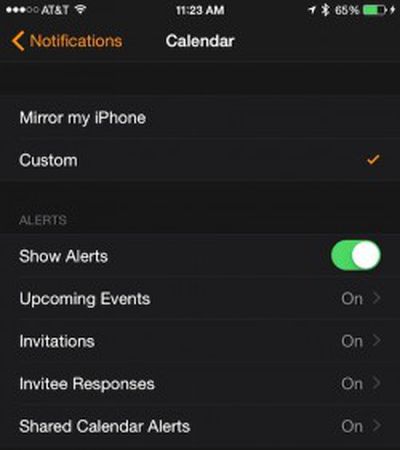

Calendar Notification Customization Apple Watch

Customize Notifications

Some Apple apps, like Calendar, Mail, and Messages are customizable with a few additional features. Be sure that the notification you wish to customize is already enabled on your iPhone first.

  1. Open the Apple Watch App on your iPhone
  2. Tap Notifications
  3. Select the app you wish to customize
  4. Change "Mirror my iPhone" to "Custom" to see your options, like sound, haptics, and repeat options.

Third-party apps do not have customization options, offering only a toggle to turn on or off the mirroring of notifications from your iPhone for a given app.

View and Respond to Live Notifications

Viewing a notification is as simple as raising your arm. To respond to it, scroll to the bottom of the notification and tap the button to perform the action.

You can also dismiss a notification by swiping down on it or scrolling to the bottom of it and tapping Dismiss.

Unread Notification Apple Watch

View and Respond to Unread Notifications

When you receive a notification on Apple Watch that you do not view right away, as long as you have the Notification Indicator turned on you will see a red dot at the top of your watch face, so you can access the notifications at any time.

  1. Navigate to the watch face, and then swipe down from the top of the screen.
  2. Rotate the Digital Crown or swipe up and down to scroll through unread notifications.
  3. Tap a notification to respond to it.
  4. Clear a notification by swiping to the left on it and then pressing clear. Use a hard "Force Press" on a notification to bring up an option to clear all notifications.

Silence Notifications

If you are in a meeting, going to the movies, or would like to otherwise be undisturbed for a short period of time, you can do so two ways.
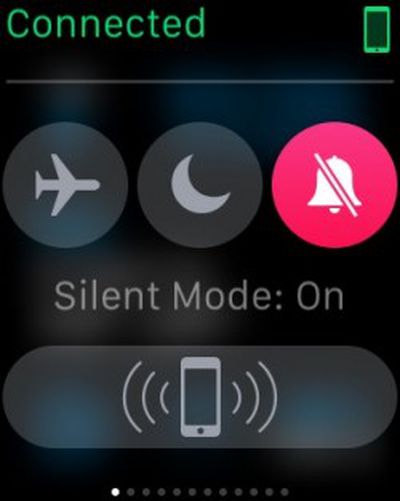
Silent Mode Apple WatchSilent Mode

  1. Navigate to the watch face, and then swipe up.
  2. Swipe to the Settings glance.
  3. Tap Silent Mode
  4. You will still feel a tap when a notification arrives.
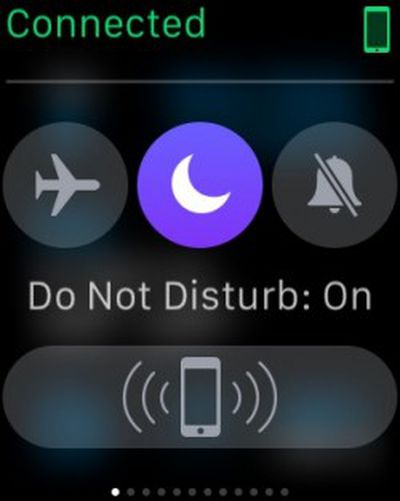
Do Not Disturb Apple WatchDo Not Disturb

  1. Navigate to the watch face, and then swipe up.
  2. Swipe to the Settings glance.
  3. Tap Do Not Disturb.
  4. Both sound and vibrations will be turned off.

By managing and customizing your Apple Watch notifications, you will be able to ensure that you stay connected to the things you want while avoiding distractions from unnecessary alerts. Plus, for those times when you just need to disconnect, you can silence your notifications temporarily.


Related Roundup: Apple Watch 12
Buyer's Guide: Apple Watch (Buy Now)
Related Forum: Apple Watch

Top Rated Comments

jclo Avatar
150 months ago
Here I am.

Just pointing out that this is yet another pointless article, mocking MR's regular readers while pandering to empty clicks from search engines, and once again posted under the name "Lory Gil". I would really like to hear from Lory on this matter, if she is a real person, or at least from a MR mod.

I think it's a mistake to assume that every MacRumors reader is at the same skill level. That an Apple Watch feature is obvious to you is not an indication that it's obvious to everyone, and honestly, the Apple Watch has a lot of complicated options and interactions to figure out. We feel that it's useful to meet the needs of users who might require a bit of help learning about all of the features on their devices (and this goes for the Mac, iPhone, and iPad too).

Even when Apple Watch features are obvious, there are often hidden little features that you might not find on your own, which also makes these posts useful for those who are already familiar with their devices.

There are a lot of people who come to MacRumors for help for a wide range of reasons, and while we realize that some of these how to posts are not useful for regular readers who are technically minded and very familiar with Apple products, people do find value in them.

We wish every post on the site would appeal to every reader, but that's just not the case. That's why we provide many different types of content aimed to meet different tastes and content preferences. That said, we appreciate the feedback -- we're always listening to what you guys have to say and we do take it into account when making content decisions.
Score: 2 Votes (Like | Disagree)
150 months ago
Here I am.

Just pointing out that this is yet another pointless article, mocking MR's regular readers while pandering to empty clicks from search engines...

It's hardly mocking; if it's something that is of no interest then it's easy enough to ignore or not get involved in. As a website I'm sure MR wants to grow its visitor numbers and repeat visitors; if it can convert an inexperienced Apple user into a regular visitor by providing them with information that's useful to them then why not? These inexperienced users will then hopefully become the experienced users of the future.

TBH I don't find the guides necessary for myself, the Apple Watch is simple to use, but I can see the benefit for others. However, it's easy to assume you know everything about something but sometimes these sort of guides have a little extra bit that of information that somehow passed you by so even for experienced users they can be useful.

I think as the Apple Watch is also quite scarce at the moment there will be a lot of people waiting on their Watch who will happily devour every bit of information about it and live vicariously through these guides until they can get their watch.

Other people may be sitting on the fence about a purchase What can the Watch do for me? How am I going to use one? These guides may assist in making that decision (whether as a sale or in the reader deciding it's not for them).
Score: 2 Votes (Like | Disagree)
150 months ago
I need DavidTheExpert's review of Lory's latest opus.
Here I am.

Just pointing out that this is yet another pointless article, mocking MR's regular readers while pandering to empty clicks from search engines, and once again posted under the name "Lory Gil". I would really like to hear from Lory on this matter, if she is a real person, or at least from a MR mod.
Score: 2 Votes (Like | Disagree)
150 months ago
I need DavidTheExpert's review of Lory's latest opus.
Score: 2 Votes (Like | Disagree)
150 months ago
Here I am.

Just pointing out that this is yet another pointless article, mocking MR's regular readers while pandering to empty clicks from search engines, and once again posted under the name "Lory Gil". I would really like to hear from Lory on this matter, if she is a real person, or at least from a MR mod.

10/10, would read again.
Score: 1 Votes (Like | Disagree)
150 months ago
My wife is finding these articles quite useful. She is learning about her watch bit by bit over time.

Really? She couldn't have figured out how to turn on calendar notifications by going to the Watch app and clicking on the big Calendar button on her own?
Score: 1 Votes (Like | Disagree)

Popular Stories

apple watch s12 ultra 4

Apple Watch Series 12, Ultra 4 Owners Report Skin Irritation

Wednesday October 7, 2026 12:02 pm PDT by
Some Apple Watch Series 12 and Ultra 4 owners have experienced unexpected skin irritation with the new models, according to reports on the MacRumors forums and Reddit. Affected users complain of a burning sensation and redness under the sensor area. The Apple Watch Series 12 and Ultra 4 measure heart rate every five seconds, and some people have wondered if that's the cause of the skin...
southern straps 3 1

MacRumors Giveaway: Win an Apple Watch Series 12 and a Nylon Band From Southern Straps

Friday October 9, 2026 10:20 am PDT by
For this week's giveaway, we've teamed up with Southern Straps to offer MacRumors readers a chance to win an Apple Watch Series 12 and a nylon band from Southern Straps to go along with it. Southern Straps is a California-based company that has been making high-quality bands for the Apple Watch since the device first launched in 2015, and the company's selection of bands offer a an...
apple watch series 6 blood oxygen monitoring 1

Apple's $634 Million Apple Watch Patent Bill Just Got Even Bigger

Tuesday October 6, 2026 6:09 am PDT by
Apple's $634 million patent loss to medical technology company Masimo has just gotten even bigger, after a federal judge ordered Apple to pay an additional $184 million in interest on what it owes (via Bloomberg Law). The ruling takes Apple's bill to around $818 million, but that doesn't include any post-judgment interest continuing to accrue until the judgment is paid. Judge James Selna ...
Latest Stories
Apple Offers Steps to Fix Daylight Saving Time Bug on Apple Watch
1 hour ago
Apple Watch Ultra 4 Hits All-Time Low Price With Amazon's $99 Discount
20 hours ago
Reminder: Apple's Big Discount on Beats 360 Ear Cushions Ends Today
20 hours ago
Here's a New Tour of Apple's HomeView Software
20 hours ago
Apple Reveals New iPad Mini's Battery Capacity
22 hours ago
Top Stories: Apple's Big MacBook Pro, iPad mini and iMac Updates
23 hours ago
'Pluribus' Season 2 Reportedly Starts Production Today
1 day ago
iPhone 18 Pro Sales Surge in China, Offsetting Decline in U.S. and Japan
1 day ago
HomeView Software 27.2: Wallpapers, Control Center, and More
2 days ago
Apple Alerts Stores to iPhone Duo's Display Cracking Issue
2 days ago
iOS 27.3 Will Enable These Apple Intelligence Features in China
2 days ago
Apple Says iOS 27.3 Beta Coming Next Week
2 days ago
Apple's Flash Storage Suppliers Are Finally 'Getting Their Revenge'
2 days ago
14 New Things Your iPhone Can Do in iOS 27.2
2 days ago
iPhone Duo Review: One Week Later
2 days ago
Samsung Mocks iPhone Duo Display Cracks in New Ad Campaign
2 days ago
The MacRumors Show: OLED MacBook Pro, iPad Mini 8, and More
2 days ago
MacBook Pro With Touch Display: 15 More Details Revealed
2 days ago
Russia Places Apple on State Surveillance Registry
2 days ago
Halloween Weekend Brings Discounts on Apple Accessories and Pre-Orders
2 days ago
Apple Has Released More Than 25 New Products in the Past Two Months
2 days ago
Local Code Launches as Free, Private AI Assistant Tool for Mac
2 days ago
Apple Acquires Ascend.io
2 days ago
HomePod Mini 2 Launches Today: All the New Features
2 days ago
AirTag 2 4-Pack Drops to New Low Price of $69.99
2 days ago
Rian Johnson's iPhone Camera App Goes Viral
2 days ago
Where Did All the iPhone Duos Go? Mostly to Apple's Stores
2 days ago
Apple's Touchscreen MacBook Pro Could Ship 1.5M Units in 2027
2 days ago
New Apple TV 4K and iPad Mini: RAM Amounts Revealed
2 days ago
Apple Executive Comments on New iPad Mini Lacking 120Hz Display
3 days ago

🔗 Related Apple News & Rumors

Stay updated with the latest Apple ecosystem news and verified rumors











































