How to Set Up an Apple Watch Using Family Setup - MacRumorsOpen MenuShow RoundupsShow Forums menuVisit ForumsOpen Sidebar
Skip to Content

How to Set Up an Apple Watch Using Family Setup

by

Family Setup is an Apple Watch feature in watchOS 7 that's designed to allow parents to set up Apple Watches for their children without them needing to own an iPhone as well.
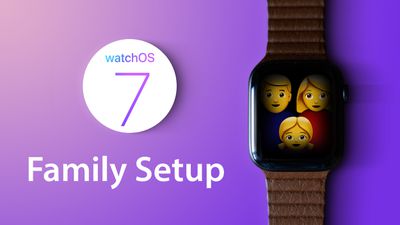
watchOS7 tips family setup
‌Family Setup‌ is mainly aimed at families with children, but it can also be used to set up an Apple Watch for an older adult or anyone else who doesn't have an iPhone but wants to take advantage of the health and fitness features of Apple Watch.

This article explains how to set up an Apple Watch to be used by someone else via ‌Family Setup‌. First though, there are some requirements to ‌Family Setup‌ that you should be aware of.

What You'll Need for Family Setup

‌Family Setup‌ is designed to work with a GPS and Cellular enabled Apple Watch Series 4 or later that's running ‌watchOS 7‌. It is not compatible with earlier Apple Watch models nor with those that do not have a cellular connection.

Cellular Apple Watch models require their own cellular plan, the price of which can vary between network operators, but you can get a plan for $10 month with most carriers in the United States. Note that while a cellular Apple Watch is required to set up a watch under ‌Family Setup‌, it can be activated without using a cellular plan.

The main person setting up ‌Family Setup‌ must have an ‌iPhone‌ 6s or later with iOS 14 installed, and all participants will need an Apple ID and will need to be part of a Family Sharing setup.

These last two requirements can be worked out during the setup process, but activating them beforehand will make the setup process a lot faster. Below are links to some how-tos that will help you with these pre-requisites, followed by a step-by-step walkthrough to set up an Apple Watch for ‌Family Setup‌.

How to Set Up an Apple Watch for Family Setup

  1. Turn on the Apple Watch.
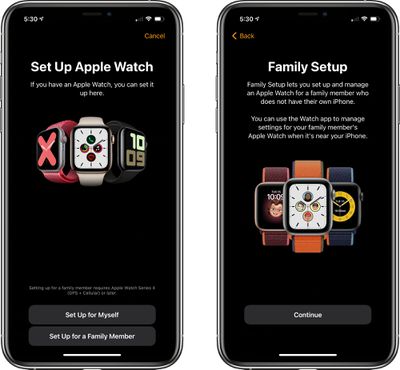
  2. Launch the Watch app on your iPhone and go to the Apple Watch setup screen.
  3. Choose Set Up for a Family Member.
    familysetup1

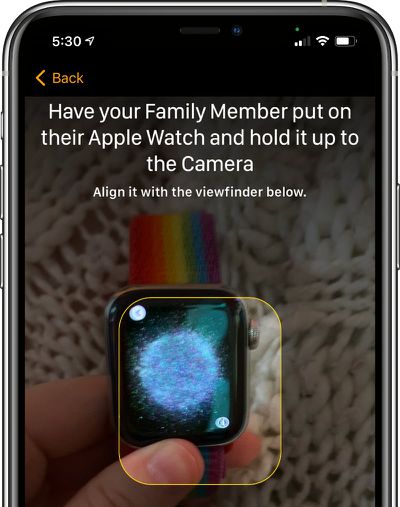
  4. Pair the Apple Watch with your ‌iPhone‌ by lining up the graphic on the watch's display with the ‌iPhone‌'s camera.
    applewatchfamilysetuppairing

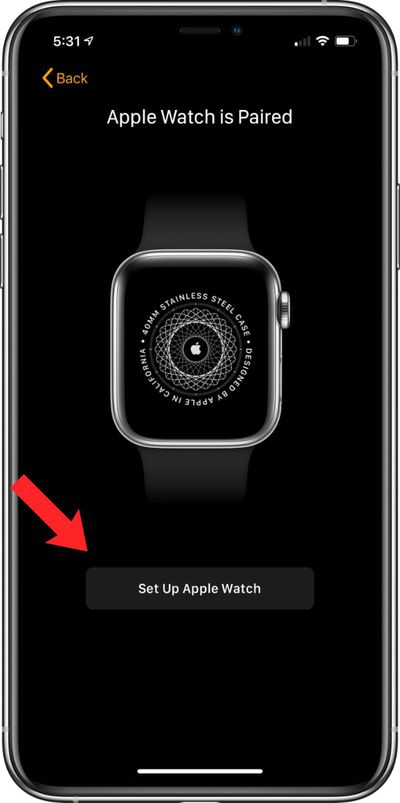
  5. Tap Set Up Apple Watch.
    setupapplewatchfamilysetup

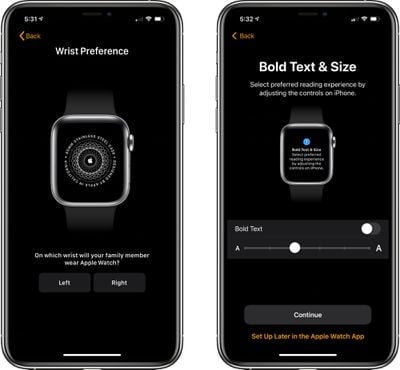
  6. Agree to the terms and conditions and select a wrist preference.
  7. Choose a text size for the Apple Watch, then select a passcode for unlocking it.
    familysetupapplewatchpreferences

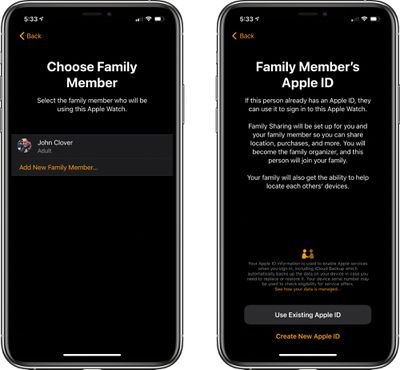
  8. Select the family member from your Family Sharing circle who will be using the Apple Watch. If the person is not a part of the Family Sharing group, you can choose to Add New Family Member and enter their ‌‌Apple ID‌‌.
    appleidfamilysetup

  9. If you chose the ‌‌Apple ID‌‌ route, you will need to go through some verification steps and enable two-factor authentication if it's not turned on. If you already had Family Sharing set up, enter the family member's ‌‌Apple ID‌‌ password to continue.
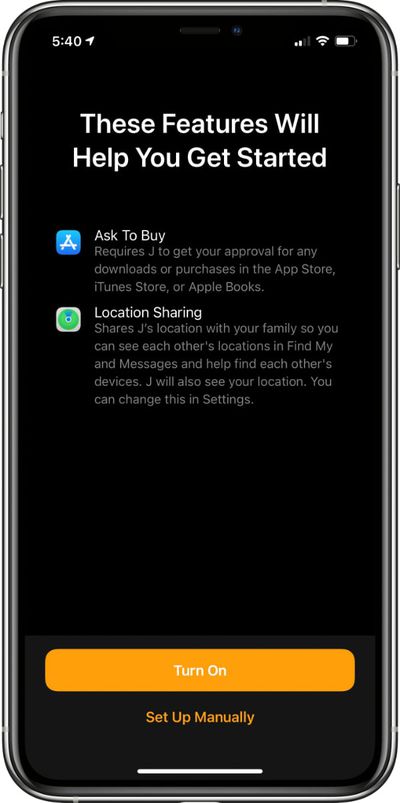
  10. Turn on Ask to Buy or Location Sharing if desired.
    familysetupgettingstarted

  11. Set up cellular and Wi-Fi access. Setting up cellular access will require going through your carrier/network operator, such as Verizon or Vodafone. This process can vary by carrier, but Apple and your carrier will walk you through the process on screen.
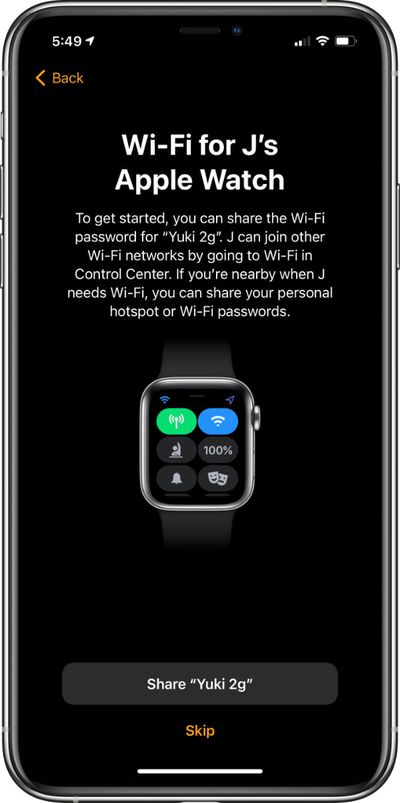
  12. You can also opt to set up cellular access at a later time and rely on Wi-Fi, but cellular is required for continual connectivity without an ‌iPhone‌. After setting up cellular or skipping it until later, tap the Share button to share your WiFi password with the Apple Watch.
    familysetupwifi

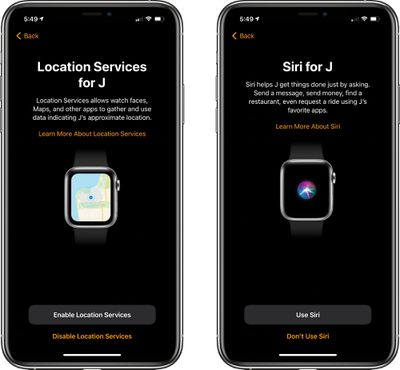
  13. Go through the additional setup screens for Location Sharing, Siri, analytics, and more.
    sirilocationservicesfamilysetup

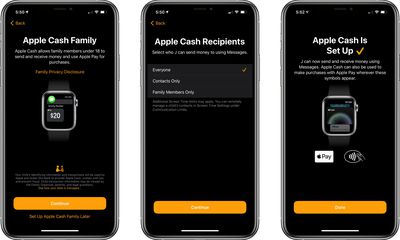
  14. Choose whether to set up Apple Cash Family, the feature that lets parents provide small amounts of cash to kids that can be used with Apple Pay for purchases. Parents can choose who their kids can send money to and receive money from. Agree to the Terms and Services, and confirm the legal name of your child.
    applecashfamilysetup

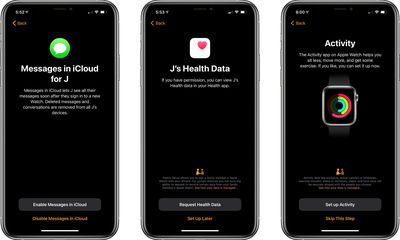
  15. Continue through the setup process, enabling or disabling additional services such as Messages in iCloud, Emergency SOS, Medical ID, Activity and route tracking options, Photos, trusted Contacts, Screen Time limits, Schooltime for limiting access during school hours, and a feature that lets parents view their children's health data, so daily activity can be monitored.
    evenmorefamilysetup

  16. After all of these settings are figured out, the Apple Watch will be ready to use and it will be listed under "Family Watches" in the Apple Watch app that belongs to the parent.
Apple offers parents quite a lot of control over what's enabled in ‌Family Setup‌ and how the Apple Watch functions. For an overview of what's available, be sure to check out our dedicated Family Setup guide.

Related Roundups: watchOS 26, watchOS 27
Related Forum: Apple Watch

Popular Stories

watchos 27

PSA: watchOS 27 Removes This Useful Feature From Your Apple Watch

Thursday September 17, 2026 1:34 am PDT by
Apple released watchOS 27 on September 14, bringing a new Audio Intelligence feature set to its latest Apple Watch models, but as a result, owners of previous models are set to lose out doubly in the process. Apple Watch Series 12 and Ultra 4 models later this year will get Live Rewind, a feature that provides a transcript of any spoken audio that was picked up by the device in the last 15...

watchos 27

Apple Releases watchOS 27 With Siri AI, New Watch Face, Smart Stack Improvements and More

Monday September 14, 2026 10:03 am PDT by
Apple today released watchOS 27, the newest version of the operating system that runs on the Apple Watch. watchOS 27 is compatible with the Apple Watch Series 9 and later, the Apple Watch Ultra 2 and later, and the Apple Watch SE 3. watchOS 27 can be downloaded for free on a compatible device through the Settings app on the watch. The update introduces support for Siri AI, a more capable...
watchos 26 hypertension alert

Upgrading to Apple Watch Series 12 Could Cost You Hypertension Notifications

Thursday September 10, 2026 11:57 am PDT by
Some Apple Watch users who upgrade to the Series 12 or the Ultra 4 might temporarily lose access to hypertension notifications. On the watchOS feature availability page, Apple says notifications might not be available on the Series 12 or Ultra 4 at launch because regulatory clearances are in process. Hypertension Notifications may not be available on Apple Watch Series 12 or Ultra 4 in your ...
Latest Stories
Apple's Smart Home Hub: Everything We Know So Far
9 hours ago
Apple's Home Hub Borrows From the iPhone Duo's StandBy Mode
10 hours ago
Apple Invites App Updated With Three New Features
14 hours ago
Apple Event on October 13?
15 hours ago
Apple Watch SE 3 vs. Series 12 Buyer's Guide: Which Should You Buy?
17 hours ago
iPad Mini 8 to Offer These 10 New Features
17 hours ago
DoorDash Unveils AI Food Ordering Through Apple's Messages App
19 hours ago
Amazon Takes Up to $150 Off Select M5 MacBook Air Models
19 hours ago
Apple Still Plans to Release a New Full-Sized HomePod
20 hours ago
Apple Working to Expand HomeKit
21 hours ago
Apple Smart Home Hub to Feature iMac G4-Style Design
21 hours ago
Three New Apple Smart Home Products Coming on October 13
22 hours ago
Apple Pay Now Available in India With Axis Bank Cards
1 day ago
OpenAI Launches Always-On 'Dots' Agents to Rival Meta's Muse
1 day ago
AirPods 5 Teardown: Batteries Removable, Case Still Tough
1 day ago
iPhone 18 Pro Owners Complain of Speaker Crackling or Popping
2 days ago
You Can 'Get Ready' for iPhone Duo Pre-Orders on October 12
2 days ago
Apple Pay Reportedly Launching in India Today
2 days ago
Apple Releases New AirPods Beta Firmware
2 days ago
Apple Shares New Guide for Using iOS 27 Parental Controls
2 days ago
Apple Creator Studio and Final Cut Camera Get New Features
2 days ago
Apple Explains Why It Removed ICE Tracking Apps Last Year
2 days ago
Amazon Expands $779.99 Apple Watch Ultra 4 Deal to More Models
2 days ago
Switch Siri AI for ChatGPT on Your Mac
2 days ago
Apple Says Emergency SOS via Satellite Now Available in Norway
2 days ago
AppleCare Guide: Is it Worth Paying For?
2 days ago
Apple Reportedly Planned to Replace 5,000 Support Employees With AI
2 days ago
Apple Planning to Launch Products Faster and More Often
2 days ago
Amazon Discounting New Mac Mini and Mac Studio Alongside Early Prime Day Deals on Monitors
2 days ago
New Apple TV 4K Hinted at in Support Document
2 days ago

🔗 Related Apple News & Rumors

Stay updated with the latest Apple ecosystem news and verified rumors