

An Apple ID is a key part of owning an Apple device, and it is used for access to iCloud, the App Store, iTunes, Apple Music, and more. It is also necessary for syncing content across devices, making purchases, using Find My to keep track of devices, and more.
Creating an Apple ID is free and easy, and it's the first step to getting an Apple device set up if you're new to the Apple ecosystem. This how to walks through creating an Apple ID on an iPhone or an iPad.
Create an Apple ID When Setting Up a New Device
When you're setting up a new device for the first time, you'll be prompted to sign in with an Apple ID. If you don't have one, you can create an Apple ID right from this screen.
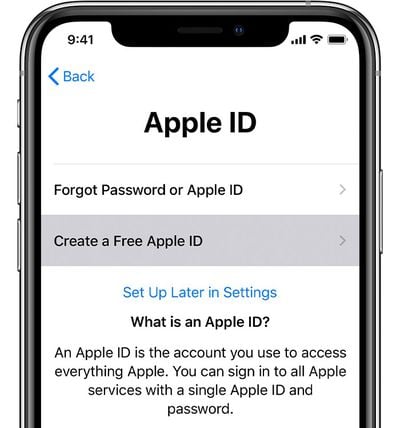
- At the Apple ID setup screen, tap "Forgot password or don't have an Apple ID?"
- Tap on "Create a Free Apple ID."
- Enter all of the required information in the forms that follow.
You will be asked to enter a first and last name, birth date, country, password, and you will be required to answer a series of security questions that can be used in case your Apple ID password is ever lost.
Note that the email address that you enter will be the login for your Apple ID. If you don't have an email address, Apple also has a process for setting up an iCloud Email address before signing up for an Apple ID.
Create an Apple ID Using the Settings App
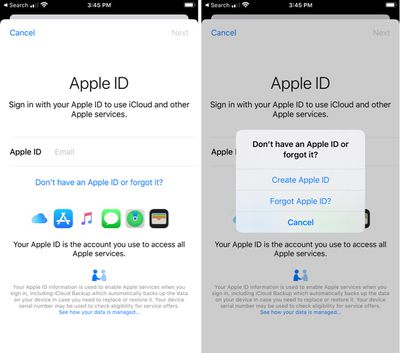
If you don't want to create an Apple ID during the device setup process, you can do it later on the iPhone or iPad through the Settings app.
- Open the Settings app.
- Tap "Forgot password or don't have an Apple ID?"

- Tap "Create Apple ID."
- Enter all of the required information in the forms that follow.
Create an Apple ID Using the App Store
There's also an option to create an iPhone or iPad Apple ID using the App Store.
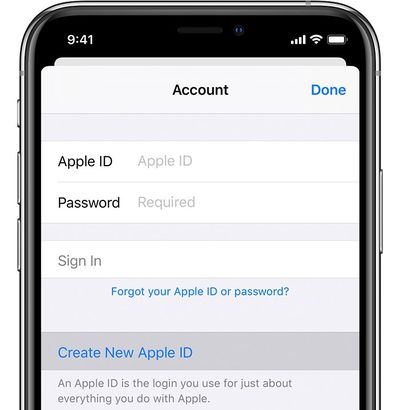
- Open the App Store.
- Tap on the profile of a person at the top right.
- Tap "Create New Apple ID."
- Enter all of the required information in the forms that follow.
Note that when you sign up for an Apple ID on the App Store, you might be prompted to enter payment and billing information, but choosing "None" allows the request to be bypassed.
Using the same Apple ID for all your Apple devices and services is important, so make sure you're not creating a new Apple ID if you already have one. Apple will let you know if you already have an Apple ID associated with a given email address when you attempt to sign up again, and will walk you through the steps of a password reset.

















































