How to Set Up an Apple TV as a Home Hub for HomeKit Devices - MacRumorsOpen MenuShow RoundupsShow Forums menuVisit ForumsOpen Sidebar
Skip to Content

How to Set Up an Apple TV as a Home Hub for HomeKit Devices

by

apple tv squareApple's HomeKit framework allows you to easily control compatible connected smart devices you have installed in your home using the Home app on iOS. However, there are some features of ‌HomeKit‌ that require you to designate a device as a Home Hub, which remains powered on and connected at your home when you're away.

The main benefit of setting up a Home Hub is that it allows you to use location-based automation features if your ‌HomeKit‌ devices support them. For example, some thermostats can change the temperature to something more economical whenever you leave your home by using a virtual geographical boundary (geofencing).

A Home Hub also allows you to use Siri to trigger actions when you're away from home. For instance, if you're leaving the office, you could ask ‌Siri‌ to increase the temperature of a connected thermostat at home so that it's nice and cozy when you arrive.

You can use an Apple TV as a Home Hub (just like you can use an iPad or HomePod), and the setup process is incredibly easy. Simply follow the steps below.

How to Set Up Your Apple TV as a Home Hub

  1. Launch the Settings app on your ‌Apple TV‌.
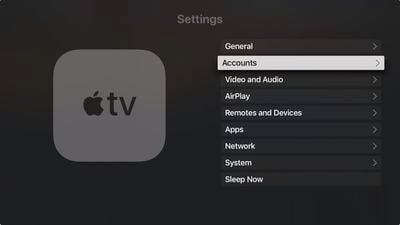
  2. Select Accounts.
    apple tv settings accounts home hub

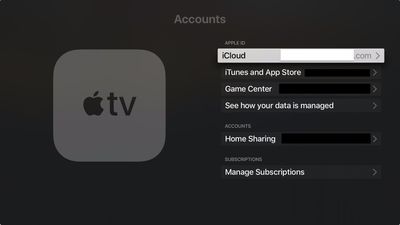
  3. Make sure that you're signed into iCloud with the same Apple ID as your iOS device.
    apple tv settings accounts home hub 1

  4. Once you've signed in to ‌iCloud‌, your ‌Apple TV‌ automatically sets itself up as a Home Hub.
You can check your ‌Apple TV‌'s Home Hub status by looking in Settings -> Accounts -> iCloud, where you should see the name of the home that it's connected to.
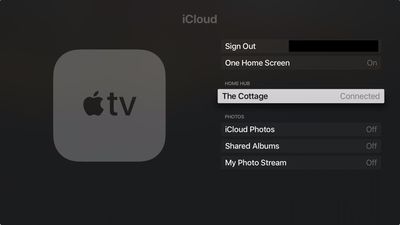
apple tv connected as home hub
You can also check the status of your home hub to if it's connected in the Home app on your iOS device. Tap the Home icon in the upper-left corner of the screen. (If you have multiple homes set up, tap Home Settings next, then tap a home.) Look under Home Hubs to see if your home hub is connected.
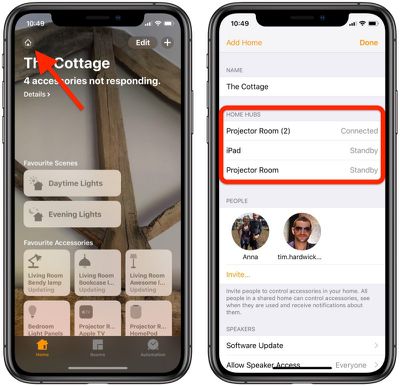
check homekit home hubsOnce you've set up your home hub, you'll need to enable two-factor authentication on your iCloud account, otherwise you won't be able to remotely access your ‌HomeKit‌ accessories.

Now that you have everything set up, the next time you're away from home you can give Siri commands on your iOS device to trigger actions, which will obviously depend on the sort of accessories you have installed.

A couple of examples might be "Turn on the living room light" or "Open the garage door," or you could ask ‌Siri‌ to check the temperature of a thermostat, for example. You can find Apple's regularly updated list of all HomeKit-compatible devices.

Popular Stories

Smart Thermostat Perspective Feature

First Look at LG's Smart Home Products Made With Apple

Wednesday October 7, 2026 6:26 am PDT by
FCC filings reveal the designs of three upcoming LG smart home accessories that Apple reportedly helped develop, including a thermostat, a temperature sensor, and a deadbolt lock. Yesterday, Bloomberg reported that Apple is working with LG Electronics on accessories for its upcoming home hub and other home products, citing regulatory documents without sharing the filings. FCC records MacRumor...


iOS 26 Home Feature

Leak Details iPhone Features for Apple's LG Home Accessories

Friday October 9, 2026 7:50 am PDT by
Smart home accessories that Apple reportedly helped LG develop could offer iPhone proximity controls and a way to begin setup before the devices have power, according to findings shared by the leaker known as "pdfu." The findings concern the upcoming LG-branded accessory range that Bloomberg revealed earlier this week. The lineup reportedly includes a thermostat, temperature sensor, deadbolt ...
iPhone Duo Display Cracking

Apple Alerts Stores to iPhone Duo's Display Cracking Issue

Friday October 30, 2026 3:20 pm PDT by
In a memo shared with Apple Stores and Apple Authorized Service Providers this week, and later obtained by MacRumors, Apple provided technicians with guidance on how to diagnose and address the iPhone Duo's inner display cracking issue. If a customer reports the issue, Apple advised technicians to inspect the iPhone Duo and repair or replace it in accordance with their standard procedures....
Latest Stories
Apple Watch Ultra 4 Hits All-Time Low Price With Amazon's $99 Discount
9 hours ago
Reminder: Apple's Big Discount on Beats 360 Ear Cushions Ends Today
9 hours ago
Here's a New Tour of Apple's HomeView Software
9 hours ago
Apple Reveals New iPad Mini's Battery Capacity
10 hours ago
Top Stories: Apple's Big MacBook Pro, iPad mini and iMac Updates
12 hours ago
'Pluribus' Season 2 Reportedly Starts Production Today
18 hours ago
iPhone 18 Pro Sales Surge in China, Offsetting Decline in U.S. and Japan
19 hours ago
HomeView Software 27.2: Wallpapers, Control Center, and More
1 day ago
Apple Alerts Stores to iPhone Duo's Display Cracking Issue
1 day ago
iOS 27.3 Will Enable These Apple Intelligence Features in China
1 day ago
Apple Says iOS 27.3 Beta Coming Next Week
1 day ago
Apple's Flash Storage Suppliers Are Finally 'Getting Their Revenge'
1 day ago
14 New Things Your iPhone Can Do in iOS 27.2
1 day ago
iPhone Duo Review: One Week Later
1 day ago
Samsung Mocks iPhone Duo Display Cracks in New Ad Campaign
1 day ago
The MacRumors Show: OLED MacBook Pro, iPad Mini 8, and More
1 day ago
MacBook Pro With Touch Display: 15 More Details Revealed
1 day ago
Russia Places Apple on State Surveillance Registry
1 day ago
Halloween Weekend Brings Discounts on Apple Accessories and Pre-Orders
1 day ago
Apple Has Released More Than 25 New Products in the Past Two Months
1 day ago
Local Code Launches as Free, Private AI Assistant Tool for Mac
1 day ago
Apple Acquires Ascend.io
1 day ago
HomePod Mini 2 Launches Today: All the New Features
2 days ago
AirTag 2 4-Pack Drops to New Low Price of $69.99
2 days ago
Rian Johnson's iPhone Camera App Goes Viral
2 days ago
Where Did All the iPhone Duos Go? Mostly to Apple's Stores
2 days ago
Apple's Touchscreen MacBook Pro Could Ship 1.5M Units in 2027
2 days ago
New Apple TV 4K and iPad Mini: RAM Amounts Revealed
2 days ago
Apple Executive Comments on New iPad Mini Lacking 120Hz Display
2 days ago
Here's a Hands-On Look at HomePod Mini 2's New Two-Tone Colors
2 days ago

🔗 Related Apple News & Rumors

Stay updated with the latest Apple ecosystem news and verified rumors