

iOS 16: How to Link an Apple Watch Face to a Focus Mode - MacRumorsOpen MenuShow RoundupsShow Forums menuVisit ForumsOpen Sidebar
Skip to Content

iOS 16: How to Link an Apple Watch Face to a Focus Mode

by

Introduced in iOS 15, Focus mode is an expansion of Do Not Disturb that allows you to set up different permissions for apps, contacts, and more depending on what you're doing. In iOS 16, Apple has expanded what Focus modes can do with new features, including the ability to activate a specific Apple Watch face when a specific Focus in enabled. Here's how it works.
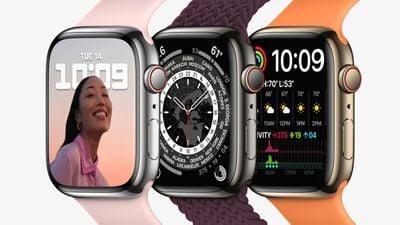
apple watch series 7 stainless steel colors
With ‌iOS 16‌, you can customize pretty much everything about your Focus. It's not just the Home Screen and Lock Screen that you can set – if you are an Apple Watch owner you can select one of your Apple Watch faces to activate on your wrist for a specific Focus mode. For example, if you have a Focus that you set when you're about to go out running, you could link a watch face to it showing lots of complications to do with weather conditions.

The following steps guide you through the process of setting an Apple Watch face to activate for a newly created Focus mode.

  1. On ‌iPhone‌, go to Settings -> Focus, and tap the + icon in the top-right corner of the screen to create a new Focus.
  2. Tap Custom in the next screen, proceed to give your Focus a name and related icon, then tap Next.
    focus

  3. Set any notification silence options for people and apps when your Focus is active, then under "Customize Screens," tap Choose under the watch face option.
  4. Choose a watch face from your Apple Watch face gallery, then tap Done.
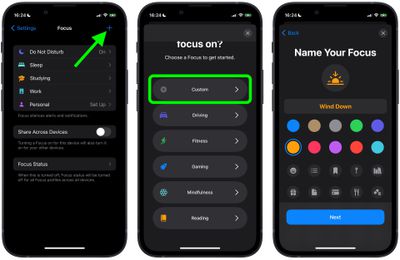
That's all there is to it. With your chosen Apple Watch face now linked to your Focus Mode, it will be activated automatically on your wrist the next time you enable the Focus on your iPhone.


Popular Stories

notification summaries

Apple Patenting Way to Improve Notification Summaries and 'Reduce Interruptions' Focus

Wednesday August 12, 2026 9:29 am PDT by
A newly published Apple patent application describes a system for deciding, in real time, whether to interrupt what someone is doing on a device or leave them alone. The application was filed with the U.S. Patent and Trademark Office (USPTO) on February 5, 2026 and published on August 6, 2026, as spotted by patent tracking site Patentlyze. The patent describes how a device can observe what...



Apple Watch Ultra 2 Black Titanium

New Apple Watch Series 12 and Apple Watch Ultra 4 Features Revealed

Sunday August 30, 2026 7:54 am PDT by
Bloomberg's Mark Gurman today further outlined what to expect from the Apple Watch Series 12 and Apple Watch Ultra 4 set to be unveiled on September 9. While it was initially rumored that Touch ID may be coming to the Apple Watch this year, Gurman reiterated that he does not expect the Series 12 or Ultra 4 to have any major design changes compared to the current Series 11 and Ultra 3 models. ...
Mac mini vs Studio Feature Sans Text 1

Apple Caught Off Guard by AI Demand for Mac Mini and Mac Studio

Sunday August 30, 2026 8:52 am PDT by
Apple's unusually timed announcement of new Mac mini and Mac Studio models this week was driven by unexpectedly strong enterprise appetite for AI hardware, according to The Information. Apple normally releases new Mac models in the autumn, closer to October or November, making this week's announcement unusually early, falling just before the anticipated arrival of new iPhone models. The...

🔗 Related Apple News & Rumors

Stay updated with the latest Apple ecosystem news and verified rumors







































