How to Turn Off Tab Bar Coloring / Tinting in Safari - MacRumorsOpen MenuShow RoundupsShow Forums menuVisit ForumsOpen Sidebar
Skip to Content

How to Turn Off Tab Bar Coloring / Tinting in Safari

by

In iOS 15 as well as Safari 15 for macOS Big Sur and macOS Catalina, Apple introduced some Safari interface design changes that haven't been universally welcomed. Fortunately, Apple has made some of these changes optional, such as the ability to disable tab bar coloring.

safari 15 tinting

Tab bar coloring on (left) versus coloring off (right) in dark mode

Tab bar coloring, or website tinting, happens when the color of Safari's interface changes around the tabs, bookmark, and navigation button areas to match the color of the website you're viewing.

The idea behind tinting is that it allows the browser interface to fade into the background and create a more immersive experience. However, the effect doesn't always look great, especially if you have several windows arranged on your desktop. Happily, Apple chose to include an option to turn it off.

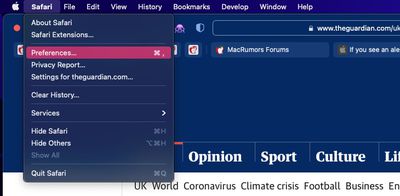
  1. Launch Safari, then select Safari -> Preferences... from the menu bar.
    safari preferences

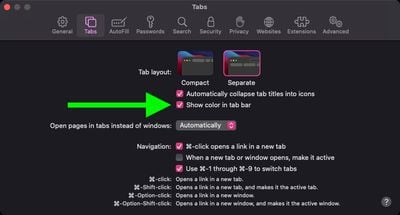
  2. Select the Tabs panel.
  3. Uncheck the box next to Show color in tab bar.
    safari

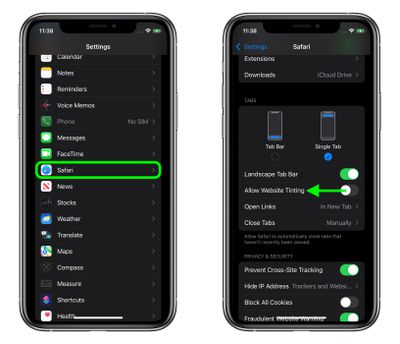
If you're using Safari in iOS 15, you can find the same option in Settings -> Safari. Under the "Tabs" section, turn off the switch next to Allow Website Tinting. On iPadOS 15, this option is called Show Color in Tab Bar, just like in Safari 15 for macOS.
settings
In previous versions of iOS, Apple included a "Show Color in Tab Bar" accessibility setting, which basically had the same effect as the new "Allow Website Tinting" toggle. The fact that Apple made the option more prominent suggests user aversion to tinting is more common than previously thought.


Tag: Safari

Top Rated Comments

007 Junior Avatar
62 months ago
I'm constantly confused whether a dark grey tab is active or not active. This is bad UI design.
Score: 37 Votes (Like | Disagree)
62 months ago
Both look terrible. I can't decide turning it on or off.

Why did Apple ruin a once great user interface on Mac? I want the Safari 14 Taskbar und Tabbar back.
Score: 16 Votes (Like | Disagree)
62 months ago
Those were the times when widgets looked like widgets and not like artwork or content. Btw. for the newcomers: Apple was once great in user interface design.


Score: 16 Votes (Like | Disagree)
Apple Knowledge Navigator Avatar
62 months ago
Disabling this was one of the first things that I did. Entirely form over function.
Score: 12 Votes (Like | Disagree)
62 months ago
The logic of colouring the current tab dark is so wrong!

Look at the following. Which tab is current?

Previously, and as per all good UI design, the lighter tab looks on top and current. Not the darker one.

Yet Apple made this idiotic change with apparently no consultation or input from design professionals. Bonkers.


By comparison look at Firefox. It is blooming clear which tab is the current one.


How does one revert / fix this Apple Safari behaviour?

Attachment Image

Attachment Image
Score: 11 Votes (Like | Disagree)
62 months ago
I think it looks good on iOS but awful on macOS.
Score: 10 Votes (Like | Disagree)

Popular Stories

safari notify macos 27

New Safari Can Monitor a Webpage and Notify You of Updates

Monday June 8, 2026 11:04 am PDT by
Apple's new version of Safari browser in macOS 27 and iOS 27 can be tasked to monitor a webpage and notify you of any changes, thanks to a new built-in feature. With "Notify Me," Safari can keep checking a website on your behalf – such as a product you've been watching for when it comes back in stock – and alert you when a change occurs. In other upcoming feature additions, using the ...
safari tab groups apple intelligence

Apple Brings AI Tab Organization and AI-Generated Extensions to Safari

Monday June 8, 2026 1:18 pm PDT by
Apple today unveiled a raft of Safari upgrades powered by Apple Intelligence, including automatic tab organization, AI-generated custom extensions, and new privacy-first browsing tools. The centerpiece feature is automatic tab organization, which uses Apple Intelligence to group a user's open tabs into relevant topics without any manual intervention. If someone is planning a weekend trip,...
Apple Acquires Award Winning App Play Feature

Apple Acquires Award-Winning App 'Play'

Monday June 29, 2026 7:39 am PDT by
In February, Apple notified the European Commission that it would be acquiring certain assets from and have the right to hire certain employees from Rabbit 3 Times, the company behind the award-winning app design tool Play. The notification was published on the European Commission's website this week, following a four-month waiting period. Play was a Mac and iPhone app that allowed designers ...

🔗 Related Apple News & Rumors

Stay updated with the latest Apple ecosystem news and verified rumors