

Reveal Hidden Folder Sizes in macOS Finder With These Tricks - MacRumorsOpen MenuShow RoundupsShow Forums menuVisit ForumsOpen Sidebar
Skip to Content

Reveal Hidden Folder Sizes in macOS Finder With These Tricks

by

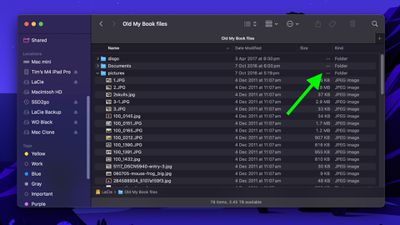
When using macOS Finder in List view, you'll see the sizes of individual files – but not folders.
Instead, folders show a pair of dashes (--) in the Size column. macOS skips calculating folder sizes by default to keep List view performance fast, especially in directories with many nested files. But if you want to keep an eye on folder sizes in certain locations, or even globally, there are a few ways to do it. Here's how.
finder window list view 1
What if you want to use List view and still keep an eye on the size of a handful of folders in a specific location – in Documents, for instance, or in a directory synced to a cloud storage service? Or what if you have a super-fast SSD that can handle the pressure of calculating the size of lots of folders on the fly? Thankfully, there are several ways to make Finder show folder sizes, even in List view.

Enable Calculate All Sizes
finder
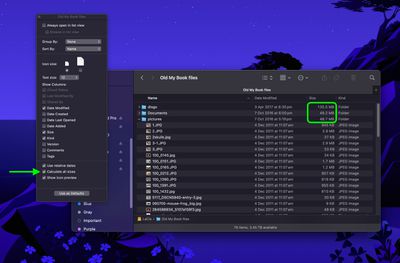
Open the folder in question, select View ➝ Show View Options from the menu bar or press the keys Command+J, and check Calculate All Sizes. Finder will now remember your viewing preference for that particular location only.

Turn On Preview Panel

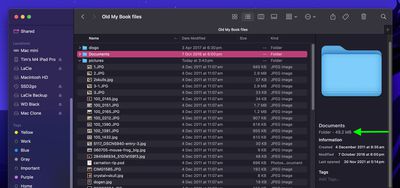
If you're looking for a more global solution for keeping tabs on folder sizes that will work in any Finder view mode, you might consider enabling the Preview panel. To do this, open a Finder window and select the menu bar option View ➝ Show Preview, or press the keys Shift+Command+P.
finder
In the Preview panel, the size of the selected folder always appears immediately below the folder name. If this is the only folder information you want to see in the Preview panel, you can select the menu bar option View ➝ Show Preview Options and uncheck all other metadata options.

Use Get Info

Of course, you may find that relying on the Preview panel to keep a check on individual folder sizes isn't an ideal use of Finder window space. This is where the menu bar option File ➝ Get Info (or key combo Command+I) can come in helpful. Opening a separate Get Info panel lets you see the size of the item in question, regardless of whether it's a file or a folder.

finder
The downside? Each Get Info panel is static and specific to the item selected. Opening several at once can clutter your desktop, since each new window stays open until manually closed.

Use Inspector for Live Folder Info
finder
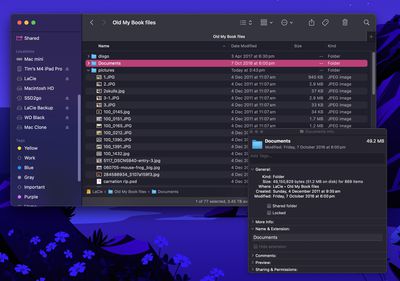
Fortunately, this inconvenience can be easily solved: Click File in the menu bar and hold the Option key, and Get Info will turn into Show Inspector. Unlike a Get Info panel, the Inspector panel is dynamically updated and will always display information for the active Finder window's currently selected file or folder – including, of course, its size.

In summary, for casual folder-size checking, use the Preview panel. For detailed or multiple folders, enable Calculate All Sizes in View Options. And if you need real-time updates without clutter, use Show Inspector.


Top Rated Comments

19 months ago
Thanks for these “how to” articles, very useful and welcomed!
Score: 5 Votes (Like | Disagree)
19 months ago
Update: Whoops! I posted this before reading the section after “the downside…”

Prepare to have your mind blown my friend…

CMD+Option+i

:)

Now whatever finder items you select, single or multiple, it will show you all the info in total without having windows. As you select or deselect items… the info window changes dynamically.
Score: 5 Votes (Like | Disagree)
abatabia Avatar
19 months ago
Very helpful. Thank you!
Score: 5 Votes (Like | Disagree)
19 months ago
It is important to know, that "Calculate all sizes" is not always showing the correct size.
When you change something inside a folder, the Finder has to recalculate the contents, but in the meantime is still showing the "old" value.
Finder usually indicates an "outdated" folder size by using a grey font (instead of black), but you can't rely on that either.

Recalculating can take a long time, especially if you have thousands of files nested inside folder. ( = your home directory.)

TL;DR:
Even if the folder says "0 KB", it is not guaranteed that it is really empty!
If you absolutely need reliable real-time info, use the Inspector instead.
Score: 2 Votes (Like | Disagree)
19 months ago
The Live Folder info from using Inspector is a good one to know. Thank you! Another really nice article 👍
Score: 2 Votes (Like | Disagree)
19 months ago
Great tips, thanks! (in these cases I already knew and use all).

Please also share the tip to show hidden files (command + shift + period), this will help so many people!
Score: 2 Votes (Like | Disagree)

Popular Stories

Home Hub Command Center with Dome Base Feature

Apple Smart Home Hub to Feature iMac G4-Style Design

Wednesday September 30, 2026 4:36 am PDT by
Apple's long-rumored smart home hub will have an iMac G4-style design and a host of unique features, Bloomberg's Mark Gurman reports. The smart home hub is said to feature a square 6-inch display, with variants that can be placed on a countertop or mounted on a wall. It features a single FaceTime camera on the front, with microphones and speakers in its connected base. Gurman described the...
HomePod minis on gradient feature 1 1

Three New Apple Smart Home Products Coming on October 13

Wednesday September 30, 2026 4:04 am PDT by
Apple plans to introduce a series of new smart home products on Tuesday, October 13, according to Bloomberg's Mark Gurman. Apple reportedly plans to debut its long-awaited smart home hub device, a new HomePod mini, and a new Apple TV on the date. The new HomePod mini and Apple TV are set to retain their existing designs, but tout faster chips to support Siri AI. The new HomePod mini will...
Apple TV Sans Remote Feature

New Apple TV 4K Leaked

Friday September 25, 2026 8:16 am PDT by
MacRumors contributor Aaron Perris has uncovered an image file from Apple for an unreleased Apple TV 4K, suggesting that a new model will finally be released soon. The image is specifically for an "Apple TV 4K (4th generation)" model. Apple TV 4K (4th generation) image (on a gradient) The image reveals that the Apple TV will have the same external design as the current model, with all of its...
Latest Stories
Apple Says iPhone Duo Has Replaceable 'Cover Layer' Above the Display
1 hour ago
Apple's Smart Home Camera Will Apparently Have 'No Video Recording'
3 hours ago
Apple TV Just Updated Its Selection of 'Bonus' Movies
4 hours ago
iPhone 18 Pro Colors Buyer's Guide: Which Should You Choose?
5 hours ago
Early Prime Big Deal Days: Best Discounts on Accessories, TVs, and More at Amazon
5 hours ago
MacBook Pro With OLED Touch Screen Rumored to Launch in October or November
6 hours ago
Apple's All-New Home Hub Rumored to Launch in These Four Colors
7 hours ago
iPhone 18 Pro Aperture Control Goes Fully Manual in Halide 3.2
8 hours ago
Apple Stores Receive 'Do Not Open' Boxes Ahead of Smart Home Products Launch
9 hours ago
iPhone 18 Pro Sales Jump in China Ahead of iPhone Duo Launch
9 hours ago
Apple TV Still Down for Some Users Following Apple Services Outage
10 hours ago
PSA: Apple Mail on Mac May Stop Syncing Microsoft 365 Accounts Today
10 hours ago
Apple's Smart Home Hub: Everything We Know So Far
21 hours ago
Apple's Home Hub Borrows From the iPhone Duo's StandBy Mode
22 hours ago
Apple Invites App Updated With Three New Features
1 day ago
Apple Event on October 13?
1 day ago
Apple Watch SE 3 vs. Series 12 Buyer's Guide: Which Should You Buy?
1 day ago
iPad Mini 8 to Offer These 10 New Features
1 day ago
DoorDash Unveils AI Food Ordering Through Apple's Messages App
1 day ago
Amazon Takes Up to $150 Off Select M5 MacBook Air Models
1 day ago
Apple Still Plans to Release a New Full-Sized HomePod
1 day ago
Apple Working to Expand HomeKit
1 day ago
Apple Smart Home Hub to Feature iMac G4-Style Design
1 day ago
Three New Apple Smart Home Products Coming on October 13
1 day ago
Apple Pay Now Available in India With Axis Bank Cards
2 days ago
OpenAI Launches Always-On 'Dots' Agents to Rival Meta's Muse
2 days ago
AirPods 5 Teardown: Batteries Removable, Case Still Tough
2 days ago
iPhone 18 Pro Owners Complain of Speaker Crackling or Popping
2 days ago
You Can 'Get Ready' for iPhone Duo Pre-Orders on October 12
2 days ago
Apple Pay Reportedly Launching in India Today
2 days ago

🔗 Related Apple News & Rumors

Stay updated with the latest Apple ecosystem news and verified rumors






































