How to Remove Suggested Contacts From iOS Share Sheet - MacRumorsOpen MenuShow RoundupsShow Forums menuVisit ForumsOpen Sidebar
Skip to Content

How to Remove Suggested Contacts From iOS Share Sheet

by

Does your iPhone keep displaying certain contacts whenever you go to share something in iOS, and you'd rather not see them? Keep reading to learn how to get rid of them.
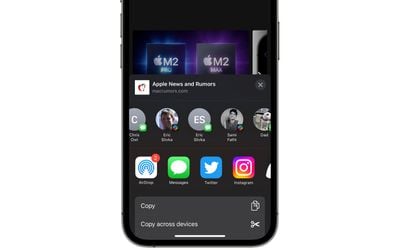
share sheet
Whenever you go to share something on your iPhone or iPad using the Share button, iOS brings up the activity view – often called the Share Sheet – at the top of which is a row of suggested contacts with whom you've interacted recently. Swiping along this row reveals more contacts, and the icon in the corner of each profile picture indicates the app that you often use to communicate with that person.

These suggested contacts are useful if you share a lot of things with the same people, but there may be times when you'd prefer not to see specific contacts there, for example if someone is a duplicate suggestion over multiple apps, or if you don't want to draw attention to your regular comms with a certain someone. Whatever the reason, you can actually steer these sharing suggestions to appear less often, or not at all. Here's how.

Make Contacts Appear Less Often in iOS Share Sheet

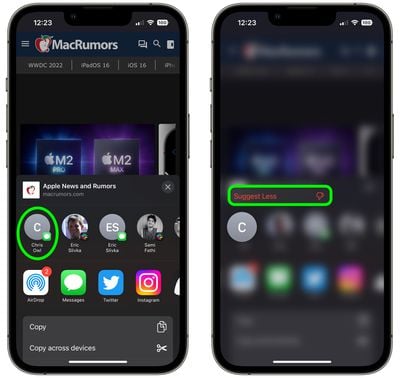
  1. Tap the Share button (the box with an arrow pointing out) in any app to bring up the Share Sheet.
  2. Long press on the suggested contact that you want to see less often in the Share Sheet.
  3. Tap Suggest Less in the popover menu.

share sheet

Bear in mind, doing this won't guarantee that the contact doesn't appear in the Share Sheet again in future, but if you keep repeating it whenever they do show up, iOS will eventually get the message.

Remove All Contacts From iOS Share Sheet

Short of deleting their contact in the Contacts app, the only way to guarantee that someone doesn't keep turning up on your Share Sheet is to disable the contact suggestions row completely.

  1. Open the Settings app.
  2. Scroll down and tap Siri & Search.
  3. Under the "Suggestions From Apple" section, toggle off the switch next to Show When Sharing.
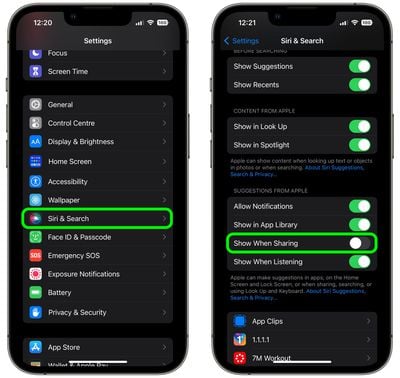
settings

That's all there is to it. Now the next time you invoke the Share Sheet, you won't see any contact profiles at the top. You can reverse the change just as easily by switching on the Show When Sharing toggle again.


Top Rated Comments

hellosil Avatar
52 months ago
Remove All Contacts From iOS Share Sheet 🥳
Thank you!
Score: 11 Votes (Like | Disagree)
ahmedg Avatar
52 months ago
Oh my God. First time ever a feature that I didn’t know existed. And guess what? I searched for something like this just yesterday.
Score: 8 Votes (Like | Disagree)
52 months ago
I’m so glad Apple added the option to turn this off. I used to be so scared I’d send someone a link to something I didn’t want to send them… :oops:
Score: 7 Votes (Like | Disagree)
MisterSavage Avatar
52 months ago
I was actually shocked at how dumb the selection process was for this. You only sent a DM to a person one time on Slack? Let's suggest them every single time you share something and not use people you contact all the time.
Score: 6 Votes (Like | Disagree)
JM Avatar
52 months ago
😱

1000 blessings on you and you family for this tip 🙌
Score: 5 Votes (Like | Disagree)
52 months ago
I don’t understand why there isn’t an option to remove a specific contact entirely. Suggest less is kind of patronizing.

“Yeah yeah we know you *think* you don’t want to see this contact, but we know better.”
Score: 4 Votes (Like | Disagree)

Popular Stories

Four iPhone 18 Pro Colors Mock Feature

iPhone 18 Pro and iPhone Ultra: Pre-Orders and Release Date

Thursday July 30, 2026 6:12 am PDT by
Apple has yet to reveal when the iPhone 18 Pro and iPhone Ultra will be announced and released, but the dates usually follow a familiar pattern. Labor Day is September 7 this year. The last time the holiday fell on that day was in 2020, but the iPhone event that year was delayed until October due to the COVID-19 pandemic. So, the last time Labor Day was on September 7 in a normal year was in ...


Apple Event Logo

Apple Working on All-New Operating System

Wednesday July 29, 2026 11:39 am PDT by
Apple is developing an all-new operating system that is essentially a mix of tvOS, watchOS, and iOS, according to Bloomberg's Mark Gurman. In a report this week, he said the operating system will feature a grid of icons, widgets, and apps, along with customizable clock faces. The new software platform is intended for Apple's long-rumored smart home hub. With built-in facial recognition,...
Dynamic Island iPhone 18 Pro Feature

iPhone 18 Pro: Twelve Changes Coming to Apple's Next Flagship

Thursday July 30, 2026 3:43 am PDT by
We're less than two months out from the launch of Apple's premium next-generation smartphone lineup, and while we're not expecting a dramatic change in terms of functionality, there are still several enhancements rumored to be coming to the iPhone 18 Pro and iPhone 18 Pro Max. One thing worth noting is that Apple is reportedly planning a major change to its iPhone release cycle this year,...

🔗 Related Apple News & Rumors

Stay updated with the latest Apple ecosystem news and verified rumors