

In iOS 15, Apple introduced a new email privacy feature called Mail Privacy Protection, which prevents companies and advertisers from tracking how you interact with their emails. This article explains the feature and how you can control it.

Apple's App Tracking Transparency feature is designed to allow users to opt out of the surreptitious tracking that third-party apps have traditionally relied on for ad targeting purposes. But tracking can go on in your email inbox, too.
Unsolicited marketing emails will sometimes know whether you've opened their email, and if so, when you did so. They can even know where you were at the time, thanks to tracking methods employed by third-party marketing platforms.
Much of this tracking is facilitated by remote images that load when viewing an email, and some of it is even sneakier, with advertisers using invisible tracking pixels. When the message is opened in your email client, code within the pixel silently send identifying information such as your IP address back to the company.
To prevent this behavior, Mail Privacy Protection hides your IP address and loads all remote content privately in the background, routing it through multiple proxy services and randomly assigning an IP address.
Instead of your actual IP address, senders will see an IP address that corresponds to the region in which you're located, giving them approximate information about you that is non-specific and cannot be used for building a profile of your behavior.
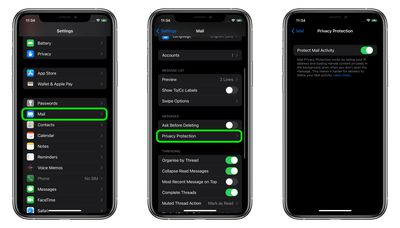
Mail Privacy Protection is not enabled by default, but when you launch the Mail app in iOS 15 for the first time, you'll be asked if you want to enable privacy protection, and you can turn it on and off manually anytime by following these simple steps.
- Launch the Settings app on your iPhone or iPad.
- Under "Mail," tap Privacy Protection.
- Tap the toggle next to Protect Mail Activity to enable or disable it.
It's worth bearing in mind that even with Mail Privacy Protection enabled, email senders can still monitor your behavior with tracked links if you end up clicking on them, but the inconspicuous tracking that you're unlikely to be aware of will no longer be able to occur.














































