

iOS 16: How to Pin Tabs in Safari on iPhone and iPad - MacRumorsOpen MenuShow RoundupsShow Forums menuVisit ForumsOpen Sidebar
Skip to Content

iOS 16: How to Pin Tabs in Safari on iPhone and iPad

by

In iOS 16 and iPadOS 16, Apple's Safari browser has inherited a handy feature from Safari on Mac – the ability to pin tabs. Keep reading to learn how it works on iPhone and iPad.
iOS 16 Safari Guide Feature
Safari's pinned tabs feature lets you better organize your tabs, especially if find you have too many open at the same time. It's particularly useful if you have certain websites that you tend to visit frequently throughout the day.

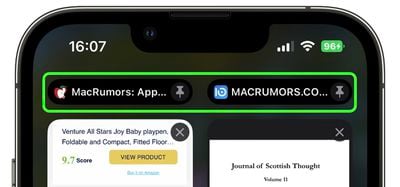
That's because when you pin a tab in iOS 16, you no longer need to go searching through all of your open tabs for it, because it gets moved right to the top of the open tabs screen, like so.
safari
The other neat thing about pinned tabs is that they stay in place, even when you open a new Safari window or quit and reopen Safari. And when you click a link to another website from a pinned tab, the other website opens in a new tab, ensuring your pinned tab always shows the website you pinned.

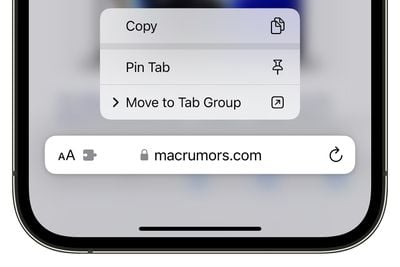
Pinning a tab that you want to come back to is easy. If you have the tab open and selected in Safari, simply long press the URL bar and select Pin Tab from the popover menu.
pin tab ios 16 tab groups
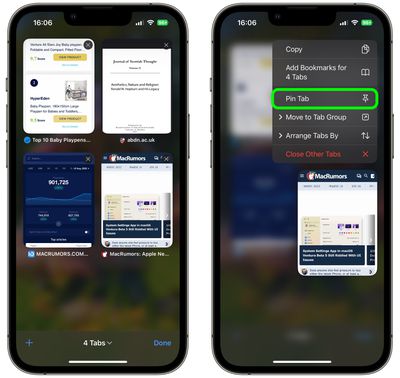
If you're viewing Safari's open tabs browser screen, find the open tab that you want to pin and long press on it, then select Pin Tab from the popover menu.
safari
Not only can you pin multiple tabs in Safari in iOS 16, you can also pin tabs that are part of Tab Groups so that they are open all the time. To pin a tab to a Tab Group in ‌iOS 16‌, open up the Tab Group, then long press on the URL bar and tap the Pin Tab option.

Tag: Safari

Popular Stories

safari notify macos 27

New Safari Can Monitor a Webpage and Notify You of Updates

Monday June 8, 2026 11:04 am PDT by
Apple's new version of Safari browser in macOS 27 and iOS 27 can be tasked to monitor a webpage and notify you of any changes, thanks to a new built-in feature. With "Notify Me," Safari can keep checking a website on your behalf – such as a product you've been watching for when it comes back in stock – and alert you when a change occurs. In other upcoming feature additions, using the ...
safari tab groups apple intelligence

Apple Brings AI Tab Organization and AI-Generated Extensions to Safari

Monday June 8, 2026 1:18 pm PDT by
Apple today unveiled a raft of Safari upgrades powered by Apple Intelligence, including automatic tab organization, AI-generated custom extensions, and new privacy-first browsing tools. The centerpiece feature is automatic tab organization, which uses Apple Intelligence to group a user's open tabs into relevant topics without any manual intervention. If someone is planning a weekend trip,...
American Express Gold Apple Pay Feature

American Express Announces New Apple Pay Feature

Tuesday June 30, 2026 10:27 am PDT by
American Express today announced that you can now redeem Membership Rewards points when checking out with Apple Pay on the web and in apps on the iPhone and iPad. When checking out with Apple Pay on iOS 18 or iPadOS 18 or later, tap on your eligible American Express card (Platinum, Gold, Green, and others) and select the Membership Rewards points option. You can use points to cover all or...


🔗 Related Apple News & Rumors

Stay updated with the latest Apple ecosystem news and verified rumors








































