How to Set Up Out-of-Office Replies in Apple Mail and iCloud Mail - MacRumorsOpen MenuShow RoundupsShow Forums menuVisit ForumsOpen Sidebar
Skip to Content

How to Set Up Out-of-Office Replies in Apple Mail and iCloud Mail

by

Mac OS X 10Apple's native Mail application in macOS lacks a specific option for enabling out-of-office replies, but there is another way you can set them up on a Mac, and that's with Rules. It's worth bearing in mind at the outset that your Mac needs to be powered on for this out-of-office method to work. That's because Apple Mail rules are only applied locally to incoming emails, and aren't active on the server side.

If you're looking for a longer term out-of-office solution, you'll want to check out Vacation mode in iCloud Mail, which we cover in the second part of this tutorial.

How to Create an Out-of-Office Reply Using Mail Rules

  1. Launch the Apple Mail app.

  2. From the menu bar, select Mail -> Preferences....

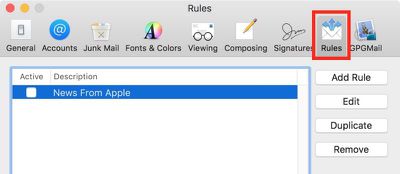
  3. Select the Rules tab.
    Rules Mail e1519290131337

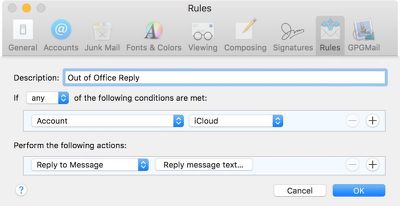
  4. In the Rules dialog box that appears, click the Add Rule button and give the rule an identifiable description, such as "Out of Office Reply".

  5. Leave the default "any" selection in "If any of the following conditions are met".

  6. For the initial condition, select Account from the first dropdown menu, and then choose the email account that you want your out-of-office rule to apply to from the condition's second dropdown menu.

  7. In the second condition under "Perform the following actions:", select Reply to Message from the dropdown menu.
    Add Rule Mail e1519290288872

  8. Now click Reply message text....

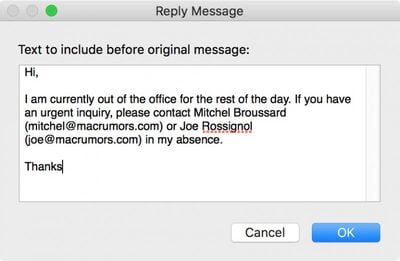
  9. In the input window that appears, type the text you want to appear in the automatic response email that will be sent when you're away.
    out of office rule text

  10. Click OK to close the input window when you're done.

  11. Click OK to close the Rules dialog box.

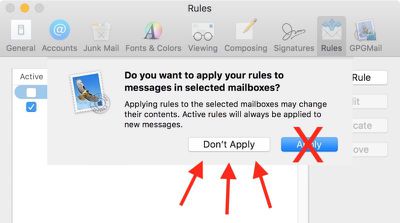
  12. WARNING! At this point, Apple Mail will ask if you want to apply the new rule to existing messages in your mailbox. Be very sure to respond to this question with a negative. In other words, click Do Not Apply, for the simple reason that clicking the alternative "Apply" option will cause Mail to send the automatic reply to all the messages currently sitting in your inbox, and you don't want that!Screen Shot 3 2 e1519290796563

  13. Your out-of-office reply rule is now active. Leave things as they are and keep your Mac on, and all incoming messages to that account will be responded to automatically. To make the out-of-office reply inactive upon your return, simply uncheck the box next to the said rule. The next time you're away, simply check the box again to reactivate it.
And that's it. It's worth noting that you can tweak the rule's conditions to suit your needs – so that the out-of-office reply is only sent out to specific people, or only in response to emails with certain subjects, for example.

How to Set Up Out-of-Office replies in iCloud Mail

Unlike Apple Mail in macOS, ‌iCloud‌ Mail has a dedicated out-of-office feature called Vacation mode that you can enable remotely from any web browser.

For obvious reasons, Vacation mode will only be useful to you if you have an ‌iCloud‌ email address. Other account holders looking for an out-of-office solution are better off using a third-party email client such as Mozilla Thunderbird. And with that caveat, here's how to get Vacation mode in ‌iCloud‌ Mail up and running.

  1. Open a browser and navigate to www.icloud.com.

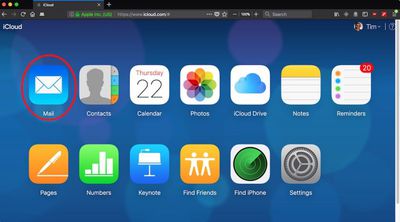
  2. Log in using your ‌iCloud‌ credentials and then click on the Mail icon.
    icloud mail

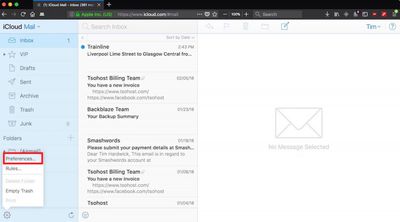
  3. When your Mail screen loads, click the cog icon in the lower left corner of the window and select Preferences... from the popup menu.
    Screen Shot 7

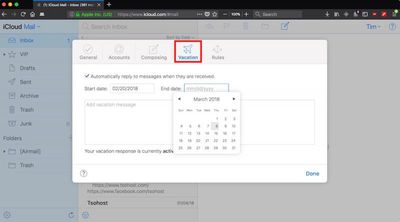
  4. Click the Vacation tab and check the box next to "Automatically reply to messages when they are received".
    Screen Shot 6

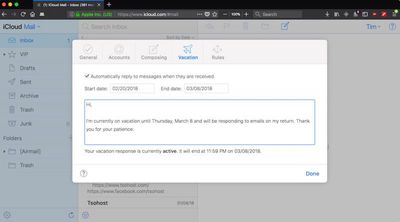
  5. Using the calendar dropdowns, click on a Start date and an End date between which you'd like your out-of-office replies to remain active.

  6. Lastly, enter the text of your automatic reply into the input box, and then click Done.Screen Shot 8
Tag: iCloud

Top Rated Comments

Mefisto Avatar
113 months ago
Who needs to do this in 2018?

Almost anywhere you go, you’ll have internet access and be able to read email.
And? If there's no reply, people expect (at least in my case) that I've read, and will reply to their email. An automated response tells them not to wait, and that I will get back to them at my convenience, or at a specific date. And I'll be damned if I'm reading, let alone replying to work emails while on vacation, for example. This feature get's around all that quite nicely.

I struggle to see what the current year has to do with it, but then again I'm getting a feeling I'm completely misunderstanding your post anyway so...

Any rules you set up in mail.app should absolutely be sent to the iCloud server and applied server side. Shows a huge and obvious gap in functionality.
100% agreed.
Score: 7 Votes (Like | Disagree)
Stella Avatar
113 months ago
Any rules you set up in mail.app should absolutely be sent to the iCloud server and applied server side. Shows a huge and obvious gap in functionality.
Score: 5 Votes (Like | Disagree)
113 months ago
The first sentence if this article is wrong.

You say that the 10.13 apple mail client has no specific way to put on out of office but it does.

The option is in the mailbox porperties

Right click the mailbox on the left hand panel > Select Properties > Select the out of office tab.

This means you don’t have to set a rule that is relient on the machine and apple mail client being open.

The method i described sets a server side rule so it works all the time and is the correct way to do this
Score: 3 Votes (Like | Disagree)
MacDawg Avatar
113 months ago
I want to know when Apple is going to fix the Zombie Email problem.
Deleted emails still keep coming back from the dead regardless of whether you mark them as spam or delete them.
This has turned into a years long running joke.
Have literally never had this happen to me, and honestly it is the first time I've heard of it
Could be a widespread problem, but not something I have ever encountered

Mac mail is horrible - I still want to know why I cant delete all emails via ipad or iphone, without doing some stupid trick. Talk about annoying and inefficient.
As mentioned above, this is iOS you are talking about and not Mac Mail
But maybe you could explain a little more... are you trying to do a mass delete, or are emails not deleting from other devices?
What exactly is the problem?
Score: 2 Votes (Like | Disagree)
113 months ago
Mac mail is horrible - I still want to know why I cant delete all emails via ipad or iphone, without doing some stupid trick. Talk about annoying and inefficient.
Sorry... but... lol.

Apple Mail on macOS and iOS are different applications, first of all. So saying the Mac app Sucks, because on your phone you cannot delete things... makes no sense. So whixh App are you talking about?! My fridge can also not mow my lawn.

Second... I guess you mean you have one email address... and receive your mails on iPhone, iPad, and your Mac. If you have an IMAP account or set it up as such on all devices then deleting an email on ONE will delete it on ALL devices. Always.
If you set it up as POP (and some let you use either IMAP or POP) then the different devices dont know of one another and actions like deletions are NOT synced.

BUT, and this is A BIG BUT:
This has ZERO absolutely ZERO to do with Apple Mail. ALL Email applications will work exactly the same way. Windows software included.


I am not saying that Mail is perfect (altho stuff like Mail Drop, and Automatik shrinking of images is awesome!!!). But what you complain about has nothing to do with Apple Mail!
Score: 2 Votes (Like | Disagree)
113 months ago
I believe this is only for Exchange-based corporate servers. Surprisingly, Apple Mail still doesn’t provide a native option for out of office.
That is correct. It is actually under Account Info and ONLY applies to Exchange/Office 365 accounts. iCloud, gmail etc accounts in Apple mail do not have that function
Score: 2 Votes (Like | Disagree)

Popular Stories

General iCloud App Feature

Apple Quietly Boosts Email Feature for iCloud+ Subscribers

Tuesday October 6, 2026 3:27 am PDT by
Yesterday we reported that Apple tripled the number of iCloud Mail aliases users can create, from three to nine. But it turns out that's not the only email-related limit Apple has raised. The company has also bumped the number of email addresses you can use per iCloud Custom Domain, from three to 10. If you subscribe to iCloud+, you can use a domain name you already own for your iCloud Mail...

General iCloud App Feature

Apple Quietly Triples iCloud Mail Alias Limit to Nine

Monday October 5, 2026 5:15 am PDT by
Apple appears to have quietly tripled the number of iCloud Mail aliases users can create, increasing the limit from three to nine. The increase was first noticed last week by a Reddit user, and picked up shortly after by a member of the MacRumors forums. MacRumors can confirm the change is live at iCloud.com. The increased limit has not been mentioned by Apple, so it could conceivably be a...


Apple MacBook Pro with PROLED XDR Display family lineup feature

Apple Announces OLED MacBook Pro With Touch Display

Wednesday October 28, 2026 10:11 am PDT by
Apple today announced a new high-end MacBook Pro, which is available in 14-inch and 16-inch sizes. The new device has a PROLED XDR display that supports touch gestures, and a glowing rear Apple logo. Pricing on the MacBook Pro starts at $2,899 for the 14-inch model and $3,399 for the 16-inch model. Apple says the MacBook Pro has the "world's best display in a pro laptop." The PROLED...
Latest Stories
Top Stories: Apple's Big MacBook Pro, iPad mini and iMac Updates
46 minutes ago
'Pluribus' Season 2 Reportedly Starts Production Today
7 hours ago
iPhone 18 Pro Sales Surge in China, Offsetting Decline in U.S. and Japan
8 hours ago
HomeView Software 27.2: Wallpapers, Control Center, and More
15 hours ago
Apple Alerts Stores to iPhone Duo's Display Cracking Issue
15 hours ago
iOS 27.3 Will Enable These Apple Intelligence Features in China
16 hours ago
Apple Says iOS 27.3 Beta Coming Next Week
16 hours ago
Apple's Flash Storage Suppliers Are Finally 'Getting Their Revenge'
17 hours ago
14 New Things Your iPhone Can Do in iOS 27.2
18 hours ago
iPhone Duo Review: One Week Later
19 hours ago
Samsung Mocks iPhone Duo Display Cracks in New Ad Campaign
20 hours ago
The MacRumors Show: OLED MacBook Pro, iPad Mini 8, and More
21 hours ago
MacBook Pro With Touch Display: 15 More Details Revealed
21 hours ago
Russia Places Apple on State Surveillance Registry
23 hours ago
Halloween Weekend Brings Discounts on Apple Accessories and Pre-Orders
23 hours ago
Apple Has Released More Than 25 New Products in the Past Two Months
1 day ago
Local Code Launches as Free, Private AI Assistant Tool for Mac
1 day ago
Apple Acquires Ascend.io
1 day ago
HomePod Mini 2 Launches Today: All the New Features
1 day ago
AirTag 2 4-Pack Drops to New Low Price of $69.99
1 day ago
Rian Johnson's iPhone Camera App Goes Viral
1 day ago
Where Did All the iPhone Duos Go? Mostly to Apple's Stores
1 day ago
Apple's Touchscreen MacBook Pro Could Ship 1.5M Units in 2027
1 day ago
New Apple TV 4K and iPad Mini: RAM Amounts Revealed
2 days ago
Apple Executive Comments on New iPad Mini Lacking 120Hz Display
2 days ago
Here's a Hands-On Look at HomePod Mini 2's New Two-Tone Colors
2 days ago
Apple Lowers App Store Fees in Taiwan Starting October 31
2 days ago
HomeView Pre-Order Returns to $289.99 on Amazon
2 days ago
Apple Avoids Showing Pinched Fingers on iPad Mini Page in South Korea
2 days ago
Old 'Popcorn Time' App Left Hundreds of Thousands of Macs at Risk
2 days ago

🔗 Related Apple News & Rumors

Stay updated with the latest Apple ecosystem news and verified rumors