One AirPod Not Charging? How to Fix the Problem - MacRumorsOpen MenuShow RoundupsShow Forums menuVisit ForumsOpen Sidebar
Skip to Content

One AirPod Not Charging? How to Fix the Problem

by

If you're having problems getting one of your AirPods or AirPods Pro to charge, read on. This article outlines the solutions available to you.
airpods pro 2 thumbnail
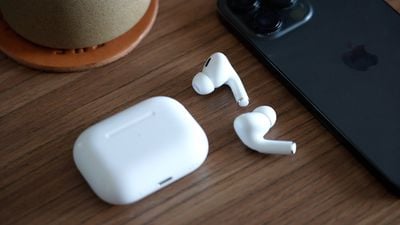
Whether you own original AirPods, AirPods 2, AirPods 3, AirPods 4, AirPods Pro, or AirPods Pro 2, all of these models can sometimes suffer from a problem where one AirPod refuses to charge in the Charging Case.

It's a common issue that's not only frustrating but it can effectively press pause on your plans for the day. Fortunately, the problem is usually fixable at home without having to contact Apple or return the AirPods. Try the following tips before you do anything else.

1. Check Charging Case Battery Level

When one AirPod stops charging, the culprit is very often the Charging Case. Generally speaking, if its charge is less than 10%, then the case doesn't have enough juice to charge both AirPods.

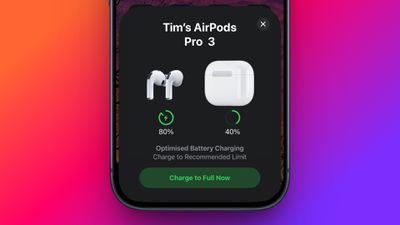
To check the battery level of your Charging Case, first put the AirPods inside the case and close the lid. Next, bring the case closer to your iPhone and open the lid. You should see an AirPods card appear on the iPhone's screen, showing the battery level of the Charging Case and both AirPods.
airpods pairing card
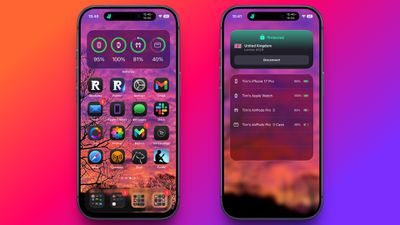
You can also check the charge status of your AirPods using the Batteries widget. This can be added to your ‌iPhone‌'s Today View (swipe right on the Lock screen or on your Home screen's first screen of apps) by tapping the Edit button at the bottom of the screen. Alternatively, you can add the Batteries widget to your Home screen.

If the battery level of the Charging Case is sufficient but one AirPod still isn't charging (i.e. there's no "lightning bolt" charging icon next to it), skip to the next step in this article.
battery widget
If it was the low battery in the Charging Case that was the cause of your problem, now you know to charge the case using a Lightning or USB-C cable, depending on the case model. It's easy to forget to plug the Charging Case into a power outlet because its battery lasts pretty long on one charge, so it's best to get into a habit of charging it every day or every other day, even if it's just for 15 minutes. That way, you'll never be left without battery for your AirPods when you're on the go.

2. Reinsert the AirPod

If the AirPod won't charge despite plenty of battery being in the Charging Case, the earpiece could be sitting incorrectly in the case and not have proper contact with the charging port. Take off any accessories such as foam eartips, then try reinserting the AirPod, and see if the charging icon appears next to it when you bring the AirPods close to your iPhone.
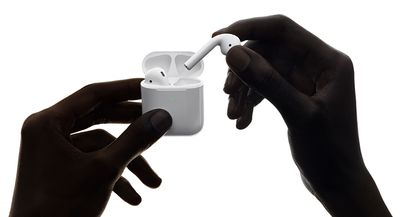
airpodsincasehands
If the AirPod still isn't charging, it could be that the contacts are dirty and that the AirPod stem and/or Charging Case need cleaning. See the cleaning tips below to learn how.

3. Clean the AirPod and Charging Case

Perhaps the most common reason an AirPod stops charging is because the charging contacts are dirty and have grime on the AirPod stem, inside the Charging Case, or both. This prevents the electrical charge from passing through sufficiently, but you can clean things up using the method outlined below.

What You'll Need

  • Lint-free or mirofiber cloth
  • Periodontal brush, straw cleaner, or Q-tip
  • 70% isopropyl alcohol (optional)

Using the dry, lint-free fabric, clean the stem of the AirPod, focusing around the silver contacts on the end.
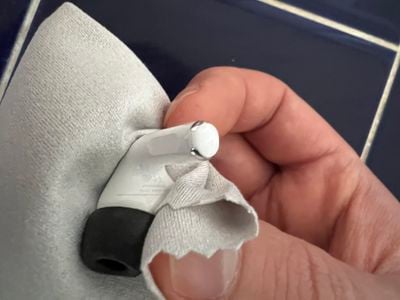
cleaning airpod not charging
Then take a periodontal brush or similar tool, and clean the internal contact points in each AirPod bay inside the Charging Case. If you encounter any stubborn gunk, take a Q-tip and moisten it with water, or spray it with some isopropyl alcohol (DO NOT spray alcohol or water directly on the case) and work the Q-tip over the dirty area.

If you use your AirPods daily, to recover and maintain proper contact between the AirPods and the Charging Case, ideally you should clean them every week.

4. Reset AirPods

Apple's original AirPods, AirPods 2, AirPods 3, AirPods 4, and AirPods Pro (1st, 2nd, and 3rd generation) all have a reset function that returns them to their factory settings. This can come in handy if you're having any sort of problem with them, such as when one AirPod refuses to charge.

  1. Put your AirPods in their case and close the lid.
  2. Wait 30 seconds, then open the lid.

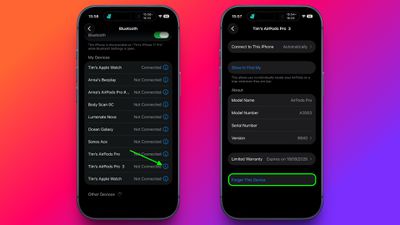
  3. On your iOS device, go to Settings ➝ [Name of your AirPods]. Alternatively, go to Settings ➝ Bluetooth and tap the circled "i" icon next to your AirPods.
  4. forget device in settings

  5. Scroll to the bottom and tap Forget This Device, then tap again to confirm.
  6. With the AirPods case lid open, press and hold the button on the back of the case for about 15 seconds until you see the status light flashing amber. (If you have AirPods 4 or AirPods Pro 3, double-tap the case, just below the status light.) If your AirPods case charges only over a wired connection, the status light is inside the case between the AirPods.
  7. With the case lid open, place your AirPods close to your device and follow the steps on your device's screen to reconnect your AirPods.
And that's all there is to it. Note that now the AirPods are reset they will no longer automatically recognize any of the devices linked to your Apple account. Opening the AirPods case near an iOS device will initiate the setup process, just like the first time you used them.

5. Contact Apple Support

If none of the above suggestions fixed the issue of one AirPod not charging, then it's probably time to contact Apple Support, as Apple's team will be able to determine whether your AirPod or Charging Case needs to be repaired or replaced.


Related Roundups: AirPods 5, AirPods Pro 3
Related Forum: AirPods

Popular Stories

Surprise and Shine Live Coverage Article

Apple Event Live Blog: iPhone Duo, iPhone 18 Pro, and More

Wednesday September 9, 2026 9:10 am PDT by
Apple's "Surprise and Shine" event kicks off today at 10:00 a.m. Pacific Time, where we're expecting to see the foldable iPhone Duo, the iPhone 18 Pro and Pro Max, Apple Watch Series 12 and Ultra 4 models, new AirPods 5 earphones, and perhaps some other announcements. Apple is providing a live video stream on its website, on YouTube, and in the company's TV app across various platforms. We...

AirPods Pro Beta Firmware 2

Apple Releases New AirPods Firmware With iOS 27 Features

Monday September 14, 2026 11:42 am PDT by
Apple today released new firmware for the AirPods Pro 2, AirPods Pro 3, AirPods 4, and AirPods Max 2. The firmware is available for all of the above devices, and it will enable support for new iOS 27 features. The firmware has a build number of 9A348. In iOS 27, iPadOS 27, and macOS Golden Gate, Apple is adding a new AirPods interface, a slider for Adaptive mode, and support for custom EQ....
airpods 5

AirPods 5 Announced With Improved Noise Cancellation, Audio Quality, and More

Wednesday September 9, 2026 10:33 am PDT by
Apple today introduced AirPods 5, offering Active Noise Cancellation with its entry-level wireless earbuds at a starting price of $129. Apple says AirPods 5 remove up to 50% more external noise than AirPods 4 with Active Noise Cancellation. They also boast a redesigned acoustic architecture and updated Adaptive EQ also promise richer, more detailed sound, and an improved Transparency mode...
Latest Stories
Apple's Smart Home Hub: Everything We Know So Far
3 hours ago
Apple's Home Hub Borrows From the iPhone Duo's StandBy Mode
4 hours ago
Apple Invites App Updated With Three New Features
8 hours ago
Apple Event on October 13?
9 hours ago
Apple Watch SE 3 vs. Series 12 Buyer's Guide: Which Should You Buy?
11 hours ago
iPad Mini 8 to Offer These 10 New Features
11 hours ago
DoorDash Unveils AI Food Ordering Through Apple's Messages App
12 hours ago
Amazon Takes Up to $150 Off Select M5 MacBook Air Models
12 hours ago
Apple Still Plans to Release a New Full-Sized HomePod
14 hours ago
Apple Working to Expand HomeKit
15 hours ago
Apple Smart Home Hub to Feature iMac G4-Style Design
15 hours ago
Three New Apple Smart Home Products Coming on October 13
16 hours ago
Apple Pay Now Available in India With Axis Bank Cards
1 day ago
OpenAI Launches Always-On 'Dots' Agents to Rival Meta's Muse
1 day ago
AirPods 5 Teardown: Batteries Removable, Case Still Tough
1 day ago
iPhone 18 Pro Owners Complain of Speaker Crackling or Popping
1 day ago
You Can 'Get Ready' for iPhone Duo Pre-Orders on October 12
1 day ago
Apple Pay Reportedly Launching in India Today
1 day ago
Apple Releases New AirPods Beta Firmware
1 day ago
Apple Shares New Guide for Using iOS 27 Parental Controls
1 day ago
Apple Creator Studio and Final Cut Camera Get New Features
1 day ago
Apple Explains Why It Removed ICE Tracking Apps Last Year
1 day ago
Amazon Expands $779.99 Apple Watch Ultra 4 Deal to More Models
1 day ago
Switch Siri AI for ChatGPT on Your Mac
1 day ago
Apple Says Emergency SOS via Satellite Now Available in Norway
1 day ago
AppleCare Guide: Is it Worth Paying For?
1 day ago
Apple Reportedly Planned to Replace 5,000 Support Employees With AI
1 day ago
Apple Planning to Launch Products Faster and More Often
1 day ago
Amazon Discounting New Mac Mini and Mac Studio Alongside Early Prime Day Deals on Monitors
2 days ago
New Apple TV 4K Hinted at in Support Document
2 days ago

🔗 Related Apple News & Rumors

Stay updated with the latest Apple ecosystem news and verified rumors