How to Make Your iPhone Display Dimmer Than Standard Brightness Controls Allow - MacRumorsOpen MenuShow RoundupsShow Forums menuVisit ForumsOpen Sidebar
Skip to Content

How to Make Your iPhone Display Dimmer Than Standard Brightness Controls Allow

by

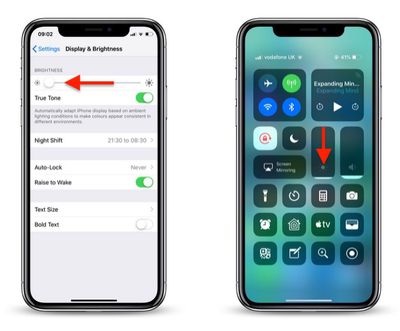
If the screen of your iPhone or iPad is too bright for comfort, the usual solution is to go to Settings -> Display & Brightness and drag the Brightness slider to the left, or open Control Center and adjust the corresponding setting from there.
how to reduce screen brightness further in iOS 1
However, if the lowest setting offered by the Brightness level just isn't dim enough for you, there are a couple of ways to make your screen even darker. One method we've covered previously is to adjust white point using the Accessibility Shortcut. Another way is to enable a low light filter, which you can do by following the steps below.

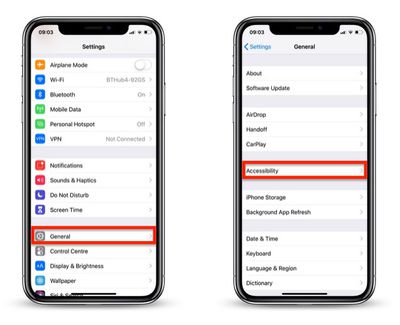
  1. Launch the Settings app on your iOS device.
  2. Tap General.
  3. Tap Accessibility.
    how to reduce screen brightness further in iOS 2

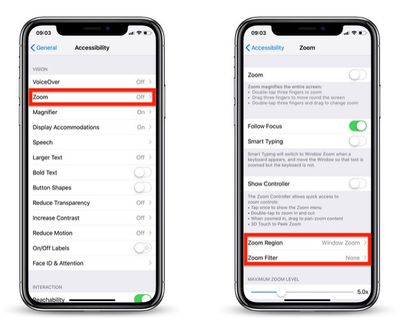
  4. Tap Zoom.
  5. Tap Zoom Region.
    how to reduce screen brightness further in iOS 3

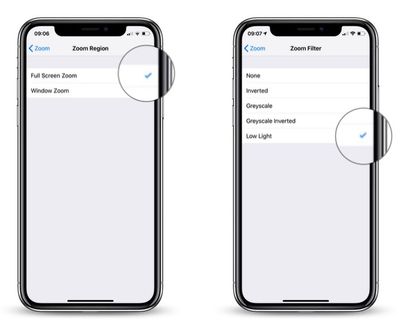
  6. Select Full Screen Zoom and return to the main Zoom menu.
  7. Tap Zoom Filter.
  8. Select Low Light and return to the main Zoom menu.
    how to reduce screen brightness further in iOS 4

  9. Now, turn on Zoom by toggling the switch at the top of the Zoom menu.
  10. Double-tap the screen with three fingers to zoom out to fullscreen.
how to reduce iphone screen brightness5
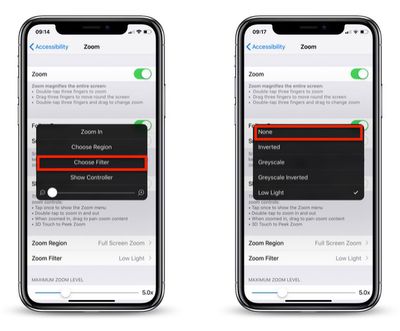
Your device's display brightness should now be extra dim. Note that you can disable the low light filter at any time: Simply triple-tap the screen with three fingers, tap Choose Filter from the overlay panel and then select None.


Top Rated Comments

McFreggle Avatar
98 months ago
Settings > General > Accessibility > Accessibility Shortcut > Reduce White Point.

Much simpler than the procedure described in this article. Triple-click on home button (or side button) for reducing the brightness. Triple-clicking again to increase it again.

You're welcome.
Score: 16 Votes (Like | Disagree)
Sovon Halder Avatar
98 months ago
Settings > General > Accessibility > Accessibility Shortcut > Reduce White Point.

Much simpler than the procedure described in this article. Triple-click on home button (or side button) for reducing the brightness. Triple-clicking again to increase it again.

You're welcome.
WARNING : This triple clicking home button accessibility feature brings a noticeable lag into double clicking function.
Score: 4 Votes (Like | Disagree)
jacjustjac Avatar
98 months ago
There’s an easier way to invoke this. At the bottom of the accessibility page, there’s one called “Accessibility Shortcut”. Select Zoom (and I also have Reduce White Point, which in my opinion is more effective). Now when you triple tap your home button (or the sleep wake button if you don’t have one), your screen can instantly dim. It’s that easy.

Lastly, I use Color Filters (Color Tint) found in Display Accomadations to make an extreme version of Night Shift, whereby my screen removes almost 99% of blue and green light, making my screen appear an ultra red. This in my opinion is more effective than lowering the brightness and Night Shift alone, because you can actually have your screen at a comfortable brightness to read black and white text, but still fall easily asleep.

I’d love to help write and article or video on this process, because I use it every night and have no problems falling asleep while using my phone, and I think others can benefit from it too.
Score: 3 Votes (Like | Disagree)
98 months ago
Settings > General > Accessibility > Accessibility Shortcut > Reduce White Point.

Much simpler than the procedure described in this article. Triple-click on home button (or side button) for reducing the brightness. Triple-clicking again to increase it again.

You're welcome.
Any difference between this and Reduce White Point?

Is it redundent to have both enabled?
I was just about to reply to this. The method macrumours shown is far too long-winded.
Yeah I was thinking the same when I read that post. Way too many steps.
Pretty sure Reduce White Point doesn't dim it as much as the Zoom Low Light filter does.
Exactly... sadly this zoom method has been doing the rounds in the last day or so and this is just 100% lazy copy and paste crap.
This method (as well as the Reduce White Point one) have been around for quite a while (at least a number of years and iOS versions).
[doublepost=1547767528][/doublepost]
Has anyone ever complained that their iPhone was too bright?
Sure, in various dark environments, for one.

Score: 2 Votes (Like | Disagree)
98 months ago
The battery
I’m not a fan of the minimum brightness in phones currently. It’s still way too bright if you’re in a dark room/half asleep
Score: 2 Votes (Like | Disagree)
ItzJordan Avatar
98 months ago
Theres probably a thread already, but does anyone else’s iPhone X/XS/XS Max experience the display to dim to a max brightness of 50% when it is quite warm (or doing instense work loads). Also the CPU and graphics seem to be throttled as everything lags while the device is warm to touch.

Experienced it heavily on the iPhone X and worked with Apple to try a resolve this with diagnostics. The performance throttling is less noticeable on the XS Max but the brightness being maxed at 50% is still noticeable...

Intensive usage needs to be occurring in order this to happen. Using Personal Hotspot (downloading/uploading files) while on a FaceTime call on the iPhone usually does the trick... also room temp needs to be around 20°c or warmer maybe. Only noticed in the summer time and noticing the past few days, as I’m over in Australia! :)

Score: 2 Votes (Like | Disagree)

Popular Stories

Apple Event Logo

Apple Working on All-New Operating System

Wednesday July 29, 2026 11:39 am PDT by
Apple is developing an all-new operating system that is essentially a mix of tvOS, watchOS, and iOS, according to Bloomberg's Mark Gurman. In a report this week, he said the operating system will feature a grid of icons, widgets, and apps, along with customizable clock faces. The new software platform is intended for Apple's long-rumored smart home hub. With built-in facial recognition,...

imac video apple feature

Apple Made Its Second-Biggest Acquisition Ever This Year

Wednesday July 29, 2026 12:03 pm PDT by
Apple this year acquired Israeli startup Q.ai for close to $2 billion, according to the Financial Times. That would make this Apple's second-biggest acquisition ever, after it paid $3 billion for the popular headphone maker Beats in 2014. This is also the largest known Apple acquisition since the company purchased Intel's smartphone modem business and patents for $1 billion in 2019. Q.ai...
Dynamic Island iPhone 18 Pro Feature

iPhone 18 Pro: Twelve Changes Coming to Apple's Next Flagship

Thursday July 30, 2026 3:43 am PDT by
We're less than two months out from the launch of Apple's premium next-generation smartphone lineup, and while we're not expecting a dramatic change in terms of functionality, there are still several enhancements rumored to be coming to the iPhone 18 Pro and iPhone 18 Pro Max. One thing worth noting is that Apple is reportedly planning a major change to its iPhone release cycle this year,...

🔗 Related Apple News & Rumors

Stay updated with the latest Apple ecosystem news and verified rumors