Make Any File a Template Using This Hidden macOS Tool - MacRumorsOpen MenuShow RoundupsShow Forums menuVisit ForumsOpen Sidebar
Skip to Content

Make Any File a Template Using This Hidden macOS Tool

by

Stationery Pad is a handy way to nix a step in your workflow if you regularly use document templates on your Mac. The long-standing Finder feature essentially tells a file's parent application to open a copy of it by default, ensuring that the original file remains unedited.

stationery pad
Stationery Pad doesn't get much attention these days, but it's a neat alternative to repeatedly editing templates and using the "Save As..." command, which can lead to overwriting the original file if you're not too careful.

Almost any file type can be defined as a template with Stationery Pad – it could be used to streamline common Photoshop jobs, create skeleton HTML/CSS files, or help with Word document invoicing. To make use of Stationery Pad, create the file you want to use as a template, then follow the steps below.

Define a File as a Template Using Stationery Pad

  1. Find the file in Finder that you want to use as a template.

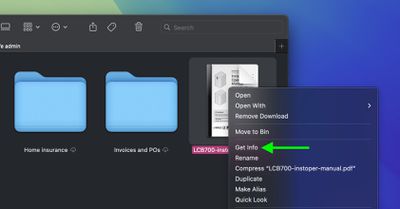
  2. Right-click (or Ctrl-click) the file and select Get Info in the contextual dropdown menu. Alternatively, click the file to select it and use the Command+I keyboard shortcut to launch Get Info.
    finder

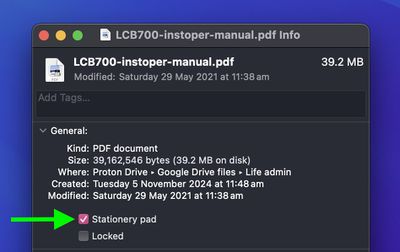
  3. Check the Stationery Pad checkbox under the General section.
    finder

  4. Click the red traffic light button to close the Get Info window.
Next time you double-click the template file, Finder will create and open a copy of it, leaving the original untouched. To reverse the behavior, simply uncheck the Stationery Pad checkbox in the template file's Get Info window.


Top Rated Comments

wanha Avatar
19 months ago
Apple is usually great at naming things, but "Stationary pad" is a terribly confusing name for this useful feature
Score: 20 Votes (Like | Disagree)
UltimateSyn Avatar
19 months ago
I’ve used Macs for ~25 years and never knew you could do this. Thank you!

Score: 20 Votes (Like | Disagree)
19 months ago
If Apple actually renamed this checkbox and call it "This file is a template" or whatever else they want to use as long as it has the word "template" on it, it would have more mainstream awareness. Who the hell uses the term "stationary pad" nowadays?
Score: 13 Votes (Like | Disagree)
AngerDanger Avatar
19 months ago
Not only did I not know what that checkbox did, I'd somehow never even noticed it 😅


Apple is usually great at naming things, but "Stationary pad" is a terribly confusing name for this useful feature
Seriously, "Make Template" would be so much less ambiguous.
Score: 9 Votes (Like | Disagree)
Willis Avatar
19 months ago
I remember looking this up around 10-15 years ago and thought oh cool, but had zero use for it. Naturally, I forgot this existed.

Probably the best Mac tip going right now
Score: 6 Votes (Like | Disagree)
Nermal Avatar
19 months ago

I’ve looked at thousands of Get Info dialogs and can’t recall ever seeing it. I have used Locked, so I must have seen it, but apparently I was never curious enough to research what it did.
I think I first noticed it in System 7 :)

Edit: After a little bit of playing around in an emulator, it looks like the feature was added in 7.
Score: 5 Votes (Like | Disagree)

Popular Stories

Apple Event Logo

Apple Working on All-New Operating System

Wednesday July 29, 2026 11:39 am PDT by
Apple is developing an all-new operating system that is essentially a mix of tvOS, watchOS, and iOS, according to Bloomberg's Mark Gurman. In a report this week, he said the operating system will feature a grid of icons, widgets, and apps, along with customizable clock faces. The new software platform is intended for Apple's long-rumored smart home hub. With built-in facial recognition,...
imac video apple feature

Apple Made Its Second-Biggest Acquisition Ever This Year

Wednesday July 29, 2026 12:03 pm PDT by
Apple this year acquired Israeli startup Q.ai for close to $2 billion, according to the Financial Times. That would make this Apple's second-biggest acquisition ever, after it paid $3 billion for the popular headphone maker Beats in 2014. This is also the largest known Apple acquisition since the company purchased Intel's smartphone modem business and patents for $1 billion in 2019. Q.ai...
Dynamic Island iPhone 18 Pro Feature

iPhone 18 Pro: Twelve Changes Coming to Apple's Next Flagship

Thursday July 30, 2026 3:43 am PDT by
We're less than two months out from the launch of Apple's premium next-generation smartphone lineup, and while we're not expecting a dramatic change in terms of functionality, there are still several enhancements rumored to be coming to the iPhone 18 Pro and iPhone 18 Pro Max. One thing worth noting is that Apple is reportedly planning a major change to its iPhone release cycle this year,...

🔗 Related Apple News & Rumors

Stay updated with the latest Apple ecosystem news and verified rumors