Skip to Content

macOS: Share a Link That Jumps to a Specific Line on a Webpage

by

Sometimes when you share a webpage link with someone, you just want to bring their attention to a specific passage or sentence to make your point, rather than have them read through the entire article.

safari icon blue banner
In 2020, Google added a function to its Chrome browser called Scroll to Text Fragment (STTF) that helps you achieve this. It allows URLs to link directly to any visible text on a page. You may have seen it work in Google Search, where clicking on a link in your returned results takes you to a highlighted passage of text further down the page.

Google later added the feature to the Chromium codebase, so most other popular Chromium browsers like Edge, Opera, Brave, and Vivaldi also support it. Here's how it works.

Copy Link With Highlight in Safari

Apple added full support for text fragment links in Safari 18, and the feature is available in Safari on macOS Sequoia and later. To use the feature, visit a web page and simply highlight the text you want to create a link to, then right-click (Ctrl-click) and choose Copy Link with Highlight from the dropdown menu.
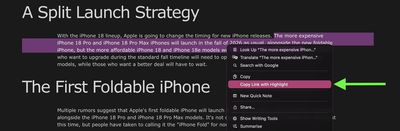
safari

The "Copy Link to Highlight" option

This will generate a special URL that includes a hash (#) symbol and "text" element, followed by a few words that bookend the selected text. All you need to do is share the link with someone, and when they click it they will be sent directly to that part of the webpage with the specific passage highlighted, as shown below.
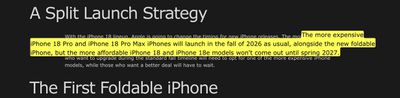
highlighted text shared safari

The shared link as the recipient sees it

That's all there is to it. The Copy Link to Highlight option is also available in Safari on iPhone and iPad, though we have found it to be buggy and inconsistent in iOS 26.3. Hopefully Apple can fix it soon. At least on Mac, it makes it easier for you to direct the recipient of the link to the content you actually want them to focus on.

Bear in mind that the look of highlighted text can differ depending on whether the page author has styled it to look a certain way. Also, text fragment linking does not work in PDFs. Since July 2025, Copy Link to Highlight has also been introduced in Firefox.


Tag: Safari

Top Rated Comments

NightFox Avatar
3 weeks ago
I will mentally add this to my 'useful things that I won't be able to remember how to do when I eventually want to do them' list
Score: 9 Votes (Like | Disagree)
GtrDude Avatar
3 weeks ago
This was available on Microsoft IE since about when the internet was invented.
Glad to know though that we're only 6 years behind Google.
Score: 6 Votes (Like | Disagree)
DrwMDvs Avatar
3 weeks ago
How do we remove the highlighted text once we visit the link? It can be pretty jarring when you're trying to read through it.
Score: 5 Votes (Like | Disagree)
TuffLuffJimmy Avatar
3 weeks ago

This was available on Microsoft IE since about when the internet was invented.
Glad to know though that we're only 6 years behind Google.
Not the way it’s implemented here. It was possible to #link specific sections of an html document as long as the page was created with that in mind. This, however, allows one to link to a specific line even if the page was not written with this in mind.
Score: 4 Votes (Like | Disagree)
3 weeks ago

This was available on Microsoft IE since about when the internet was invented.
Glad to know though that we're only 6 years behind Google.
I can't find any reference to this in old IE docs, and I don't remember ever seeing it (other than by using standard HTML anchor links, which didn't highlight anything, and which all browsers did and do support). But I'll take your word for it.

Until it's a W3C standard it's a bit of a risk adding it at all, and I'm kind of surprised they have. I guess they figured it's been in the CSS4 draft spec for long enough at this point.
Score: 4 Votes (Like | Disagree)
3 weeks ago
I’m annoyed by this as often as I’m helped by it. Half the links from Google that I copy have this text when I don’t want it, and Apple always thinks the last part of the link is a word to check the spelling on, so it takes 5-10 taps just to remove the part of the link I don’t want.
Score: 3 Votes (Like | Disagree)

Popular Stories

macbook air blue

What's Coming in the M5 MacBook Air

Thursday February 26, 2026 3:57 pm PST by
Along with the low-cost MacBook, Apple could introduce a refreshed version of the MacBook Air next week. Most of the focus will be on the new machine, but the MacBook Air is expected to get some useful internal updates. M5 Chip The next-generation MacBook Air will adopt the M5 chip, which Apple already introduced in the iPad Pro and MacBook Pro models that came out last year. Apple's M5...
ipad mini 7 1

Could Apple's OLED iPad Mini Finally Be a Kindle Killer?

Friday February 27, 2026 12:08 pm PST by
With a similar screen size and easy, one-handed grip, the iPad mini has always been the Apple device that overlaps most with dedicated e-readers. Now, amid rumors pointing to an OLED display for the next generation, could the iPad mini finally replace devices such as the Kindle and Kobo? The shift from LCD to OLED could make the iPad mini far more appealing as a reading device. OLED panels...
Apple Announces Special Event in New York Feature 1

Apple Teases 'A Big Week Ahead' With Announcements Starting Monday

Thursday February 26, 2026 6:06 am PST by
Apple CEO Tim Cook today teased "a big week ahead," with announcements starting Monday. His post included an #AppleLaunch hashtag with a colorful Apple logo, along with a short video that ultimately shows an Apple logo on the lid of a Mac. Apple is reportedly planning a three-day stretch of product announcements from Monday, March 2 through Wednesday, March 4, with up to five new products...

🔗 Related Apple News & Rumors

Stay updated with the latest Apple ecosystem news and verified rumors