How to Launch the Intel Version of a Universal Apple Silicon App - MacRumorsOpen MenuShow RoundupsShow Forums menuVisit ForumsOpen Sidebar
Skip to Content

How to Launch the Intel Version of a Universal Apple Silicon App

by

Macs powered by Apple silicon, such as the M1 MacBook Pro, can run both iOS apps and Mac apps, but they can also run x86-64 software that's been built to work on Intel architecture, thanks to something called Rosetta 2.
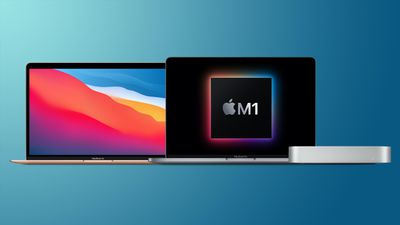
mac mini macbook pro macbook air m1
Rosetta 2 is the translation layer that enables a Mac with Apple silicon to use apps built for an Intel-based Mac. The first time you launch an app that requires it, an alert will appear asking permission for Rosetta to be installed. After that, the translation layer works in the background whenever you use an app built only for Mac computers with an Intel processor, and automatically translates the app for use with Apple silicon the first time the app is run.

When developers update their apps to run natively on Apple silicon, they use something called a Universal binary. Originally, Universal apps referred to executable files that run natively on both PowerPC or Intel Macs. At WWDC 2020 in June, however, Apple announced Universal 2, which allows apps to run on both Intel-based Macs and Apple silicon Macs.

If an app has yet to be updated to Universal 2, an M1-powered Mac will still run it, but it will do so by converting the Intel x86-64 code using Rosetta 2 emulation software. But what if you want to run the Intel version rather than the Apple silicon version? You may want to do this if the Apple silicon version of the app is missing a particular feature, or if you're using an app with third-party plug-ins or extensions that haven't been updated to support Apple silicon yet.

In such cases, you can use the following steps to force a Universal app to run the Rosetta version instead.

  1. First, if the app you want to run in Rosetta is running, save your work and quit it.
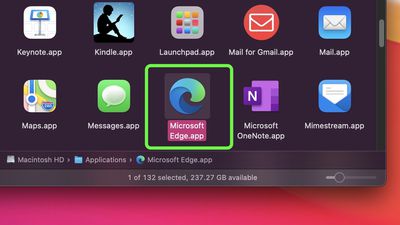
  2. Next, open a Finder window, navigate to the Applications folder on your Mac, and locate the app in question.
    finder

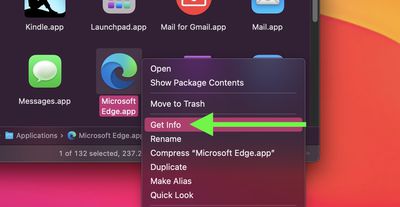
  3. Right-click (or Ctrl-click) the app's icon and select Get Info from the contextual dropdown menu.
    finder

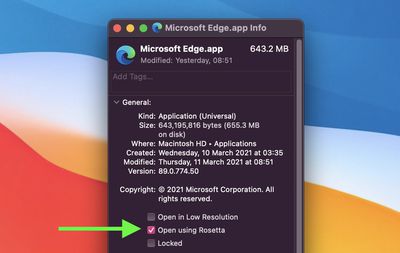
  4. Click the checkbox next to "Open using Rosetta."
    Get Info

  5. Close the Info window, then re-launch the app.
From hereon in, your Mac will run the Intel version of the app using the Rosetta translation layer. To stop using Rosetta at any time, simply repeat the steps above and uncheck the box next to "Open using Rosetta."

Popular Stories

rosetta 2

macOS 27.2 Stops Upgrades From Removing Rosetta

Monday October 26, 2026 6:55 pm PDT by
Upgrading to macOS 27 no longer removes an existing Rosetta installation, according to Apple's enterprise release notes for macOS 27.2. Previously, upgrading to macOS 27 removed existing installations of Rosetta, the translation tool that lets Intel-based apps run on Apple silicon Macs. macOS 27 remains the final release with full Rosetta support. Apple plans to phase out general-purpose...
skyrim

Skyrim Comes to Apple Silicon Macs With New Unofficial Installer

Tuesday October 20, 2026 7:56 pm PDT by
Bethesda's beloved role-playing game "The Elder Scrolls V: Skyrim" has reached multiple generations of consoles since its 2011 debut, but it never officially came to the Mac. A new unofficial project called SkyrimMT now aims to make playing and modding it on Apple silicon Macs easier than ever. Mac owners have found ways to play Skyrim over the years, including installing Windows through...

iPhone Duo Display Cracking

Apple Alerts Stores to iPhone Duo's Display Cracking Issue

Friday October 30, 2026 3:20 pm PDT by
In a memo shared with Apple Stores and Apple Authorized Service Providers this week, and later obtained by MacRumors, Apple provided technicians with guidance on how to diagnose and address the iPhone Duo's inner display cracking issue. If a customer reports the issue, Apple advised technicians to inspect the iPhone Duo and repair or replace it in accordance with their standard procedures....
Latest Stories
Apple Watch Ultra 4 Hits All-Time Low Price With Amazon's $99 Discount
18 hours ago
Reminder: Apple's Big Discount on Beats 360 Ear Cushions Ends Today
19 hours ago
Here's a New Tour of Apple's HomeView Software
19 hours ago
Apple Reveals New iPad Mini's Battery Capacity
20 hours ago
Top Stories: Apple's Big MacBook Pro, iPad mini and iMac Updates
21 hours ago
'Pluribus' Season 2 Reportedly Starts Production Today
1 day ago
iPhone 18 Pro Sales Surge in China, Offsetting Decline in U.S. and Japan
1 day ago
HomeView Software 27.2: Wallpapers, Control Center, and More
1 day ago
Apple Alerts Stores to iPhone Duo's Display Cracking Issue
2 days ago
iOS 27.3 Will Enable These Apple Intelligence Features in China
2 days ago
Apple Says iOS 27.3 Beta Coming Next Week
2 days ago
Apple's Flash Storage Suppliers Are Finally 'Getting Their Revenge'
2 days ago
14 New Things Your iPhone Can Do in iOS 27.2
2 days ago
iPhone Duo Review: One Week Later
2 days ago
Samsung Mocks iPhone Duo Display Cracks in New Ad Campaign
2 days ago
The MacRumors Show: OLED MacBook Pro, iPad Mini 8, and More
2 days ago
MacBook Pro With Touch Display: 15 More Details Revealed
2 days ago
Russia Places Apple on State Surveillance Registry
2 days ago
Halloween Weekend Brings Discounts on Apple Accessories and Pre-Orders
2 days ago
Apple Has Released More Than 25 New Products in the Past Two Months
2 days ago
Local Code Launches as Free, Private AI Assistant Tool for Mac
2 days ago
Apple Acquires Ascend.io
2 days ago
HomePod Mini 2 Launches Today: All the New Features
2 days ago
AirTag 2 4-Pack Drops to New Low Price of $69.99
2 days ago
Rian Johnson's iPhone Camera App Goes Viral
2 days ago
Where Did All the iPhone Duos Go? Mostly to Apple's Stores
2 days ago
Apple's Touchscreen MacBook Pro Could Ship 1.5M Units in 2027
2 days ago
New Apple TV 4K and iPad Mini: RAM Amounts Revealed
2 days ago
Apple Executive Comments on New iPad Mini Lacking 120Hz Display
3 days ago
Here's a Hands-On Look at HomePod Mini 2's New Two-Tone Colors
3 days ago

🔗 Related Apple News & Rumors

Stay updated with the latest Apple ecosystem news and verified rumors