

Following the launch of Macs powered by Apple silicon, numerous third-party apps have been updated to ensure they are optimized to run on Apple's custom processors. Even if an app hasn't been updated, Apple's non-Intel Macs can still run them, thanks to Apple's Rosetta 2 translation layer. But how do you know which of your apps are running natively as Universal executables and which ones are using Rosetta emulation? Read on to find out.
Universal Apps Explained
When developers update their apps to run natively on Apple silicon, they use something called a Universal binary. Originally, Universal apps referred to executable files that run natively on both PowerPC or Intel Macs. At WWDC 2020 in June, however, Apple announced Universal 2, which allows apps to run on both Intel-based Macs and Apple silicon Macs.
If an app has yet to be updated to Universal 2, an Apple silicon Mac will still run it, but it will do so by converting the Intel x86-64 code using Rosetta 2 emulation software. Even when emulating x86 code under Rosetta 2, the Macs with Apple silicon generally run non-native apps faster than Intel-based Macs, but it's good to know which apps have been optimized for the advanced hardware inside your M1 Mac. Here's how.
How to Check for Universal Apps in macOS
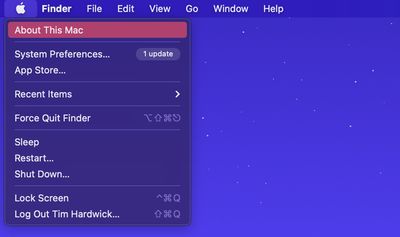
- Click the Apple symbol in the top-left corner of your Mac's menu bar and choose About This Mac.

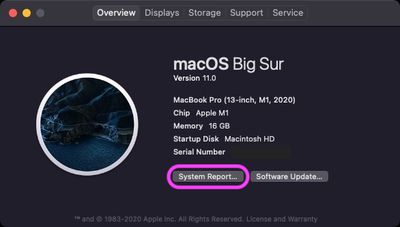
- In the "Overview" tab, click the System Report... button.
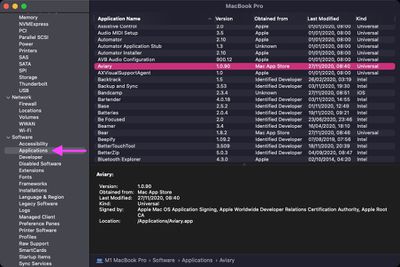
- In the System Report window, select Software -> Applications in the sidebar. In the Applications list that loads, look under the Kind column to see whether an app is a Universal binary or a non-native Intel executable.
In addition to the System Report list, you can check individual apps too: right-click an app's icon in Finder, then select Get Info from the contextual menu and look at its Kind under "General."
In addition to the above, iMazing has released a free app [Direct Link] that scans your macOS apps and displays their supported CPU architecture, while repo offers a free menu bar app called Silicon Info that lets you quickly view the architecture of the currently running application.
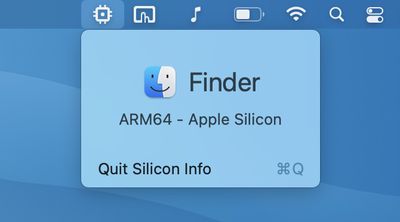
You can also check if an app has been optimized for Apple silicon before you even install it, thanks to a website by Abdullah Diaa called Is Apple silicon ready? The site maintains an up-to-date database of apps indicating native M1 support, Rosetta 2 only, and those that don't work at all.
It's worth noting that Apple considers Rosetta 2 to be a temporary solution for developers while they remake their existing Intel-based programs to run on Arm-based Macs, meaning they will eventually need to create Universal apps that work natively on both Intel and Apple silicon machines.
Apple ended support for OG Rosetta three years after its release to smooth the transition from PowerPC chips to Intel processors, so if a developer doesn't update their app eventually, it may become unusable on Apple silicon machines in the future.


















































Top Rated Comments
I was tired of constantly opening Activity Monitor to see if my apps were running natively yet so I figured the menu bar was the quicker. Hope others find it useful too!
Cheers
Rosetta 2 was developed in-house, and it's super fast. And, perhaps even more importantly, there are far more Intel Mac apps than there ever were PPC apps (because Macs are more popular today), so we’d loose access to a much richer library of software.
There's a lot more in an App package than Binaries, like for instance images, supporting files, databases and so on.
Just an example below, this is Safari App package, look at the Safari binary size, there are more binaries in /Safari/Contents but not that many and not huge.
Edit: I just researched a bit more into the Safari App package, it's ~19 MB, slimming it down would not even save you 1 MB.
There are much bigger binaries but in my experience slimming down an App folder saves you max 10% of the total size, done that after going from PPC to Intel, lots of Universal Apps back than, there are still Universal Intel/PPC Apps.
It's OK for small apps but some exceed 3GB (Ableton Live for example). So basically the Universal app you need to download is 6GB instead of 3GB (and it also will occupy 6GB on your system).
I remember PPC/Intel Stripping tools which could strip the unneeded.
But that's not possible now with code signing - if you would strip it now, it just won't work.
Anyhow, I think devs should also provide separate ARM and Intel downloads.