iPhone 17: Using the New Center Stage Front Camera - MacRumorsOpen MenuShow RoundupsShow Forums menuVisit ForumsOpen Sidebar
Skip to Content

iPhone 17: Using the New Center Stage Front Camera

by

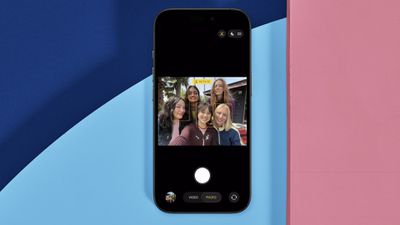
On all models in Apple's new iPhone 17 series as well as the iPhone Air, the new 18MP Center Stage front camera transforms mobile photography with its square sensor design and intelligent auto-adjustment features. Unlike traditional front cameras, the system automatically rotates and zooms to capture perfect selfie shots.

iphone 17 center stage camera
The square sensor also captures more image data than rectangular sensors, giving you unprecedented flexibility in framing and composition without sacrificing image quality.

Understanding Auto-Rotate and Auto-Zoom

Center Stage automatically switches between horizontal and vertical orientation when you're lining up a shot, meaning you don't need to physically rotate your iPhone. The camera also dynamically adjusts its field of view based on what's happening in front of it.

When you're taking a solo selfie, for example, Center Stage keeps the frame tight for a more personal feel. As friends join the shot, the view expands to include everyone without cropping anyone out.

Taking Photos with Center Stage
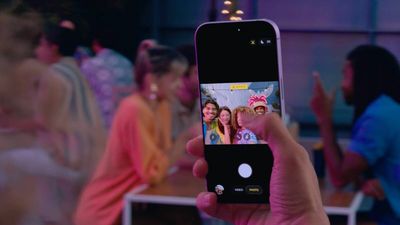
iphone 17 center stage camera shooting

  1. Open the Camera app on your iPhone.
  2. Tap the circular arrows icon at the bottom right to switch to the selfie camera.
  3. The Center Stage button (the icon of a person's profile within a frame) above the viewfinder should appear as yellow, indicating the feature is enabled.
  4. Line up your shot – Center Stage automatically adjusts orientation and zoom.
  5. Hit the shutter button to capture your photo or video.
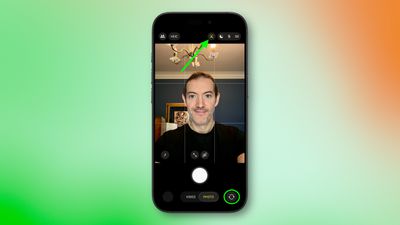
iphone 17 selfie center stage 1

Manual Camera Controls

You can override Center Stage's automatic functions when you need more control:

  • Manual rotation: Tap the orientation icon within the viewfinder to switch between portrait and landscape modes.
  • Manual zoom: Use the zoom icon (arrows pointing in/out) within the viewfinder to adjust the field of view yourself.
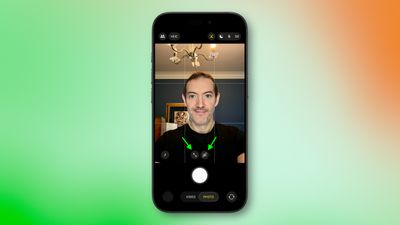
iphone 17 manual rotate zoom

How to Disable Auto-Rotate

iphone 17 center stage rotate
When the front camera is engaged, if Center Stage detects faces beside you or in the background and rotates to include them when you want a personal selfie:

  1. Tap the yellow Center Stage button.
  2. Tap Off next to "Auto Rotate."
  3. Take your photo normally – the camera will no longer auto-rotate. Alternatively, use the rotate orientation icon in the viewfinder to do so manually.
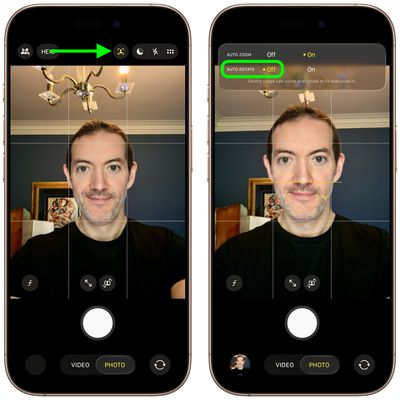
iphone 17 disable auto rotate

How to Disable Auto-Zoom

iphone 17 center stage auto zoom
When the front camera is engaged, if Center Stage's automatic zoom adjustments don't match your needs:

  1. Tap the yellow Center Stage button.
  2. Tap Off next to "Auto Zoom."
  3. Use the manual zoom button (with arrows pointing in/out) within the viewfinder to frame your shot exactly as desired.
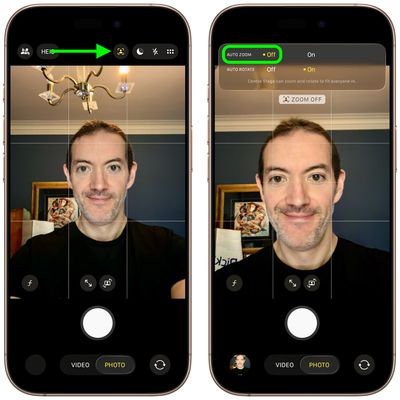
iphone 17 disable auto zoom

Center Stage works during FaceTime calls too, keeping your face centered, similar to how it functions on iPads and MacBooks. If you're interested to learn about dual capture video recording on iPhone 17, be sure to check out our dedicated how-to.

Related Roundups: iPhone 17, iPhone Air
Related Forum: iPhone

Top Rated Comments

cbaca51 Avatar
15 months ago
Seriously such a great feature for the front camera. That with the upgrade in MP, cameras are a really nice upgrade this year!
Score: 13 Votes (Like | Disagree)
15 months ago

Funny how the photo at the top shows the camera on the wrong side of the phone.
On the Air (which is the model of the photo), the camera is on the left side.
Score: 6 Votes (Like | Disagree)
Ntombi Avatar
15 months ago
Used it for the first time today with two friends and it was great. We take a selfie almost every time we get together, and usually, at least one of us is looking at the wrong side and needs a retake. This turned out so well, and we all looked good.

For reference, I’m a medium-brown Black woman, and one of my friends is a super duper pale white woman, and the other is in between. So getting our skin to all look good in one is already a big accomplishment. Add the portrait/landscape issue, and whew boy.

This camera is a big step up.
Score: 5 Votes (Like | Disagree)
jz0309 Avatar
15 months ago
Thanks for the article, haven’t had a chance yet to use the cameras on my 17PM much so will give this a try too
Score: 5 Votes (Like | Disagree)
15 months ago
Even more icons in the camera app. You need a manual if you don’t use the app every day.
Score: 4 Votes (Like | Disagree)
15 months ago

the auto rotate does not work on FaceTime. thanks Tim
FaceTime in iOS 26 has to be one of the worst “upgrades” in a while and it’s such a pain to use now, this doesn’t help it
Score: 4 Votes (Like | Disagree)

Popular Stories

iphone air thinness

iPhone Air 2 Could Be as Thin as an Unfolded iPhone Duo

Thursday October 8, 2026 4:21 am PDT by
Apple's iPhone Air 2 will be approximately 0.4mm thinner than the current model despite having a higher-capacity battery, claims the account "yeux1122" on the Korean Naver blog. Apple lists the original iPhone Air at 5.6mm thick, so a 0.4mm reduction would put its successor at approximately 5.2mm, around 7% thinner. Interestingly, that would match the thickness of the new iPhone Duo when...
Apple MacBook Pro with PROLED XDR Display family lineup feature

Apple Announces OLED MacBook Pro With Touch Display

Wednesday October 28, 2026 10:11 am PDT by
Apple today announced a new high-end MacBook Pro, which is available in 14-inch and 16-inch sizes. The new device has a PROLED XDR display that supports touch gestures, and a glowing rear Apple logo. Pricing on the MacBook Pro starts at $2,899 for the 14-inch model and $3,399 for the 16-inch model. Apple says the MacBook Pro has the "world's best display in a pro laptop." The PROLED...


iPhone Duo Display Cracking

Apple Alerts Stores to iPhone Duo's Display Cracking Issue

Friday October 30, 2026 3:20 pm PDT by
In a memo shared with Apple Stores and Apple Authorized Service Providers this week, and later obtained by MacRumors, Apple provided technicians with guidance on how to diagnose and address the iPhone Duo's inner display cracking issue. If a customer reports the issue, Apple advised technicians to inspect the iPhone Duo and repair or replace it in accordance with their standard procedures....
Latest Stories
Apple Watch Ultra 4 Hits All-Time Low Price With Amazon's $99 Discount
4 hours ago
Reminder: Apple's Big Discount on Beats 360 Ear Cushions Ends Today
4 hours ago
Here's a New Tour of Apple's HomeView Software
4 hours ago
Apple Reveals New iPad Mini's Battery Capacity
6 hours ago
Top Stories: Apple's Big MacBook Pro, iPad mini and iMac Updates
7 hours ago
'Pluribus' Season 2 Reportedly Starts Production Today
13 hours ago
iPhone 18 Pro Sales Surge in China, Offsetting Decline in U.S. and Japan
14 hours ago
HomeView Software 27.2: Wallpapers, Control Center, and More
21 hours ago
Apple Alerts Stores to iPhone Duo's Display Cracking Issue
22 hours ago
iOS 27.3 Will Enable These Apple Intelligence Features in China
22 hours ago
Apple Says iOS 27.3 Beta Coming Next Week
22 hours ago
Apple's Flash Storage Suppliers Are Finally 'Getting Their Revenge'
23 hours ago
14 New Things Your iPhone Can Do in iOS 27.2
1 day ago
iPhone Duo Review: One Week Later
1 day ago
Samsung Mocks iPhone Duo Display Cracks in New Ad Campaign
1 day ago
The MacRumors Show: OLED MacBook Pro, iPad Mini 8, and More
1 day ago
MacBook Pro With Touch Display: 15 More Details Revealed
1 day ago
Russia Places Apple on State Surveillance Registry
1 day ago
Halloween Weekend Brings Discounts on Apple Accessories and Pre-Orders
1 day ago
Apple Has Released More Than 25 New Products in the Past Two Months
1 day ago
Local Code Launches as Free, Private AI Assistant Tool for Mac
1 day ago
Apple Acquires Ascend.io
1 day ago
HomePod Mini 2 Launches Today: All the New Features
1 day ago
AirTag 2 4-Pack Drops to New Low Price of $69.99
1 day ago
Rian Johnson's iPhone Camera App Goes Viral
1 day ago
Where Did All the iPhone Duos Go? Mostly to Apple's Stores
1 day ago
Apple's Touchscreen MacBook Pro Could Ship 1.5M Units in 2027
1 day ago
New Apple TV 4K and iPad Mini: RAM Amounts Revealed
2 days ago
Apple Executive Comments on New iPad Mini Lacking 120Hz Display
2 days ago
Here's a Hands-On Look at HomePod Mini 2's New Two-Tone Colors
2 days ago

🔗 Related Apple News & Rumors

Stay updated with the latest Apple ecosystem news and verified rumors