iPhone 17: Using the New Dual Capture Video Feature - MacRumorsOpen MenuShow RoundupsShow Forums menuVisit ForumsOpen Sidebar
Skip to Content

iPhone 17: Using the New Dual Capture Video Feature

by

The iPhone 17 lineup brings a new video feature that lets you record from both the front and rear cameras simultaneously. Dual Capture creates picture-in-picture recordings that should be perfect for reaction videos, tutorials, or any scenario where you want to capture both yourself and the action in front of you. Here's what you need to know about the feature.
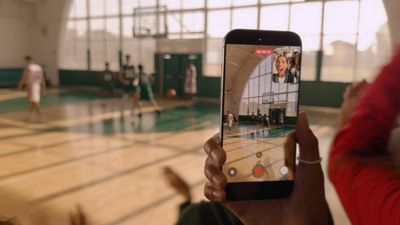
iphone 17 dual capture video
Dual Capture works across the iPhone 17 series, including the iPhone Air. Here's how to get up and running with the new feature.

iPhone 17: How to Enable Dual Capture Mode

  1. Open the Camera app on your iPhone.
  2. Tap Video at the bottom.
  3. Tap the icon made up of dots at the top right of the interface, or alternatively, tap again the selected video option in the carousel at the bottom of the interface.
  4. Select Dual Capture from the pop-up menu, then tap in the viewfinder.
  5. Tap the shutter to start recording via both front and rear cameras.
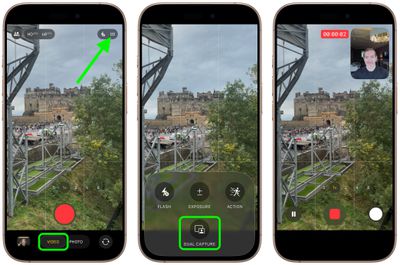
enable dual capture video iphone 17

Once you have used Dual Capture mode, for the rest of the app session the camera interface will show a handy new icon in the top-right corner, allowing you to turn it on and off without involving the pop-up menu.
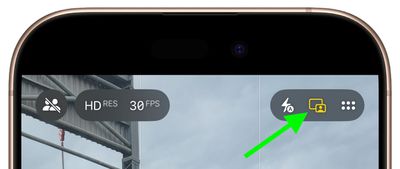
iphone 17 dual capture icon

What You Can Do While Recording

Once you start recording, you gain several useful controls. On iPhone 17 Pro and Pro Max models, you can switch between the 48MP main camera, 48MP ultrawide, and 48MP telephoto lenses for different perspectives without stopping your recording.

The smaller front camera window can also be moved around the screen by dragging it with your finger, which is handy if the preview window blocks something important in your shot. Bear in mind that any repositioning of the window gets saved in your final video, though.
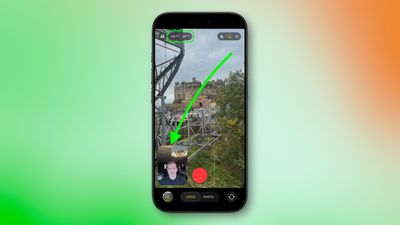
iphone 17 dual capture move camera window

Recording Quality and Limitations

Dual Capture records in either 1080p or 4K resolution at 24 or 30 fps. For maximum editing flexibility later, 4K at 30fps will likely deliver the best results.

The feature does come with some trade-offs. For one, you're locked into Apple's single layout design, where the rear camera takes up most of the frame while the front camera appears in a smaller window. Unlike Samsung's similar feature, you can't switch the feeds or choose a split-screen layout that shows both cameras equally.

Lastly, bear in mind that everything saves as one video file, not separate clips for each camera.

Related Roundups: iPhone 17, iPhone 17 Pro, iPhone Air
Related Forum: iPhone

Top Rated Comments

10 months ago
I'm not looking forward to more reaction videos
Score: 25 Votes (Like | Disagree)
mihighil Avatar
10 months ago

Understand & know this is new, but anyone know why it’s limited to the 17 series? Must be hardware requirements.
Use the rode capture app (usable on older models) its a arbitrary limitation on older models.
Score: 15 Votes (Like | Disagree)
10 months ago
Theres been apps doing this for years. I used to use DoubleTake when i was still doing Youtube. Hell of a good app. You could also record two seperate feeds though that and edit it how you like later on.
Score: 11 Votes (Like | Disagree)
Ralfi Avatar
10 months ago
This will result in very corny videos with non-genuine & staged reactions.

When the broadcasters script fans in the crowd to yell something when the camera pans to them, it’s fake, cringy & very off-putting.
Score: 7 Votes (Like | Disagree)
berrymetal Avatar
10 months ago
I wish the videos were non-destructive, in a way that you can reposition the selfie PiP later on when you edit the video (and resize it maybe). Perhaps that's something we will see in the future...
Score: 6 Votes (Like | Disagree)
mihighil Avatar
10 months ago
This was available through the Rode Capure app, great app and its free (no in app purchases)
Score: 6 Votes (Like | Disagree)

Popular Stories

apple intelligence black

iPhone 17's 8GB Limit Costs It These Two Siri AI Features in iOS 27

Wednesday June 10, 2026 2:19 am PDT by
Apple this week revealed what its most advanced on-device AI model does, and the feature list is shorter than the hardware requirements might suggest. In its Siri AI announcement during WWDC 2026, Apple confirmed that the model powers two things: more expressive Siri voices and a major accuracy gain for systemwide dictation. Both require 12GB of unified memory. Among current iPhones, that ...
New Siri Wave

The iPhone 17 Can't Do This With Siri. The iPhone 18 Will

Tuesday June 16, 2026 4:56 am PDT by
During WWDC 2026, Apple confirmed that its most powerful on-device AI model is currently only compatible with the latest iPhone Air, iPhone 17 Pro, and iPhone 17 Pro Max. The reason for the device limitation is that the AI model requires 12GB of RAM to run, and only the above iPhones have that amount. Unfortunately, the iPhone 17 misses out because it has 8GB of RAM. That means iPhone 17 ...
iPhone 17 Review Thumb 3

iPhone 17 Prices Could Go Up as Soon as This Month

Monday June 22, 2026 3:39 am PDT by
There is growing speculation that Apple may hike the prices of its iPhone 17 lineup as soon as this month, following CEO Tim Cook's recent comments about "unavoidable" price increases. Last week, Cook told The Wall Street Journal that Apple is no longer able to absorb the increased cost of memory and storage chips, both of which are in high demand from AI and neocloud companies as they...

🔗 Related Apple News & Rumors

Stay updated with the latest Apple ecosystem news and verified rumors