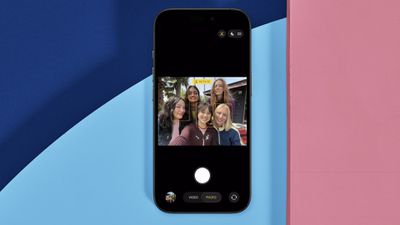
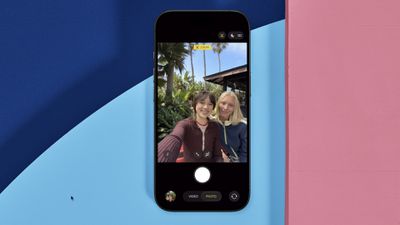
On all models in Apple's new iPhone 17 series as well as the iPhone Air, the new 18MP Center Stage front camera transforms mobile photography with its square sensor design and intelligent auto-adjustment features. Unlike traditional front cameras, the system automatically rotates and zooms to capture perfect selfie shots.

iphone 17 center stage camera
The square sensor also captures more image data than rectangular sensors, giving you unprecedented flexibility in framing and composition without sacrificing image quality.

Understanding Auto-Rotate and Auto-Zoom

Center Stage automatically switches between horizontal and vertical orientation when you're lining up a shot, meaning you don't need to physically rotate your iPhone. The camera also dynamically adjusts its field of view based on what's happening in front of it.

When you're taking a solo selfie, for example, Center Stage keeps the frame tight for a more personal feel. As friends join the shot, the view expands to include everyone without cropping anyone out.

Taking Photos with Center Stage
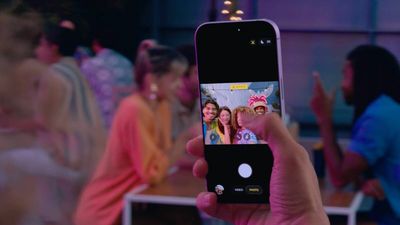
iphone 17 center stage camera shooting

  1. Open the Camera app on your iPhone.
  2. Tap the circular arrows icon at the bottom right to switch to the selfie camera.
  3. The Center Stage button (the icon of a person's profile within a frame) above the viewfinder should appear as yellow, indicating the feature is enabled.
  4. Line up your shot – Center Stage automatically adjusts orientation and zoom.
  5. Hit the shutter button to capture your photo or video.
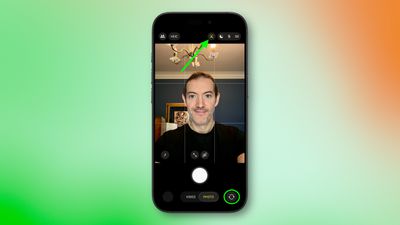
iphone 17 selfie center stage 1

Manual Camera Controls

You can override Center Stage's automatic functions when you need more control:

  • Manual rotation: Tap the orientation icon within the viewfinder to switch between portrait and landscape modes.
  • Manual zoom: Use the zoom icon (arrows pointing in/out) within the viewfinder to adjust the field of view yourself.
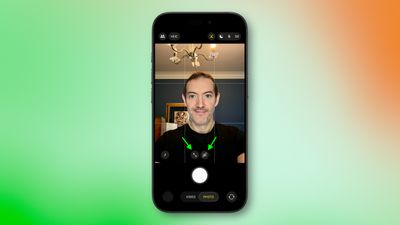
iphone 17 manual rotate zoom

How to Disable Auto-Rotate

iphone 17 center stage rotate
When the front camera is engaged, if Center Stage detects faces beside you or in the background and rotates to include them when you want a personal selfie:

  1. Tap the yellow Center Stage button.
  2. Tap Off next to "Auto Rotate."
  3. Take your photo normally – the camera will no longer auto-rotate. Alternatively, use the rotate orientation icon in the viewfinder to do so manually.
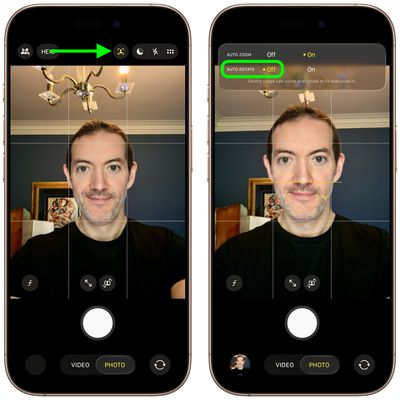
iphone 17 disable auto rotate

How to Disable Auto-Zoom

iphone 17 center stage auto zoom
When the front camera is engaged, if Center Stage's automatic zoom adjustments don't match your needs:

  1. Tap the yellow Center Stage button.
  2. Tap Off next to "Auto Zoom."
  3. Use the manual zoom button (with arrows pointing in/out) within the viewfinder to frame your shot exactly as desired.
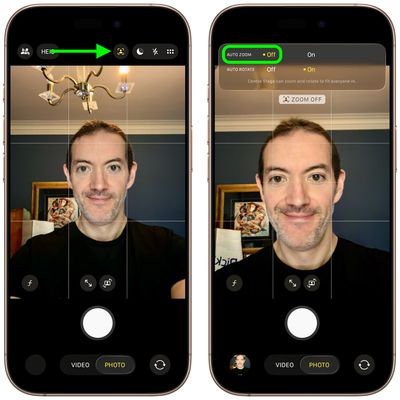
iphone 17 disable auto zoom

Center Stage works during FaceTime calls too, keeping your face centered, similar to how it functions on iPads and MacBooks. If you're interested to learn about dual capture video recording on iPhone 17, be sure to check out our dedicated how-to.


Related Roundups: iPhone 17, iPhone 17 Pro, iPhone Air
Related Forum: iPhone

Top Rated Comments

cbaca51 Avatar
19 weeks ago
Seriously such a great feature for the front camera. That with the upgrade in MP, cameras are a really nice upgrade this year!
Score: 13 Votes (Like | Disagree)
AlexESP Avatar
19 weeks ago

Funny how the photo at the top shows the camera on the wrong side of the phone.
On the Air (which is the model of the photo), the camera is on the left side.
Score: 6 Votes (Like | Disagree)
jz0309 Avatar
19 weeks ago
Thanks for the article, haven’t had a chance yet to use the cameras on my 17PM much so will give this a try too
Score: 5 Votes (Like | Disagree)
Ntombi Avatar
19 weeks ago
Used it for the first time today with two friends and it was great. We take a selfie almost every time we get together, and usually, at least one of us is looking at the wrong side and needs a retake. This turned out so well, and we all looked good.

For reference, I’m a medium-brown Black woman, and one of my friends is a super duper pale white woman, and the other is in between. So getting our skin to all look good in one is already a big accomplishment. Add the portrait/landscape issue, and whew boy.

This camera is a big step up.
Score: 5 Votes (Like | Disagree)
zachz Avatar
19 weeks ago

the auto rotate does not work on FaceTime. thanks Tim
FaceTime in iOS 26 has to be one of the worst “upgrades” in a while and it’s such a pain to use now, this doesn’t help it
Score: 4 Votes (Like | Disagree)
ifxf Avatar
19 weeks ago
Even more icons in the camera app. You need a manual if you don’t use the app every day.
Score: 4 Votes (Like | Disagree)

Popular Stories

Aston Martin CarPlay Ultra Screen

Apple's CarPlay Ultra to Expand to These Vehicle Brands Later This Year

Sunday February 1, 2026 10:08 am PST by
Last year, Apple launched CarPlay Ultra, the long-awaited next-generation version of its CarPlay software system for vehicles. Nearly nine months later, CarPlay Ultra is still limited to Aston Martin's latest luxury vehicles, but that should change fairly soon. In May 2025, Apple said many other vehicle brands planned to offer CarPlay Ultra, including Hyundai, Kia, and Genesis. In his Powe...
Apple Logo Black

Apple Just Made Its Second-Biggest Acquisition Ever After Beats

Thursday January 29, 2026 10:07 am PST by
Apple today confirmed to Reuters that it has acquired Q.ai, an Israeli startup that is working on artificial intelligence technology for audio. Apple paid close to $2 billion for Q.ai, according to sources cited by the Financial Times. That would make this Apple's second-biggest acquisition ever, after it paid $3 billion for the popular headphone and audio brand Beats in 2014. Q.ai has...
Apple Logo Black

Apple's Next Launch is 'Imminent'

Sunday February 1, 2026 12:31 pm PST by
The calendar has turned to February, and a new report indicates that Apple's next product launch is "imminent," in the form of new MacBook Pro models. "All signs point to an imminent launch of next-generation MacBook Pros that retain the current form factor but deliver faster chips," Bloomberg's Mark Gurman said on Sunday. "I'm told the new models — code-named J714 and J716 — are slated...
14 inch MacBook Pro Keyboard

Apple Changes How You Order a Mac

Saturday January 31, 2026 10:51 am PST by
Apple recently updated its online store with a new ordering process for Macs, including the MacBook Air, MacBook Pro, iMac, Mac mini, Mac Studio, and Mac Pro. There used to be a handful of standard configurations available for each Mac, but now you must configure a Mac entirely from scratch on a feature-by-feature basis. In other words, ordering a new Mac now works much like ordering an...
Apple MacBook Pro M4 hero

New MacBook Pros Reportedly Launching Alongside macOS 26.3

Sunday February 1, 2026 5:42 am PST by
Apple is planning to launch new MacBook Pro models with M5 Pro and M5 Max chips alongside macOS 26.3, according to Bloomberg's Mark Gurman. "Apple's faster MacBook Pros are planned for the macOS 26.3 release cycle," wrote Gurman, in his Power On newsletter today. "I'm told the new models — code-named J714 and J716 — are slated for the macOS 26.3 software cycle, which runs from...