

On the iPhone 17 series and iPhone Air, the new 18-megapixel Center Stage front camera now uses a square sensor, allowing you to take horizontal or vertical photos and videos without changing the orientation that you are holding your iPhone.

iphone 17 center stage camera
Because the sensor itself is square, your ‌iPhone‌ no longer locks you into one orientation. That means you can frame selfies, group shots, or video clips however you like and then instantly switch between portrait and landscape without physically rotating the device.

It's particularly useful when you want to capture moments quickly, hold the phone more comfortably, or keep the camera steady while recording. The following steps show you how it's done on ‌iPhone 17‌ models and ‌iPhone Air‌.

How to Rotate iPhone 17 Center Stage Camera

  1. Open the Camera app on your ‌iPhone‌.
  2. Tap the circular arrows icon at the bottom right to switch to the selfie camera.
  3. Tap Video or Photo at the bottom.
  4. Tap the orientation rotation icon inside the viewfinder to switch between portrait and landscape mode.
  5. Tap the zoom icon (two arrows) inside the viewfinder to zoom in or out as desired.
  6. Line up your shot and hit the shutter button to take a photo or start recording video.
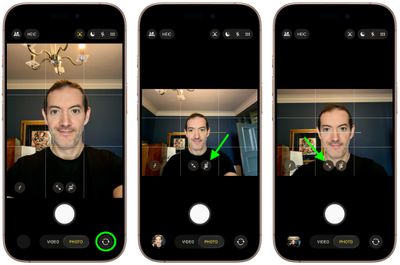
iphone 17 rotate zoom center stage manual

That's all there is to it. Note that manually zooming will disable Center Stage until you exit the Camera app and relaunch it. For more on how to control the new Center Stage features, including how to disable auto-rotate, check out this dedicated how-to.


Related Roundups: iPhone 17, iPhone 17 Pro, iPhone Air
Related Forum: iPhone

Popular Stories

Aston Martin CarPlay Ultra Screen

Apple's CarPlay Ultra to Expand to These Vehicle Brands Later This Year

Sunday February 1, 2026 10:08 am PST by
Last year, Apple launched CarPlay Ultra, the long-awaited next-generation version of its CarPlay software system for vehicles. Nearly nine months later, CarPlay Ultra is still limited to Aston Martin's latest luxury vehicles, but that should change fairly soon. In May 2025, Apple said many other vehicle brands planned to offer CarPlay Ultra, including Hyundai, Kia, and Genesis. In his Powe...
Apple Logo Black

Apple's Next Launch is 'Imminent'

Sunday February 1, 2026 12:31 pm PST by
The calendar has turned to February, and a new report indicates that Apple's next product launch is "imminent," in the form of new MacBook Pro models. "All signs point to an imminent launch of next-generation MacBook Pros that retain the current form factor but deliver faster chips," Bloomberg's Mark Gurman said on Sunday. "I'm told the new models — code-named J714 and J716 — are slated...
iOS 26

iOS 26.3 and iOS 26.4 Will Add These New Features to Your iPhone

Tuesday February 3, 2026 7:47 am PST by
We are still waiting for the iOS 26.3 Release Candidate to come out, so the first iOS 26.4 beta is likely still at least a week or two away. Following beta testing, iOS 26.4 will likely be released to the general public in March or April. Below, we have recapped known or rumored iOS 26.3 and iOS 26.4 features so far. iOS 26.3 iPhone to Android Transfer Tool iOS 26.3 makes it easier...
Apple MacBook Pro M4 hero

New MacBook Pros Reportedly Launching Alongside macOS 26.3

Sunday February 1, 2026 5:42 am PST by
Apple is planning to launch new MacBook Pro models with M5 Pro and M5 Max chips alongside macOS 26.3, according to Bloomberg's Mark Gurman. "Apple's faster MacBook Pros are planned for the macOS 26.3 release cycle," wrote Gurman, in his Power On newsletter today. "I'm told the new models — code-named J714 and J716 — are slated for the macOS 26.3 software cycle, which runs from...
iOS 26 Home Feature

Apple Gives Final Warning to Home App Users

Tuesday February 3, 2026 8:55 am PST by
In 2022, Apple introduced a new Apple Home architecture that is "more reliable and efficient," and the deadline to upgrade and avoid issues is fast approaching. In an email this week, Apple gave customers a final reminder to upgrade their Home app by February 10, 2026. Apple says users who do not upgrade may experience issues with accessories and automations, or lose access to their smart...














