

iPhone 16: How to Capture Spatial Photos and Video - MacRumorsOpen MenuShow RoundupsShow Forums menuVisit ForumsOpen Sidebar
Skip to Content

iPhone 16: How to Capture Spatial Photos and Video

by

If you have an iPhone 15 Pro or iPhone 16, you can shoot spatial photos and video for viewing in the Photos app on Apple's Vision Pro headset. Keep reading to learn how it's done.
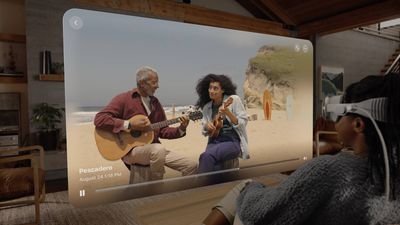
spatial video apple visioin pro
Apple's Vision Pro headset launched in February 2024 in the United States, and has since been released in several countries around the world. One of the many features of the device is its ability to display spatial photos and play back spatial videos captured on iPhone 15 Pro and ‌iPhone 16‌ models.

When played on an iPhone in the ‌Photos‌ app, spatial photos and videos (marked with a "spatial" label) appear as regular 2D photos and videos without any extra depth effect. But viewed on Apple Vision Pro, they take on a 3D depth that is far more lifelike, intimate, and immersive.

For best results when recording Spatial Video, the iPhone should be held stable in landscape orientation while capturing video. Video is recorded at 30 frames per second at 1080p, and one minute of video takes up 130MB of storage space.

Here's how to capture spatial photo and video on iPhone 15 Pro and later models:

  1. Open the Camera app on your iPhone.
  2. Swipe left to Spatial in the mode options below the viewfinder.
  3. Tap the camera/film camera toggle to switch between photo and video.
  4. Hold your phone in landscape orientation, then tap the shutter to take a photo or start recording video.
  5. If you're shooting video, tap the shutter again to stop.
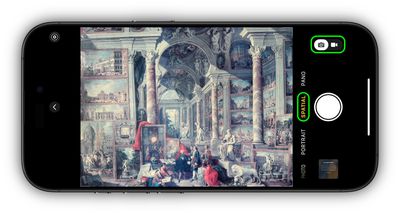
camera

Note that on the Vision Pro headset, Spatial Videos are not shown full screen by default. If you expand the video, Apple warns that the video "has excess motion" and "could cause discomfort if expanded."

Related Roundups: Apple Vision Pro, iPhone 16
Buyer's Guide: Vision Pro (Neutral)
Related Forums: Apple Vision Pro, iPhone

Popular Stories

General visionOS watchOS and tvOS Betas Feature Redux

Apple Releases Second watchOS 26.6, tvOS 26.6 and visionOS 26.6 Betas

Monday June 15, 2026 10:06 am PDT by
Apple today provided developers with the second betas of upcoming watchOS 26.6, tvOS 26.6, and visionOS 26.6 betas for testing purposes. The software comes three weeks after Apple seeded the first betas. The software updates are available through the Settings app on each device, and because these are developer betas, a free developer account is required. There's no word on what's in the...
Apple Glasses Triad Feature

Kuo: Apple's Vision Pro Successors Off the Table as Focus Shifts to Smart Glasses

Wednesday June 3, 2026 11:14 am PDT by
Incoming Apple CEO John Ternus signed off on a major revision of Apple's Vision Pro and smart glasses plans, consolidating Apple's work in the category. According to Apple analyst Ming-Chi Kuo, Ternus nixed plans for a second Vision Pro and a lighter Vision Air. Kuo says there are only two smart glasses products in development, including the AI smart glasses that Apple is creating to rival...
f 5d631a2d7714517b0b0137e38aadf744d175cb3e

Apple Releases First iOS 27, iPadOS 27, and macOS 27 Betas to Developers

Monday June 8, 2026 11:40 am PDT by
Following the WWDC 2026 keynote event, Apple has seeded the first betas of iOS 27, iPadOS 27, macOS 27, watchOS 27, tvOS 27, and visionOS 27 to developers for testing purposes. Registered developers can opt in to betas and download the software through the Settings app on each device. The software includes many of the new features that were shown off earlier today, though some of what...

🔗 Related Apple News & Rumors

Stay updated with the latest Apple ecosystem news and verified rumors









































