

iOS 17: How to Send Files and Photos With AirDrop Proximity Sharing - MacRumorsOpen MenuShow RoundupsShow Forums menuVisit ForumsOpen Sidebar
Skip to Content

iOS 17: How to Send Files and Photos With AirDrop Proximity Sharing

by

In iOS 17, Apple has made sharing files and media easier than ever, thanks to a cool new AirDrop proximity feature that does most of the work for you.
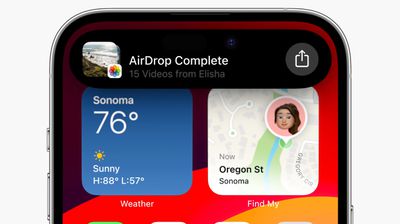
airdrop videos ios 17
In prior versions of iOS, transferring a file or photo between Apple devices involves opening the file in question, tapping the Share button, selecting AirDrop, then choosing the nearby device you want to send the file to.

With iOS 17, this procedure still exists for sharing between Apple devices, but if you're transferring between iPhones then you can cut out some of the typical sharing steps by using AirDrop's new proximity feature.

To initiate a transfer, select the photo or file that you want to share with someone. From there, simply bring your unlocked ‌iPhone‌ next to the other person's unlocked ‌iPhone, and your device will pop up a share interface without you having to tap on the Share Sheet.

Tap the Share button that pops up to send the photo or file to the person next to you, and it will be received on the other device automatically, with permission granted through their proximity.
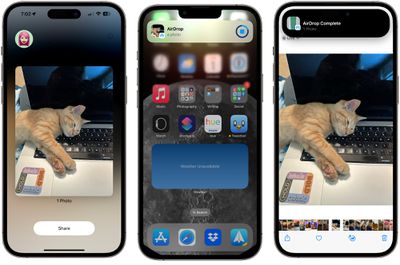
airdrop proximity sharing

Note that sharing files this way works even if AirDrop receiving is turned off or limited to contacts, so it offers a way to share a file with someone without having to change your overall AirDrop settings.

Enable or Disable AirDrop Proximity Sharing

We're used to AirDrop working with someone in the same room and involving a few manual steps, but the proximity sharing feature makes transfers between two devices virtually effortless. Of course, if you don't like the idea of proximity sharing, you can turn it off. Here's how it's done in iOS 17.

  1. Open the Settings app.
  2. Tap through to General -> AirDrop.
  3. Toggle the switch next to Bringing Devices Together on or off.
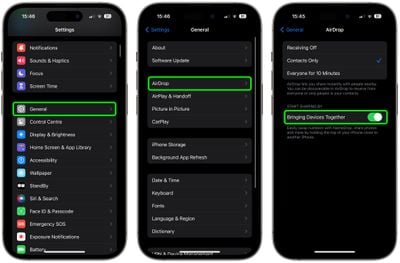
settings

That's all there is to it. Note that disabling this setting will also prevent the sharing of contacts via NameDrop. To learn about how contact sharing has also become easier than ever in iOS 17, check out our dedicated NameDrop how-to.


Tag: AirDrop

Top Rated Comments

vegetassj4 Avatar
39 months ago

Since so little interaction is required, I wonder how long it will be before someone devises a way to exploit this for nefarious purposes.

iOS RSR 17.1.1 (a)

addresses an issue that permits unintentional proximity sharing of all photos to everyone for 10 minutes
Score: 9 Votes (Like | Disagree)
macsplusmacs Avatar
39 months ago
I respect the amount of cats in this story immensely.
Score: 8 Votes (Like | Disagree)
cocky jeremy Avatar
39 months ago
You get a **** pic, you get a **** pic, everybody gets a **** pic!
Score: 5 Votes (Like | Disagree)
Cromulent Avatar
39 months ago
AirDrop is by far my favourite iOS feature. I use it all the time with family.

It would be cool if you could send an encrypted file over the internet to someone on your friends list so you could share anything from anywhere.
Score: 5 Votes (Like | Disagree)
39 months ago
Good article. Should be easier to transfer files and photos
Score: 3 Votes (Like | Disagree)
39 months ago

Yes. And Apple made fun of them for having to bring your devices close together to share :rolleyes:
Actually, as I recall, they were making fun of physically having to bump the two phones together to initiate a transfer. This new AirDrop is using NFC, so the phones only have to be brought within about 6 inches of one another to initiate the transfer. Still I prefer the "old" AirDrop. It seems like one has more control over that.
Score: 3 Votes (Like | Disagree)

Popular Stories

Apple Watch Ultra 2 Black Titanium

New Apple Watch Series 12 and Apple Watch Ultra 4 Features Revealed

Sunday August 30, 2026 7:54 am PDT by
Bloomberg's Mark Gurman today further outlined what to expect from the Apple Watch Series 12 and Apple Watch Ultra 4 set to be unveiled on September 9. While it was initially rumored that Touch ID may be coming to the Apple Watch this year, Gurman reiterated that he does not expect the Series 12 or Ultra 4 to have any major design changes compared to the current Series 11 and Ultra 3 models. ...
Mac mini vs Studio Feature Sans Text 1

Apple Caught Off Guard by AI Demand for Mac Mini and Mac Studio

Sunday August 30, 2026 8:52 am PDT by
Apple's unusually timed announcement of new Mac mini and Mac Studio models this week was driven by unexpectedly strong enterprise appetite for AI hardware, according to The Information. Apple normally releases new Mac models in the autumn, closer to October or November, making this week's announcement unusually early, falling just before the anticipated arrival of new iPhone models. The...
Apple Event Logo

Apple Unveiled Four New Products This Week

Wednesday August 26, 2026 5:54 pm PDT by
Apple on Tuesday unveiled a new Mac mini with M6 and M5 Pro chip options, a new Mac Studio with M5 Max and M5 Ultra chip options, a new version of the Polishing Cloth with a lower price, and updated Magic Keyboards for Macs. To learn more about these products, read our coverage below: Apple Announces New Mac Mini With M6 and M5 Pro Chips and More Apple Unveils New Mac Studio With M5 Max...

🔗 Related Apple News & Rumors

Stay updated with the latest Apple ecosystem news and verified rumors









































