iOS 18: Recording Audio With Transcripts in Notes - MacRumorsOpen MenuShow RoundupsShow Forums menuVisit ForumsOpen Sidebar
Skip to Content

iOS 18: Recording Audio With Transcripts in Notes

by

In iOS 18, Apple has made a significant enhancement to the Notes app, introducing a built-in audio recording feature that streamlines the process of capturing and transcribing voice notes. The new functionality is available on iPhone 12 and later models, and allows you to record audio directly within a note, eliminating the need to use separate apps or share files.
ios 18 notes app voice recording
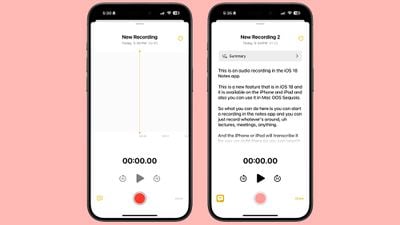
The new audio recording tool in Notes offers more than just simple voice capture. As users record, the app automatically generates a real-time transcript, making it easier to review and search through recorded content. This feature is particularly useful for students attending lectures, professionals in meetings, or anyone who needs to quickly capture and reference spoken information.

Record a Voice Note and Get a Transcript

To use the new audio recording feature in iOS 18's Notes app, simply follow these steps:

  1. Open the Notes app and create a new note or open an existing one.
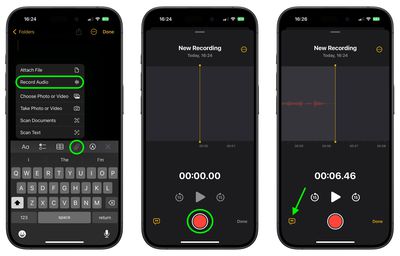
  2. Tap inside the note, then select the paperclip icon from the menu above the keyboard.
  3. Choose Record Audio from the pop-up menu.
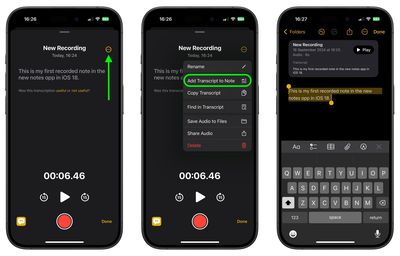
  4. Press the red record button to start recording, and tap it again to stop. To view the transcript, tap the quote bubble icon in the bottom-left corner.
    notes

  5. To add the full transcript to the note, tap the three-dot menu in the upper right corner.
  6. Select Add Transcript to Note from the dropdown menu.
    notes

That's all there is to it. While the audio recording feature offers new note-taking abilities, it's worth noting that it currently only supports English, but Apple will likely bring support for additional languages in a future update.

In an iOS 18 update coming later this year, Apple Intelligence will also be able to generate transcription summaries, offering a distilled, more easily digestible version of your voice recordings.


Top Rated Comments

Jxdawg Avatar
26 months ago
If only this was available when I was a student…

Also, proud of Apple for not slapping the AI label on it like so many other companies have been.
Score: 7 Votes (Like | Disagree)
26 months ago
An outstanding feature...one I'll be using a lot!
Score: 5 Votes (Like | Disagree)
26 months ago

If only this was available when I was a student…

Also, proud of Apple for not slapping the AI label on it like so many other companies have been.
I hear you...now everything from a data dashboard to a bayesian filter has now been rebranded as AI. Pretty soon my next cheeseburger will be AI-enhanced.

On another note, unless you are at least five years into retirement, we are all still students. The world is accelerating way, way too fast to not be studying (or practicing) something at all times. So I welcome any technology that helps us learn...including, almost ironically given my earlier statement...AI.


Score: 5 Votes (Like | Disagree)
kiranmk2 Avatar
26 months ago
Seems a bit complicated - too much clicking on strange icons or the three dots to find "hidden" options. I would have thought a better approach was to make this part of the Voice Recordings app and give a (clear) option to transcribe the recording and add this to the Notes app.
Score: 4 Votes (Like | Disagree)
26 months ago
I kind of wish the transcription text was actually transcribed onto the note itself (or at least be an option to do so) instead of being contained in the little voice module inside the note. A small annoyance but it would make navigating those much easier for me personally. For example, being able to use “Find in Note” directly from the note itself and not having to first click into the recording. Also, even if you don’t give the recording a title it doesn’t carry over to being the title of the actual note. Quite an annoying to have to title things twice.
Score: 3 Votes (Like | Disagree)
26 months ago
Isn't communicating without keeping a copy of the conversation the main idea of making a phone call?
Score: 3 Votes (Like | Disagree)

Popular Stories

Apple Watch Ultra 2 Black Titanium

New Apple Watch Series 12 and Apple Watch Ultra 4 Features Revealed

Sunday August 30, 2026 7:54 am PDT by
Bloomberg's Mark Gurman today further outlined what to expect from the Apple Watch Series 12 and Apple Watch Ultra 4 set to be unveiled on September 9. While it was initially rumored that Touch ID may be coming to the Apple Watch this year, Gurman reiterated that he does not expect the Series 12 or Ultra 4 to have any major design changes compared to the current Series 11 and Ultra 3 models. ...
Mac mini vs Studio Feature Sans Text 1

Apple Caught Off Guard by AI Demand for Mac Mini and Mac Studio

Sunday August 30, 2026 8:52 am PDT by
Apple's unusually timed announcement of new Mac mini and Mac Studio models this week was driven by unexpectedly strong enterprise appetite for AI hardware, according to The Information. Apple normally releases new Mac models in the autumn, closer to October or November, making this week's announcement unusually early, falling just before the anticipated arrival of new iPhone models. The...
Apple Event Logo

Apple Unveiled Four New Products This Week

Wednesday August 26, 2026 5:54 pm PDT by
Apple on Tuesday unveiled a new Mac mini with M6 and M5 Pro chip options, a new Mac Studio with M5 Max and M5 Ultra chip options, a new version of the Polishing Cloth with a lower price, and updated Magic Keyboards for Macs. To learn more about these products, read our coverage below: Apple Announces New Mac Mini With M6 and M5 Pro Chips and More Apple Unveils New Mac Studio With M5 Max...

🔗 Related Apple News & Rumors

Stay updated with the latest Apple ecosystem news and verified rumors