iOS 18: Add Multiple Pages to Control Center - MacRumorsOpen MenuShow RoundupsShow Forums menuVisit ForumsOpen Sidebar
Skip to Content

iOS 18: Add Multiple Pages to Control Center

by

iOS 18 overhauls the Control Center by letting you reorder, resize, and remove buttons, access a controls gallery, and add multiple screens, moving away from the single-screen layout of recent years. In this article we are going to show you how you can create dedicated pages for various control types, such as connectivity, HomeKit devices, and Accessibility options.
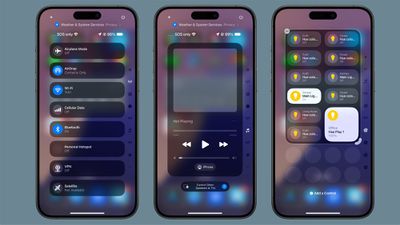
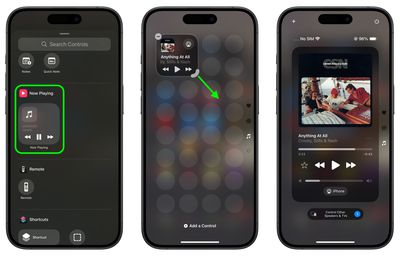
ios 18 control center pages
The new Control Center comes pre-configured with multiple default pages, which you can freely customize, add to, or remove. The system accommodates up to 15 separate screens, offering unprecedented flexibility when compared to previous versions of iOS.

Navigation between these pages is easy. You can swipe up and down through Control Center, tap small icons on the right side of the display, or hold and scrub through these icons for quick access. The following steps explain how to add additional pages to your Control Center.

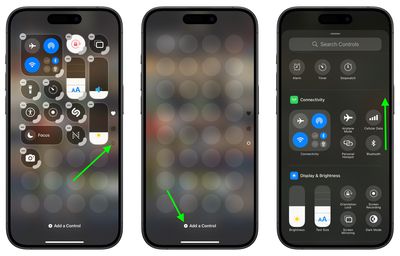
  1. Swipe down from the top-right corner of the screen to launch Control Center.
  2. Tap the circle icon at the bottom of the icon list, which indicates a new blank page.
  3. Tap Add a Control to open the Controls Gallery.
  4. Use the search field at the top, or browse the controls with a finger scroll to find the control that you want to include on the page, then tap it.
    control center

  5. Using the corner anchor, drag with your finger to expand the control if you wish.
  6. When finished, tap a space on the page to exit editing mode.
    control center

Control Center intelligently assigns icons to each page based on its content. When controls exceed the available space on a page, or if a resized control becomes too large, Control Center automatically creates a new page and relocates the excess controls. Bear in mind that the option to create a new page only appears when an existing page is approximately half full, ensuring adequate spacing between icons and maintaining a clean, organized layout.

iOS 18 and iPadOS 18 are currently in beta and expected to go on general release around mid-September.


Top Rated Comments

27 months ago
Reorganizing Control Center is a complete disaster. It has a fixed grid...so WHY does it have to automatically rearrange EVERYTHING on the page when I try to move a control from 1 spot to another? It's like having a rubix cube mini game in the way.

Score: 10 Votes (Like | Disagree)
Radin.Y Avatar
27 months ago
There is no constancy in design language here. there are way too many different designs. And the team that worked on this was not in communication with the rest of iOS teams, so the UI is so fragmented. This screen is so ugly!!
And with ever-growing size of displays, it is getting more and more difficult to reach the top corner to access the Control Center.

Score: 6 Votes (Like | Disagree)
miamialley Avatar
27 months ago
I took away the extra pages, only to leave the one page of shortcuts.

Score: 5 Votes (Like | Disagree)
27 months ago
iOS is becoming as complex as Windows 7.
Score: 5 Votes (Like | Disagree)
27 months ago
Would be more useful if Control Center were most easily accessed, rather than having to stretch all the way up to reach for the tiny corner.
Score: 4 Votes (Like | Disagree)
Kylo83 Avatar
27 months ago
To much it should just be one place and swipe from the bottom, it’s to complicated and over done now
Score: 4 Votes (Like | Disagree)

Popular Stories

iOS 27 Next to iPhone

Here's When iOS 27 Rolls Out Today in Every Time Zone [Update: It's Out]

Sunday September 13, 2026 3:00 am PDT by
Update 10:04 a.m.: iOS 27 is rolling out now, though it may take a bit for all users to see it, so keep checking! Apple is about to release iOS 27, which will finally deliver more advanced Siri AI capabilities as well as a variety of other refinements, improvements, and new features to iPhones. It's Apple's biggest software update of the year, and Apple announced at Wednesday's iPhone event...
iOS 27 Icon iPhone

iOS 27 Available Now With These 8 New Features

Monday September 14, 2026 9:00 am PDT by
Update — 10 a.m. Pacific Time: Apple has released iOS 27. During its iPhone 18 Pro and iPhone Duo event last week, Apple announced that iOS 27 will be released widely on Monday, September 14. iOS 27 should be available around 10 a.m. Pacific Time / 1 p.m. Eastern Time today via the Settings app, under General → Software Update. Below, we have highlighted eight new features and...
Apple iCloud Plus expansion hero

iCloud+ Now Includes Apple TV, Apple Arcade, and Curated Apple Music Stations in Over 100 Countries

Tuesday September 15, 2026 1:43 am PDT by
Apple today announced a new subscription initiative that turns paid iCloud+ subscriptions into a broader services bundle in more than 100 countries. In select countries, Apple says every paid iCloud+ plan, including the cheapest 50GB tier, now includes Apple TV and Apple Arcade "at no additional cost," while family sharing extends the storage, TV and Arcade access to up to five people....

🔗 Related Apple News & Rumors

Stay updated with the latest Apple ecosystem news and verified rumors