Apple's native Camera app has plenty of tools for helping you get the right shot, but some are more hidden than others. The camera level is the perfect example of a really handy tool that many users don't even know exists, mainly because it's part of a feature that's turned off by default.
If you tend to take pictures of things when standing directly over your subject, like a meal on a table or an ornament on the ground, then you'll want to use the camera level, as it helps you capture a balanced shot without having to use a tripod arm or mount. It's also useful for taking a shot of something directly above you, like an object on the ceiling or in the sky.
Here's how to enable and use it on iOS 11 and later.
How to Enable the Camera Level on iPhone and iPad
The camera level tool used to be part of the Grid overlay, but Apple has separated out the function in recent versions of iOS, and it now has its own switch.
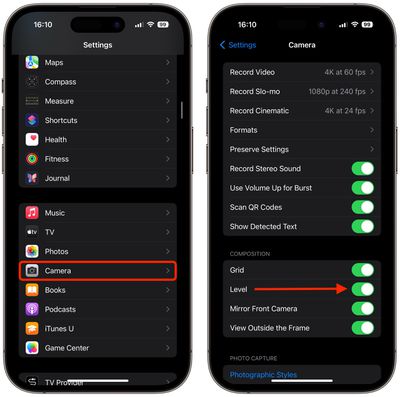
Open the Settings app on your iOS device.
Scroll down the list and tap Camera.
In the "Composition" section, toggle on the switch next to Level.
How to Use the Camera Level on iPhone and iPad
Open the Camera app on your iOS device.
Set the capture mode to Photo, Portrait, Square, or Time Lapse, using the sliding menu above the shutter button.
Point the camera straight down above your subject (or straight up if the subject/scene you want to capture is above you).
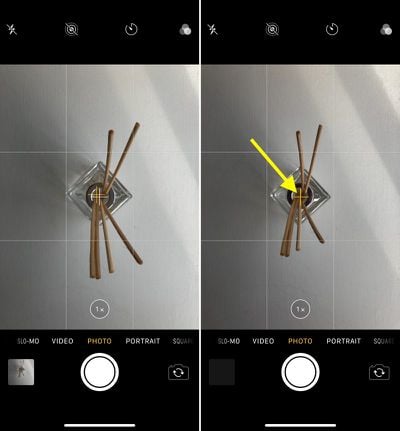
Line up the floating crosshair with the fixed crosshair in the center of the screen by adjusting the angle of your phone's camera. The crosshairs will both glow yellow when in perfect alignment.
Tap the shutter button to capture the shot.
The aligned crosshairs turn yellow (right), indicating the lens is parallel with the ground.
The level tool also comes in handy when scanning documents on a desk with your phone's camera, but iOS now offers a dedicated scanning feature in the Notes app, so you'll probably want to use that instead.
It’s only when you’re pointing the camera straight down
Well, that's..... useful for taking downward pictures... Would have loved the level to be available in regular shots so I can level the camera to keep the horizon level in my landscape shots.
This really highlights how poorly designed some of the Apple apps are that you have to leave the app and dig into a submenu of the completely seperate settings app to toggle features like this.
It’s mad that you also have to go to this page to change the camera recording quality.
Edit: I posted before reading others’ comments, it does work, but it doesn’t make much sense if it will only work facing down. How often do people actually take photos in that manner?
Friday October 30, 2026 3:20 pm PDT by Joe Rossignol
In a memo shared with Apple Stores and Apple Authorized Service Providers this week, and later obtained by MacRumors, Apple provided technicians with guidance on how to diagnose and address the iPhone Duo's inner display cracking issue.
If a customer reports the issue, Apple advised technicians to inspect the iPhone Duo and repair or replace it in accordance with their standard procedures....
Thursday October 29, 2026 1:47 pm PDT by Joe Rossignol
While the new iPad mini has an OLED display, the device does not support ProMotion, meaning the display's refresh rate is limited to 60Hz instead of 120Hz.
ProMotion support would have allowed for the iPad mini's refresh rate to automatically adjust from 10Hz to 120Hz depending on the content being displayed, but evidently Apple has kept the feature exclusive to the iPad Pro among iPad...
Thursday October 29, 2026 11:52 am PDT by Joe Rossignol
In the U.S. and most other countries, Apple's website shows the new iPad mini being held by pinched fingers, but this is not the case in South Korea.
The new iPad mini shown with pinched fingers on Apple's website in the U.S.
On its South Korean website, Apple simply shows an image of the iPad mini on its own.
The new iPad mini shown without pinched fingers on Apple's website in South Korea ...




















































Top Rated Comments
It’s mad that you also have to go to this page to change the camera recording quality.