Play Ambient Background Sounds on iPhone to Stay Focused - MacRumorsOpen MenuShow RoundupsShow Forums menuVisit ForumsOpen Sidebar
Skip to Content

Play Ambient Background Sounds on iPhone to Stay Focused

by

On iPhone and iPad, one of several accessibility features that Apple includes is Background Sounds. The sounds are designed to help you stay focused, stay calm, and help you minimize distractions while you are busy with something.
Background Sounds Water Feature
The Background Sounds on offer include balanced, bright, and dark noise, as well as natural sounds like ocean, rain, and stream. All of the sounds can be set to play in the background to mask unwanted environmental or external noise, and the sounds mix into or duck under other audio and system sounds.

Enabling Background Sounds on iPhone and iPad

The following steps explain how to enable Background Sounds on iPhones and iPads running iOS 15/iPadOS 15 and later.

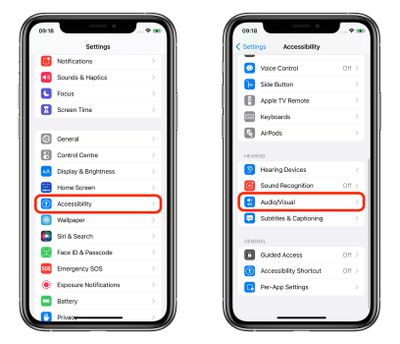
  1. Launch the Settings app on your iPhone or ‌iPad‌.
  2. Tap Accessibility.
  3. Under "Hearing," tap Audio/Visual.
    settings

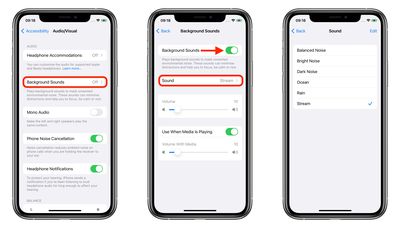
  4. Tap Background Sounds.
  5. Tap the switch to turn on Background Sounds.
  6. Tap Sound to choose a sound effect.
  7. Choose from Balanced Noise, Bright Noise, Dark Noise, Ocean, Rain, and Stream.
    settings

Your device will need to download individual sound effects when you play them for the first time, so make sure you have an internet connection, but after that you can play the background sound whether or not you're online.

Control Center Access

Once you have downloaded the background sounds, you can get fast access them from the Control Center. To do this, you need to have the Hearing item added to Control Center (go to Settings -> Control Center and add Hearing to the included list), then follow these steps.

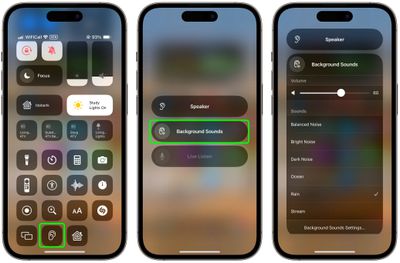
  1. Open Control Center by dragging down diagonally from the top-right of your device's screen.
  2. Tap the Hearing button, then choose Background Sounds.
  3. Tap the Background Sounds button to start playing.
  4. Tap the name of the current sound to view other sounds, then tap a sound name to listen to a preview. After you choose a sound, tap Background Sounds to go back.
  5. Tap the background to go back to Control Center.
control center

Background sounds are also available on Macs running macOS Ventura or later. Check out our dedicated how-to article for all the details.


Top Rated Comments

67 months ago
It’s actually much simpler to access if you add the ‘Hearing’ shortcut to Control Center. From there, you can access it from within any app.

Attachment Image
Score: 20 Votes (Like | Disagree)
67 months ago
I'm pretty sure it's under Accessibility for a good reason.


I don’t see the point in it
Then you can count yourself lucky. Not everybody can say of themselves that they do not need the Accessibility settings. To be honest, I find your comment a bit tone deaf.


Score: 17 Votes (Like | Disagree)
67 months ago


In iOS 15 and iPadOS 15, one of several new accessibility features that Apple has introduced is Background Sounds, which is designed to minimize distractions and help you stay focused, stay calm, and minimize distractions with the help of your iPhone or iPad.
You're definitely going to need this feature when you see the pricing for the new iPhones in September.
Score: 14 Votes (Like | Disagree)
iDento Avatar
67 months ago
I like this, but I don’t see as an accessibility feature. Dark noise helps me sleep.
Score: 12 Votes (Like | Disagree)
67 months ago

I like this, but I don’t see as an accessibility feature. Dark noise helps me sleep.
filing under Accessibility is odd
Score: 9 Votes (Like | Disagree)
Apple_Robert Avatar
67 months ago
MR is one big daily distraction. :P
Score: 9 Votes (Like | Disagree)

Popular Stories

Apple Event Logo

Apple Working on All-New Operating System

Wednesday July 29, 2026 11:39 am PDT by
Apple is developing an all-new operating system that is essentially a mix of tvOS, watchOS, and iOS, according to Bloomberg's Mark Gurman. In a report this week, he said the operating system will feature a grid of icons, widgets, and apps, along with customizable clock faces. The new software platform is intended for Apple's long-rumored smart home hub. With built-in facial recognition,...
imac video apple feature

Apple Made Its Second-Biggest Acquisition Ever This Year

Wednesday July 29, 2026 12:03 pm PDT by
Apple this year acquired Israeli startup Q.ai for close to $2 billion, according to the Financial Times. That would make this Apple's second-biggest acquisition ever, after it paid $3 billion for the popular headphone maker Beats in 2014. This is also the largest known Apple acquisition since the company purchased Intel's smartphone modem business and patents for $1 billion in 2019. Q.ai...
Dynamic Island iPhone 18 Pro Feature

iPhone 18 Pro: Twelve Changes Coming to Apple's Next Flagship

Thursday July 30, 2026 3:43 am PDT by
We're less than two months out from the launch of Apple's premium next-generation smartphone lineup, and while we're not expecting a dramatic change in terms of functionality, there are still several enhancements rumored to be coming to the iPhone 18 Pro and iPhone 18 Pro Max. One thing worth noting is that Apple is reportedly planning a major change to its iPhone release cycle this year,...

🔗 Related Apple News & Rumors

Stay updated with the latest Apple ecosystem news and verified rumors