

How to Install the macOS Sequoia Public Beta - MacRumorsOpen MenuShow RoundupsShow Forums menuVisit ForumsOpen Sidebar
Skip to Content

How to Install the macOS Sequoia Public Beta

by

Apple has made a macOS 15 Sequoia beta available for its public beta testing group, letting public beta testers try out the software before it launches this fall. Keep reading to learn whether you should install it on your Mac, and if so, how to go about it.
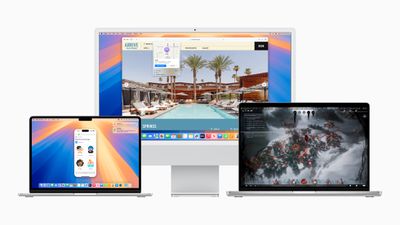
Apple WWDC24 macOS Sequoia hero 240610
Signing up to get the macOS Sequoia beta is simple, and can be done by enrolling a Mac in Apple's free Apple Beta Software Program. The steps you need to complete to install the software on your device are provided towards the end of this article, but before you jump ahead, here are a few things worth considering.

Should I Install macOS Sequoia Public Beta?

Before downloading the update, it's worth noting that Apple does not recommend installing the macOS Sequoia Beta on your main Mac, so if you have a secondary Mac that has no important data on it, use that. This is beta software, which means there are often bugs and issues that pop up that can prevent software from working properly or cause other problems.

With that caveat in mind, the steps in the remainder of this article show you how to get the macOS 15 beta on your Mac. First though, check that you have a compatible Mac.

Will macOS Sequoia run on My Mac?

macOS 15 Sequoia works with the same Macs as macOS 14 Sonoma other than the 2018 and 2019 MacBook Air. They include:

  • MacBook Air (2020 and later)
  • MacBook Pro (2018 and later)
  • iMac (2019 and later)
  • Mac Mini (2018 and later)
  • iMac Pro (2017 and later)
  • Mac Pro (2019 and later)
  • Mac Studio (2022 and later)

You can check your Mac's model by clicking the Apple in the menu bar and choosing About This Mac.

Don't Forget to Back Up Your Mac

Be sure to back up your Mac using Time Machine before installing the software using the method, otherwise you won't be able to revert back to the previous version of macOS if things go wrong.

How to Download macOS Sequoia Public Beta
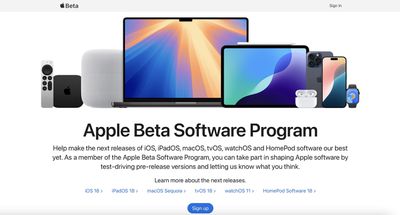
apple beta software program

  1. On your Mac, open up Safari and navigate to the Apple Beta Software Program website.
  2. Tap the Sign up button and enter your Apple ID credentials, or sign in with your Apple ID if you've signed up to beta test a previous update.
  3. Agree to the Apple Beta Software Program terms and conditions if required.
  4. After signing in, you'll see a main screen that's a Guide for Public Betas. Click on macOS.
  5. Read through Apple's instructions carefully, and then using the link in the "Get Started" section, select enroll your Mac.
  6. Make sure to make a backup of your current version of macOS using Time Machine by following Apple's instructions. This will allow you to downgrade back to your earlier version of macOS if necessary and is crucial if you don't enjoy the macOS Sequoia testing experience.
  7. If your Mac is running macOS Ventura 13.4 or later, go to System Settings -> General -> Software Update and click the Info button next to "Beta updates." Then choose the macOS beta you'd like to install. If your Mac is running macOS Ventura 13.3 or earlier, download Apple's macOS Beta Access Utility and run the installer. Then follow the onscreen instructions to complete installation. Note that your Mac must be signed in with the same Apple ID you used to enroll in the Apple Beta Software Program.

Installation of the macOS beta is manually chosen in System Settings -> General -> Software Update. If a newly released beta is not available when you check, you will receive a notification when it is available to download.

macOS Sequoia Features

macOS Sequoia's standout feature is iPhone Mirroring, enabling you to control your iPhone from your Mac using your keyboard and mouse. This includes viewing notifications and using iPhone apps even when the device is tucked away and locked. Later this year, you'll also be able to drag and drop apps between your Mac and iPhone.
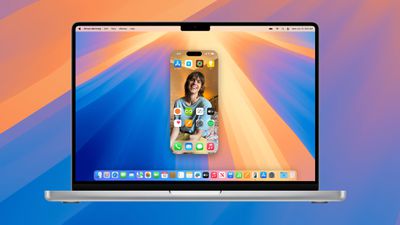
macos sequoia iphone mirroring
Window tiling has been enhanced for easier management of multiple windows. Safari now offers webpage summaries and highlights, while the Messages app supports message scheduling and Tapback reactions with any emoji. A new Passwords app simplifies managing passwords, logins, and passkeys. The Photos app has a redesigned interface, and the Notes app now includes audio transcription and summarization, along with automatic equation solving.

macOS Sequoia incorporates all new Apple Intelligence features coming to iOS 18, providing various quality of life improvements. These include writing tools for proofreading and polishing your text across apps, the Image Playground for creating unique images, and Genmoji for designing custom emojis. The Photos app features a Clean Up tool for removing unwanted images, and Siri has improved AI for better language understanding and contextual relevance, even consulting ChatGPT for complex queries.

Additional features are also coming to macOS Sequoia. More details are available in our dedicated roundup.


Related Forum: macOS Sequoia

Top Rated Comments

29 months ago

Hm. Interesting that a 2018 MacBook Pro can handle it but a 2018 iMac cannot. Seems like given iMacs overall horsepower advantage that should be the other way around.

Looking at MacTracker, I don't see a 2018 iMac. There was one release in 2017, and then the next one was 2019.

But how much base RAM did it have? I would assume 8GB but in 2017 wouldn't put it past Apple to still be shipping with 4GB by default.

Apple won't say it because it makes them look bad for being downright stingy with RAM, but 8GB is the bare minimum. And they also probably think we should be very grateful they even remember any Intel Macs exist at all.
Score: 3 Votes (Like | Disagree)
midkay Avatar
29 months ago

Only real reason to install the beta is for iPhone mirroring, so unless you also have a spare iPhone, not much point.

For me at least. I can't think of anything else exciting.
The new window snapping/tiling features! I keep wishing I had them on a near daily basis. Public beta is tempting.
Score: 2 Votes (Like | Disagree)
29 months ago
Good guide. But staying away from betas. Will wait till the release in September/October
Score: 1 Votes (Like | Disagree)
ThunderSkunk Avatar
29 months ago
Yeah or that security updates to a web browser are only available as a whole operating system update. & by extension, after 5 or 6 years they then prohibit you from any further updates, and under threat of leaving you exposed, recommend you chuck that $4000 computer and finally solve it by buying another one.
Score: 1 Votes (Like | Disagree)
iHorseHead Avatar
29 months ago

Hm. Interesting that a 2018 MacBook Pro can handle it but a 2018 iMac cannot. Seems like given iMacs overall horsepower advantage that should be the other way around.
Interesting that macOS Sierra supported MacBooks from 2009 and didn't support MacBook Pros from 2009.
iMac (Late 2009 or later)
MacBook (Late 2009 or later)
MacBook Air (Late 2010 or later)
MacBook Pro (Mid 2010 or later)
Mac Mini (Mid 2010 or later)
Mac Pro (Mid 2010 or later)

Interesting that OpenCoreLegacy is able to support more Macs and yet Apple isn't. Interesting that dosdude1 is able to upgrade the storage on Mac Studio, yet Apple isn't. Very interesting. It's like Apple has done that before several times and just want you to buy a new Mac…Interesting.
Score: 1 Votes (Like | Disagree)
29 months ago

The new window snapping/tiling features! I keep wishing I had them on a near daily basis. Public beta is tempting.
I'll wait for the RC. Every year I tell myself I'll wait until .1, but I really want that screen mirroring.

I'm tempted to do a fresh install on my Mac considering how much is now built-in that I was using third party applications for.
Score: 1 Votes (Like | Disagree)

Popular Stories

Home Hub Command Center with Dome Base Feature

Apple Smart Home Hub to Feature iMac G4-Style Design

Wednesday September 30, 2026 4:36 am PDT by
Apple's long-rumored smart home hub will have an iMac G4-style design and a host of unique features, Bloomberg's Mark Gurman reports. The smart home hub is said to feature a square 6-inch display, with variants that can be placed on a countertop or mounted on a wall. It features a single FaceTime camera on the front, with microphones and speakers in its connected base. Gurman described the...
HomePod minis on gradient feature 1 1

Three New Apple Smart Home Products Coming on October 13

Wednesday September 30, 2026 4:04 am PDT by
Apple plans to introduce a series of new smart home products on Tuesday, October 13, according to Bloomberg's Mark Gurman. Apple reportedly plans to debut its long-awaited smart home hub device, a new HomePod mini, and a new Apple TV on the date. The new HomePod mini and Apple TV are set to retain their existing designs, but tout faster chips to support Siri AI. The new HomePod mini will...
Apple TV Sans Remote Feature

New Apple TV 4K Leaked

Friday September 25, 2026 8:16 am PDT by
MacRumors contributor Aaron Perris has uncovered an image file from Apple for an unreleased Apple TV 4K, suggesting that a new model will finally be released soon. The image is specifically for an "Apple TV 4K (4th generation)" model. Apple TV 4K (4th generation) image (on a gradient) The image reveals that the Apple TV will have the same external design as the current model, with all of its...
Latest Stories
Apple Stores Receive 'Do Not Open' Boxes Ahead of Smart Home Products Launch
8 minutes ago
iPhone 18 Pro Sales Jump in China Ahead of iPhone Duo Launch
30 minutes ago
Apple TV Still Down for Some Users Following Apple Services Outage
1 hour ago
PSA: Apple Mail on Mac May Stop Syncing Microsoft 365 Accounts Today
2 hours ago
Apple's Smart Home Hub: Everything We Know So Far
12 hours ago
Apple's Home Hub Borrows From the iPhone Duo's StandBy Mode
13 hours ago
Apple Invites App Updated With Three New Features
17 hours ago
Apple Event on October 13?
18 hours ago
Apple Watch SE 3 vs. Series 12 Buyer's Guide: Which Should You Buy?
20 hours ago
iPad Mini 8 to Offer These 10 New Features
20 hours ago
DoorDash Unveils AI Food Ordering Through Apple's Messages App
22 hours ago
Amazon Takes Up to $150 Off Select M5 MacBook Air Models
22 hours ago
Apple Still Plans to Release a New Full-Sized HomePod
23 hours ago
Apple Working to Expand HomeKit
1 day ago
Apple Smart Home Hub to Feature iMac G4-Style Design
1 day ago
Three New Apple Smart Home Products Coming on October 13
1 day ago
Apple Pay Now Available in India With Axis Bank Cards
2 days ago
OpenAI Launches Always-On 'Dots' Agents to Rival Meta's Muse
2 days ago
AirPods 5 Teardown: Batteries Removable, Case Still Tough
2 days ago
iPhone 18 Pro Owners Complain of Speaker Crackling or Popping
2 days ago
You Can 'Get Ready' for iPhone Duo Pre-Orders on October 12
2 days ago
Apple Pay Reportedly Launching in India Today
2 days ago
Apple Releases New AirPods Beta Firmware
2 days ago
Apple Shares New Guide for Using iOS 27 Parental Controls
2 days ago
Apple Creator Studio and Final Cut Camera Get New Features
2 days ago
Apple Explains Why It Removed ICE Tracking Apps Last Year
2 days ago
Amazon Expands $779.99 Apple Watch Ultra 4 Deal to More Models
2 days ago
Switch Siri AI for ChatGPT on Your Mac
2 days ago
Apple Says Emergency SOS via Satellite Now Available in Norway
2 days ago
AppleCare Guide: Is it Worth Paying For?
2 days ago

🔗 Related Apple News & Rumors

Stay updated with the latest Apple ecosystem news and verified rumors











































