How to Install the macOS Mojave Public Beta - MacRumorsOpen MenuShow RoundupsShow Forums menuVisit ForumsOpen Sidebar
Skip to Content

How to Install the macOS Mojave Public Beta

by

Apple has released the first public beta of macOS Mojave, the next major version of its Mac operating system due to launch in the fall. The availability of the public beta means Mac users don't need to be part of the Apple Developer Program to be able to download and test the software. This article shows you how it's done.
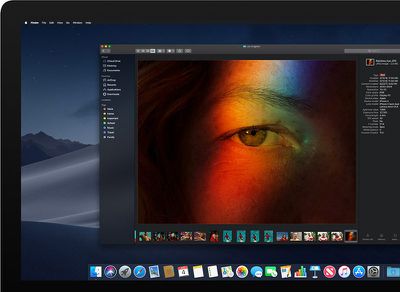
macosmojavedarkmode
Before continuing, a word of warning: We don't recommend installing the macOS Mojave Public Beta on your main Mac. The stability of beta software cannot be guaranteed, as it often contains bugs and issues that have yet to be ironed out, so you're better off using a test machine to avoid any potential data loss.

macOS Mojave is a major update that introduces a range of new features like a Dark Mode, Desktop and Finder improvements, new apps, and a revamped Mac App Store, but not every Mac that can run macOS High Sierra will run macOS Mojave. The full list of compatible Mac models is as follows:

  • MacBook (Early 2015 or newer)
  • MacBook Air (Mid 2012 or newer)
  • MacBook Pro (Mid 2012 or newer)
  • Mac mini (Late 2012 or newer)
  • iMac (Late 2012 or newer)
  • iMac Pro (2017)
  • Mac Pro (Late 2013, plus mid 2010 and mid 2012 models with recommended Metal-capable GPU)

Bear in mind that if you decide you want to revert back to your previous setup after testing the Mojave beta, you will need to erase the beta partition and perform a new macOS High Sierra installation.

Enroll in the Apple Beta Software Program

To install the macOS Mojave public beta, you need to enroll your Mac in the free Apple Beta Software Program.

  1. Visit the Apple Beta Software Program website in a browser on your Mac.

  2. Click the Sign up button, or sign in if you are already a member.

  3. Enter your Apple ID credentials and click the Sign in button, and input your two-factor authentication code if requested.

  4. Agree to the Apple Beta Software Program terms and conditions if necessary.

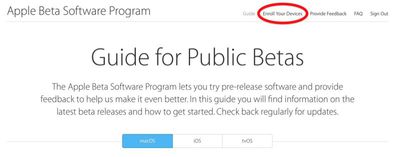
  5. On the Guide for Public Betas screen, click Enroll Your Devices above the top line. Alternatively, with the Mac tab selected, scroll down to the Get Started section and click enroll your device. moajve beta enroll your devices

Download the macOS Mojave Public Beta

After enrolling in the Apple Beta Software Program, you need to grab the profile installer and run it on your Mac. Here's how:

  1. In the same Enroll Your Devices section on the beta site's Mac tab, click the profile button under where it says Download macOS Mojave public beta access utility, and wait for the file to download.

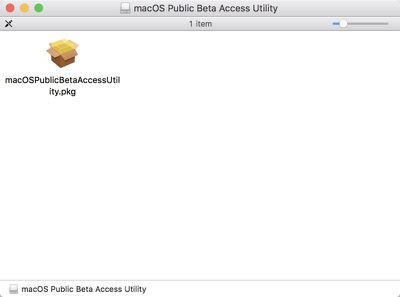
  2. Open the downloaded file in your Downloads window and double-click the package to run the installer. macosmojavepublicbetapackage

  3. When the installer has completed the download, the Mac App Store should open automatically showing the macOS Mojave screen. Click Download to download the public beta software. When the download is complete, your Mac should restart automatically.
Install the macOS Mojave Public Beta

If the macOS Mojave installer doesn't automatically open upon restart, launch it from your Applications folder using the Finder.

  1. Click Continue at the bottom of the installer.

  2. A dropdown prompt may appear advising you to back up your Mac. Assuming you've already backed up, click Continue. If not, click Cancel and do that now.

  3. Click Continue at the bottom once you've finished backing up, or if you already performed a backup.

  4. Click Agree to accept the terms and conditions and then click Agree again to confirm.

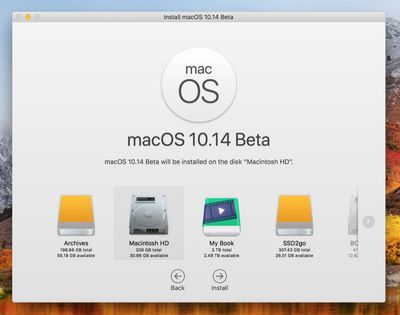
  5. Select the drive on which you want to install the public beta.
    mojave beta install screen 1

  6. Click Install, enter your administrator password, and click OK.

  7. Click Restart, or wait for your Mac to reboot automatically.

And that's it. Your Mac should now be running the macOS Mojave Public Beta. For a complete picture of all of the new features you can expect to see when macOS Mojave is released in the fall, make sure to check out our full macOS Mojave roundup.

Related Forum: macOS Mojave

Top Rated Comments

108 months ago
Nice article for sure, but I do think that if someone really needs it then they probably shouldn't be installing beta software.
Score: 3 Votes (Like | Disagree)
iamtheonlyone4ever Avatar
108 months ago
Went like a breeze on my late 2015 21.5" 4k iMac. Upgrading from High Sierra which was on an HFS+ partition it converted to APFS during the upgrade. I created a USB installation stick
http://osxdaily.com/2018/06/11/make-macos-mojave-beta-boot-install-usb-drive/

Follow directions for the Public Beta and make a Time Machine Backup First.
thanks for the useful command
is incredible how can someone creates a guide on how to install Mac OS beta
and don't even include that basic piece of information
which is in most cases necessary
just to be fair I look at the main post and I didn't found that information
I double check and I still didn't find it
so if I missed I apologies
but I have the one you posted
thanks

there are a few ways to install Mac OS beta
a person can upgrade
a person can clean install on a separate drive
also some people likes to create a bootable pen drive
just in case
always keep that in mind
Score: 2 Votes (Like | Disagree)
justperry Avatar
108 months ago
Can anyone confirm if this beta is actually that buggy or not?
I've said it before here, it's by far the best beta OS release since it's inception about 2 decades ago.
Score: 2 Votes (Like | Disagree)
108 months ago
Hoping for great things. Now, please update the Mac line! Ready to buy a new laptop.
Score: 2 Votes (Like | Disagree)
emm386 Avatar
108 months ago
The stability of beta software cannot be guaranteed
Right...like Apple "guarantees" the stability of their final operating systems...
Score: 1 Votes (Like | Disagree)
justperry Avatar
108 months ago
Cool! I'm upgrading tonight.
Do make a backup in case something goes wrong, as one should always do.

In my case it went well on my 2012 MBP but not on my MacMini of the same year, this though is not Apple's fault.
I have an SSD and a HD inside, I installed Windows on one but didn't use Bootcamp, instead I Partitioned the disks myself, it's not a corestorage partition and on top of that it had filevault on, I did a High Sierra Install last year and it got hosed, this time I forgot to switch off Filefvault on it and again it got hosed.
But, this was a very special case, I heard few people complaining about a hosed system after installing the beta so you are most likely not affected, and again, this wasn't Apple's fault.


I installed Mojave on a Mid-2012 MBP (the oldest MBP that it will run on). I have a SSD in the main drive bay and a 7200 rpm Western Digital drive in the optical bay, and installed it on the spinning drive. It's painfully slow because it's on a spinning drive (which is why I have Sierra on the SSD). The biggest issue is that it tells me that I don't have any Wi-Fi hardware installed, so of course I can't connect to the internet. The card type is:
AirPort Extreme (0x14E4, 0xF5) Has anyone else had this happen?
I have the same machine, that is the 13", you might try this:

Go to /Library/Preferences/SystemConfiguration
Make a copy of that folder to the Desktop
Delete the /Library/Preferences/SystemConfiguration Folder
Restart
You will lose all network settings so you have to input them again.
If the above didn't work you can put the folder back and restart again to restore what you had before.
SIP needs to be off for this be able to change anything in the Library Folder.
If you don't know what that is you have to options, ask here again how to disable SIP or just wait for a fix.


The first question you ask yourself in the Beta program is how do I fall back. Over the years I have placed my fate into the hands of Carbon Copy Cloner (CCC). Too date I have only had to fall back twice and in both cases CCC delivered.
I thought CCC wasn't completely compatible with Mojave or APFS just yet.
Score: 1 Votes (Like | Disagree)

Popular Stories

Home Hub Command Center with Dome Base Feature

Apple Smart Home Hub to Feature iMac G4-Style Design

Wednesday September 30, 2026 4:36 am PDT by
Apple's long-rumored smart home hub will have an iMac G4-style design and a host of unique features, Bloomberg's Mark Gurman reports. The smart home hub is said to feature a square 6-inch display, with variants that can be placed on a countertop or mounted on a wall. It features a single FaceTime camera on the front, with microphones and speakers in its connected base. Gurman described the...
HomePod minis on gradient feature 1 1

Three New Apple Smart Home Products Coming on October 13

Wednesday September 30, 2026 4:04 am PDT by
Apple plans to introduce a series of new smart home products on Tuesday, October 13, according to Bloomberg's Mark Gurman. Apple reportedly plans to debut its long-awaited smart home hub device, a new HomePod mini, and a new Apple TV on the date. The new HomePod mini and Apple TV are set to retain their existing designs, but tout faster chips to support Siri AI. The new HomePod mini will...
Apple TV Sans Remote Feature

New Apple TV 4K Leaked

Friday September 25, 2026 8:16 am PDT by
MacRumors contributor Aaron Perris has uncovered an image file from Apple for an unreleased Apple TV 4K, suggesting that a new model will finally be released soon. The image is specifically for an "Apple TV 4K (4th generation)" model. Apple TV 4K (4th generation) image (on a gradient) The image reveals that the Apple TV will have the same external design as the current model, with all of its...
Latest Stories
Apple's Smart Home Hub: Everything We Know So Far
10 hours ago
Apple's Home Hub Borrows From the iPhone Duo's StandBy Mode
11 hours ago
Apple Invites App Updated With Three New Features
15 hours ago
Apple Event on October 13?
16 hours ago
Apple Watch SE 3 vs. Series 12 Buyer's Guide: Which Should You Buy?
18 hours ago
iPad Mini 8 to Offer These 10 New Features
18 hours ago
DoorDash Unveils AI Food Ordering Through Apple's Messages App
20 hours ago
Amazon Takes Up to $150 Off Select M5 MacBook Air Models
20 hours ago
Apple Still Plans to Release a New Full-Sized HomePod
21 hours ago
Apple Working to Expand HomeKit
22 hours ago
Apple Smart Home Hub to Feature iMac G4-Style Design
22 hours ago
Three New Apple Smart Home Products Coming on October 13
23 hours ago
Apple Pay Now Available in India With Axis Bank Cards
1 day ago
OpenAI Launches Always-On 'Dots' Agents to Rival Meta's Muse
1 day ago
AirPods 5 Teardown: Batteries Removable, Case Still Tough
2 days ago
iPhone 18 Pro Owners Complain of Speaker Crackling or Popping
2 days ago
You Can 'Get Ready' for iPhone Duo Pre-Orders on October 12
2 days ago
Apple Pay Reportedly Launching in India Today
2 days ago
Apple Releases New AirPods Beta Firmware
2 days ago
Apple Shares New Guide for Using iOS 27 Parental Controls
2 days ago
Apple Creator Studio and Final Cut Camera Get New Features
2 days ago
Apple Explains Why It Removed ICE Tracking Apps Last Year
2 days ago
Amazon Expands $779.99 Apple Watch Ultra 4 Deal to More Models
2 days ago
Switch Siri AI for ChatGPT on Your Mac
2 days ago
Apple Says Emergency SOS via Satellite Now Available in Norway
2 days ago
AppleCare Guide: Is it Worth Paying For?
2 days ago
Apple Reportedly Planned to Replace 5,000 Support Employees With AI
2 days ago
Apple Planning to Launch Products Faster and More Often
2 days ago
Amazon Discounting New Mac Mini and Mac Studio Alongside Early Prime Day Deals on Monitors
2 days ago
New Apple TV 4K Hinted at in Support Document
2 days ago

🔗 Related Apple News & Rumors

Stay updated with the latest Apple ecosystem news and verified rumors