

In macOS, Apple allows you to share Tab Groups in Safari with colleagues, friends, and family. Keep reading to learn how it's done.

Introduced back in macOS Monterey, Tab Groups are designed to make organizing and preserving open tabs more manageable in Safari without having to have those tabs active.
In a Tab Group, you can easily collect and save related tabs, which can be especially advantageous in scenarios where collaboration and coordination are key. For instance, teams working on research projects can compile relevant sources into a shared group, allowing everyone to stay aligned and contribute in real time.
Families planning a vacation can gather booking sites, maps, and activity pages in one place, making it easy to explore options together. Even casual browsing, like curating gift ideas or event plans with friends, can benefit from this feature, turning scattered links into a centralized, living workspace. Here's how it's done.
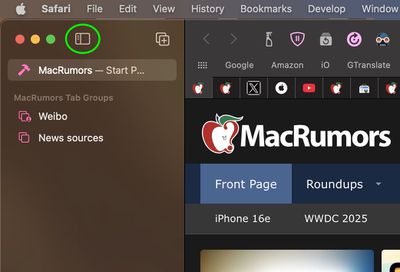
- To share a currently open Tab Group in Safari, reveal Safari's sidebar by clicking the Show sidebar button.

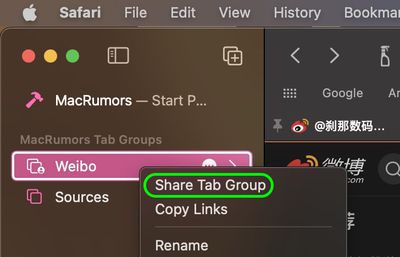
- Right-click the Tab Group or click the ellipsis button (three encircled dots) next to the Tab Group in the list and select Share Tab Group from the contextual menu.
- Choose the desired sharing method from the Share Sheet menu that appears. Selecting Mail or Messages, for example, will open the associated app with a link to the Tab Group, ready to be sent.
Once you've sent an invite, you can see who has access to the Tab Group by clicking the user profile icon that appears on the right-hand side of Safari's address bar.
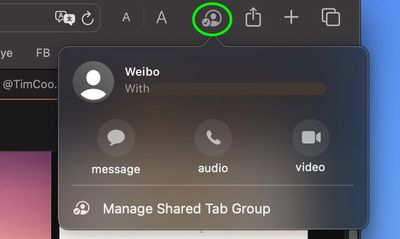
From there, you can manage access to the Tab Group: you can revoke access, add new people, or call and message them to chat about the project. Note that everyone you collaborate with must be signed in to their Apple Account, have Safari turned on in iCloud settings, and have two-factor authentication turned on.
If you're on iPhone and iPad, here's how to share Tab Groups: Tap the open tabs button in the bottom-right corner of the screen (the two squares overlapping), then tap the Share icon (the square with the arrow pointing out). Tap Messages, then choose the person that you want to share the group with.

















































Top Rated Comments