

How to Fix a Damaged macOS Installer - MacRumorsOpen MenuShow RoundupsShow Forums menuVisit ForumsOpen Sidebar
Skip to Content

How to Fix a Damaged macOS Installer

by

Creating a macOS installer on a bootable USB drive provides a convenient way of installing a fresh copy of macOS on multiple Macs, and also allows you to perform a clean installation quickly and easily.
Catalina
If you tried to run your installer recently and unexpectedly received an error that it is damaged and can't be used, then don't worry – keep reading for a simple and straightforward way to fix it.

Why is my macOS Installer Damaged?

If you tried to use a macOS installer in the last few days or weeks, you may have been met with an error message saying something like "This copy of the Install macOS Mojave.app application is damaged, and can’t be used to install macOS."
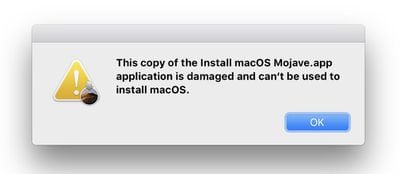
installer
As Apple explains in a newly published support document, the likely reason for the "damaged" error message is an expired certificate. Happily though, the fix is very simple.

How to Fix a Damaged macOS Installer

To fix the damaged installer, you should just download the installer again. Doing so will also ensure that you have all of the macOS updates that have been released since you made the original installer, meaning you won't have to update macOS immediately after the initial installation is complete.

You can find the latest official download links below for the last six versions of Apple's Mac operating system, all of which contain a new certificate that has not expired:

To learn how to perform a clean installation of macOS using the bootable USB drive method, click one of the following links: macOS Catalina, macOS Mojave, macOS Sierra.


Top Rated Comments

gank41 Avatar
92 months ago

That message does not mean you can't download it.
It only means that the installer won't run on that system version.
You will see that message after the download is complete (because the system automatically tries to launch the installer)
And, you have the downloaded installer, in your Applications folder. I would save the installer app to an external drive, and use one of the methods to create a fresh bootable installer from that app.
Finally, delete the downloaded installer from your boot drive.
Actually, I get that message BEFORE it tries to download it. I'm well aware that you can still download the file and create USB Installers and whatnot.. Gotta have the file downloaded first, though. And I'm not able to get that far.
Score: 4 Votes (Like | Disagree)
chrfr Avatar
90 months ago

I am sure that I already had been looking and can't seem to find and it's puzzles me..
It could be on any drive attached to your computer.
Score: 3 Votes (Like | Disagree)
gank41 Avatar
92 months ago

Right this had baffled me and a colleague for a few days. The issue im having, now I understand the cause of the error, is that the links send you to the App Store and it just announces that it cant connect to the store. It will if I go to an app thats there. Any clues folks
The only way I was able to get the App Store installers was by going through a Virtual Machine of 10.14 and downloading them from there, and then copying them over.
Score: 2 Votes (Like | Disagree)
92 months ago

The createinstallmedia command will fail with the new Sierra installer. Some code is munged somewhere. As a workaround, do an actual installation to your flash drive, then just copy the new installer to that drive's Applications folder. At least you can boot and get Sierra installed to an otherwise unbootable drive (or reinstalled over an earlier installation nondestructively).
Thank you. I too have a workaround. Make a bootable DVD installer instead.

To do this copy and paste these into terminal to make the bootable iso file (assuming you have the Sierra installer in your Applications folder):

hdiutil attach /Applications/Install\ macOS\ Sierra.app/Contents/SharedSupport/InstallESD.dmg -noverify -nobrowse -mountpoint /Volumes/install_app

hdiutil create -o /tmp/Sierra.cdr -size 7.85g -layout SPUD -fs HFS+J

hdiutil attach /tmp/Sierra.cdr.dmg -noverify -nobrowse -mountpoint /Volumes/install_build

asr restore -source /Volumes/install_app/BaseSystem.dmg -target /Volumes/install_build -noprompt -noverify -erase

rm /Volumes/OS\ X\ Base\ System/System/Installation/Packages

cp -rp /Volumes/install_app/Packages /Volumes/OS\ X\ Base\ System/System/Installation/

cp -rp /Volumes/install_app/BaseSystem.chunklist /Volumes/OS\ X\ Base\ System/BaseSystem.chunklist

cp -rp /Volumes/install_app/BaseSystem.dmg /Volumes/OS\ X\ Base\ System/BaseSystem.dmg

hdiutil detach /Volumes/install_app

hdiutil detach /Volumes/OS\ X\ Base\ System/

hdiutil convert /tmp/Sierra.cdr.dmg -format UDTO -o /tmp/Sierra.iso

mv /tmp/Sierra.iso.cdr ~/Desktop/Sierra.iso

A bootable iso file called Sierra.iso will then appear on your desktop and you can use this to burn it to a dual layer dvd:

sudo drutil burn /Users/YOURNAME/Desktop/Sierra.iso

where you replace "YOURNAME" with the username for the account you are logged into at the time.

and then boot to startup manager with option key to select the dvd.

Just be aware though that a bootable dvd takes a lot longer to boot up than a bootable usb.
Score: 2 Votes (Like | Disagree)
92 months ago

Another weird problem I'm having is the error: ''..... is not a valid mount point'' in terminal. It only happens when I want to make a Sierra bootable installer, all the others work fine. Changing the name of the USB drive does not solve the issue and I've checked the path and it's correct. Does anyone else has this issue with the new 10.12 Sierra installer?
Indeed. I was so curious about your post that I downloaded Sierra and attempted to make the bootable usb to see if this bug is reproducible.

I got the same result.

The reproducibility of the bug makes it very suitable to apple for a bug report.

I have submitted the bug report to apple.
Score: 2 Votes (Like | Disagree)
92 months ago
So is this new certificate also going to expire at some point in the future?
Score: 2 Votes (Like | Disagree)

Popular Stories

iPhone Duo Display Cracking

Apple Alerts Stores to iPhone Duo's Display Cracking Issue

Friday October 30, 2026 3:20 pm PDT by
In a memo shared with Apple Stores and Apple Authorized Service Providers this week, and later obtained by MacRumors, Apple provided technicians with guidance on how to diagnose and address the iPhone Duo's inner display cracking issue. If a customer reports the issue, Apple advised technicians to inspect the iPhone Duo and repair or replace it in accordance with their standard procedures....
iPad mini OLED feature 1

Apple Executive Comments on New iPad Mini Lacking 120Hz Display

Thursday October 29, 2026 1:47 pm PDT by
While the new iPad mini has an OLED display, the device does not support ProMotion, meaning the display's refresh rate is limited to 60Hz instead of 120Hz. ProMotion support would have allowed for the iPad mini's refresh rate to automatically adjust from 10Hz to 120Hz depending on the content being displayed, but evidently Apple has kept the feature exclusive to the iPad Pro among iPad...
Pinched iPad Mini

Apple Avoids Showing Pinched Fingers on iPad Mini Page in South Korea

Thursday October 29, 2026 11:52 am PDT by
In the U.S. and most other countries, Apple's website shows the new iPad mini being held by pinched fingers, but this is not the case in South Korea. The new iPad mini shown with pinched fingers on Apple's website in the U.S. On its South Korean website, Apple simply shows an image of the iPad mini on its own. The new iPad mini shown without pinched fingers on Apple's website in South Korea ...


Latest Stories
Apple Watch Ultra 4 Hits All-Time Low Price With Amazon's $99 Discount
14 hours ago
Reminder: Apple's Big Discount on Beats 360 Ear Cushions Ends Today
14 hours ago
Here's a New Tour of Apple's HomeView Software
14 hours ago
Apple Reveals New iPad Mini's Battery Capacity
15 hours ago
Top Stories: Apple's Big MacBook Pro, iPad mini and iMac Updates
16 hours ago
'Pluribus' Season 2 Reportedly Starts Production Today
23 hours ago
iPhone 18 Pro Sales Surge in China, Offsetting Decline in U.S. and Japan
1 day ago
HomeView Software 27.2: Wallpapers, Control Center, and More
1 day ago
Apple Alerts Stores to iPhone Duo's Display Cracking Issue
1 day ago
iOS 27.3 Will Enable These Apple Intelligence Features in China
1 day ago
Apple Says iOS 27.3 Beta Coming Next Week
1 day ago
Apple's Flash Storage Suppliers Are Finally 'Getting Their Revenge'
1 day ago
14 New Things Your iPhone Can Do in iOS 27.2
1 day ago
iPhone Duo Review: One Week Later
1 day ago
Samsung Mocks iPhone Duo Display Cracks in New Ad Campaign
2 days ago
The MacRumors Show: OLED MacBook Pro, iPad Mini 8, and More
2 days ago
MacBook Pro With Touch Display: 15 More Details Revealed
2 days ago
Russia Places Apple on State Surveillance Registry
2 days ago
Halloween Weekend Brings Discounts on Apple Accessories and Pre-Orders
2 days ago
Apple Has Released More Than 25 New Products in the Past Two Months
2 days ago
Local Code Launches as Free, Private AI Assistant Tool for Mac
2 days ago
Apple Acquires Ascend.io
2 days ago
HomePod Mini 2 Launches Today: All the New Features
2 days ago
AirTag 2 4-Pack Drops to New Low Price of $69.99
2 days ago
Rian Johnson's iPhone Camera App Goes Viral
2 days ago
Where Did All the iPhone Duos Go? Mostly to Apple's Stores
2 days ago
Apple's Touchscreen MacBook Pro Could Ship 1.5M Units in 2027
2 days ago
New Apple TV 4K and iPad Mini: RAM Amounts Revealed
2 days ago
Apple Executive Comments on New iPad Mini Lacking 120Hz Display
2 days ago
Here's a Hands-On Look at HomePod Mini 2's New Two-Tone Colors
2 days ago

🔗 Related Apple News & Rumors

Stay updated with the latest Apple ecosystem news and verified rumors










































