


How to Divide Your Apple Watch Workouts into Segments - MacRumorsOpen MenuShow RoundupsShow Forums menuVisit ForumsOpen Sidebar
Skip to Content

How to Divide Your Apple Watch Workouts into Segments

by

workout appUsing the Segments feature in the Apple Watch Workout app is a great way to track changes in exercise intensity over the course of a workout. It can also help you find out which activities in a mixed session push your body the most.

If your regular running route includes a hilly section, for example, using segments to indicate where it begins and/or ends lets you review how much time it takes to complete compared to the rest of your workout.

Or maybe you use your Apple Watch to track gym sessions that include various high-intensity strength training or mixed cardio exercises. Marking a new segment every time you move to another piece of equipment or perform a different exercise will give you a better idea of how effective each activity is at burning calories.

How to Mark a Segment During a Workout

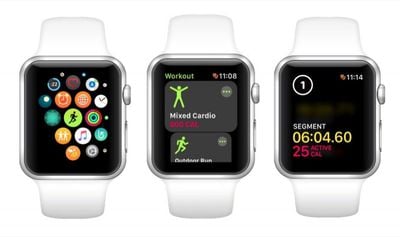
  1. Launch the Workout app on your Apple Watch.

  2. Choose a workout type to track from the list, then go ahead and start your workout.
    segments in an apple watch workout

  3. To divide your workout into two segments, simply raise your wrist and double-tap on the screen. The time elapsed becomes Segment 1 of your workout, while the remaining time becomes Segment 2.

  4. To create a third segment in your workout, just double-tap on the screen again. Repeat this action as many times as you want.
How to View Segment Metrics on Your iPhone

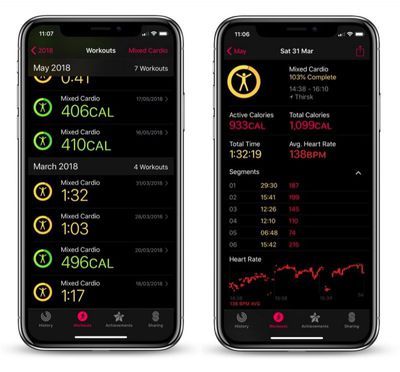
  1. Launch the Activity app on your iPhone.

  2. Tap the Workouts tab.
    activity app segments iphone

  3. Select the workout in which you recorded segments.

  4. In the workout summary screen, locate the Segments section just above the heart rate graph, and tap the chevron alongside it to reveal your numbered segments with stats for duration and calories burned.
Related Roundup: Apple Watch 12
Buyer's Guide: Apple Watch (Buy Now)
Related Forum: Apple Watch

Top Rated Comments

JRobinsonJr Avatar
108 months ago
I was looking for that too but it seems like these are splits rather than a multi-event training that's needed for a triathlon, am I missing something?
Nope. These are just splits.

I've sent Apple a long tirade of feature requests around this. In the "good ol' days" even the electronic trackers were essentially dumb. With the Watch, IMO, there is zero technical reason it could not be location / speed / altitude / cadence / movement aware... and integrate that into the exercise app. For example, there are exercise tracking programs for both indoor and outdoor walking AND running... as four separate activities. Given that the watch has a built-in accelerometer, plus GPS and altitude info, it could easily detect the difference between walking, jogging and running (based on speed), plus note the difference in performance metrics on flat land, up-hill, down-hill, etc. In theory it should even be able to detect the rapid back-and-forth movements of doing cardio on machines, such as elliptical, treadmills, perhaps even rowing machines.

I've even suggested opening the exercise app to 3rd party add-ons. Imagine integrating "track my X" into the exercise app. Not only would it track body metrics, but actually show your efforts on a map. This could permit extending the watch's capabilities to support many different movement-based exercises.

For the triathlon scenario, the watch should already be able to detect the difference in movement types between running, swimming and cycling.

Sure, we're still early in the Watch development cycle, and I'm very happy with what is does now. With continued evolution the future could be great!
Score: 3 Votes (Like | Disagree)
roncito Avatar
108 months ago
I wish there was a way to turn this off. When I’m running in the winter or fall and wearing a long sleeve shirt it messes with the watch and I end up with these segments scattered through my run. To to avoid this, sometimes if I remember, I start the workout then I have to go to the home screen and then flip up the control center and turn on the water mode to lock the screen all while starting to run. Pretty annoying. Just wish they had and option to turn them off in the watch app.
Why don't you just swipe once you start the workout and tap lock?
Score: 2 Votes (Like | Disagree)
JRobinsonJr Avatar
108 months ago
Garmin already has the ability to switch events for triathlon scenario and their users make fun of the Apple Watch all the time due to the lack of it; it's even a meme at this point :(
Ha! Well then... it's time for Apple to be courageous and follow the leader!
Score: 1 Votes (Like | Disagree)
108 months ago
Why don't you just swipe once you start the workout and tap lock?
Oh man! They must have added this in watch os 4?! I’ve never noticed the lock water droplet there before!! I always just swipe over there to select end or pause! Thank you!
Score: 1 Votes (Like | Disagree)
108 months ago
Thanks MacRumors for this tip! I learn something new from you every day!

I agree that the Apple Watch could be so much more. If only Apple would focus less on emojis, Animojis, and other ojis, and simply focused on things that really matter instead. The Apple Watch has so much potential as an exercise device, hopefully they will devote more attention to it one day.


Score: 1 Votes (Like | Disagree)
108 months ago
I was looking for that too but it seems like these are splits rather than a multi-event training that's needed for a triathlon, am I missing something?
No, these are just splits. To properly track a triathlon, you would swipe over and select New, then select the proper activity for that stage of the event. But that takes time. It's a lot quicker to select a more generic cardio work out and use splits to indicate the boundaries of the activities. You know whats up with that, and can use that info later to track progress from one event to the next.
Score: 1 Votes (Like | Disagree)

Popular Stories

Surprise and Shine Live Coverage Article

Apple Event Live Blog: iPhone Duo, iPhone 18 Pro, and More

Wednesday September 9, 2026 9:10 am PDT by
Apple's "Surprise and Shine" event kicks off today at 10:00 a.m. Pacific Time, where we're expecting to see the foldable iPhone Duo, the iPhone 18 Pro and Pro Max, Apple Watch Series 12 and Ultra 4 models, new AirPods 5 earphones, and perhaps some other announcements. Apple is providing a live video stream on its website, on YouTube, and in the company's TV app across various platforms. We...
apple surprise and shine event

Apple Event Today: iPhone 18 Pro and iPhone Duo Cheat Sheet

Tuesday September 8, 2026 10:24 am PDT by
Apple's biggest event of the year is almost here, and all eyes are on Cupertino. With the first foldable iPhone expected to headline Apple's "Surprise and Shine" event on Wednesday, September 9, at 10:00 a.m. Pacific Time, the rumor mill has been running full throttle, fuelled by the biggest single design change in the life of the iPhone. To get you up to speed, here's a quick reference...
apple watch series 12

Leak Hints at Four New Features for Apple Watch Series 12 and Ultra 4

Monday September 7, 2026 8:57 am PDT by
Ahead of the announcement of the Apple Watch Series 12 and Ultra 4 later this week, code in the watchOS 27 and iOS 27 betas points to a series of new features for the product line. The information comes from a new post from MacRumors forums member "pdfu." The findings include: New "Readiness" app: An all-new separate Watch app referred to in code as "Readiness," distinct from the...
Latest Stories
Apple TV Still Down for Some Users Following Apple Services Outage
1 minute ago
PSA: Apple Mail on Mac May Stop Syncing Microsoft 365 Accounts Today
25 minutes ago
Apple's Smart Home Hub: Everything We Know So Far
11 hours ago
Apple's Home Hub Borrows From the iPhone Duo's StandBy Mode
12 hours ago
Apple Invites App Updated With Three New Features
16 hours ago
Apple Event on October 13?
17 hours ago
Apple Watch SE 3 vs. Series 12 Buyer's Guide: Which Should You Buy?
19 hours ago
iPad Mini 8 to Offer These 10 New Features
19 hours ago
DoorDash Unveils AI Food Ordering Through Apple's Messages App
20 hours ago
Amazon Takes Up to $150 Off Select M5 MacBook Air Models
21 hours ago
Apple Still Plans to Release a New Full-Sized HomePod
22 hours ago
Apple Working to Expand HomeKit
23 hours ago
Apple Smart Home Hub to Feature iMac G4-Style Design
23 hours ago
Three New Apple Smart Home Products Coming on October 13
1 day ago
Apple Pay Now Available in India With Axis Bank Cards
1 day ago
OpenAI Launches Always-On 'Dots' Agents to Rival Meta's Muse
2 days ago
AirPods 5 Teardown: Batteries Removable, Case Still Tough
2 days ago
iPhone 18 Pro Owners Complain of Speaker Crackling or Popping
2 days ago
You Can 'Get Ready' for iPhone Duo Pre-Orders on October 12
2 days ago
Apple Pay Reportedly Launching in India Today
2 days ago
Apple Releases New AirPods Beta Firmware
2 days ago
Apple Shares New Guide for Using iOS 27 Parental Controls
2 days ago
Apple Creator Studio and Final Cut Camera Get New Features
2 days ago
Apple Explains Why It Removed ICE Tracking Apps Last Year
2 days ago
Amazon Expands $779.99 Apple Watch Ultra 4 Deal to More Models
2 days ago
Switch Siri AI for ChatGPT on Your Mac
2 days ago
Apple Says Emergency SOS via Satellite Now Available in Norway
2 days ago
AppleCare Guide: Is it Worth Paying For?
2 days ago
Apple Reportedly Planned to Replace 5,000 Support Employees With AI
2 days ago
Apple Planning to Launch Products Faster and More Often
2 days ago

🔗 Related Apple News & Rumors

Stay updated with the latest Apple ecosystem news and verified rumors












































