iOS 15: How to Deactivate or Delete a 'Hide My Email' Private Address - MacRumorsOpen MenuShow RoundupsShow Forums menuVisit ForumsOpen Sidebar
Skip to Content

iOS 15: How to Deactivate or Delete a 'Hide My Email' Private Address

by

In iOS 15, paid iCloud+ plans feature Hide My Email, which lets you create unique, random email addresses that forward messages to your personal inbox whenever you want to keep your personal email address private.
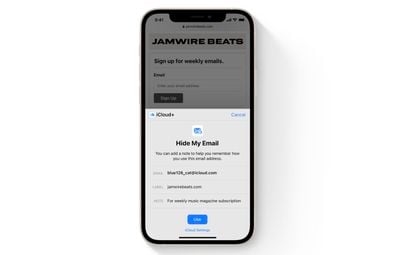
hide my email safari demo
They're really useful if you think that a business or website is likely to share your email address with ad agencies or other third-parties for marketing purposes. Providing them with a dummy address means you can deactivate or delete the address at any time, ensuring any unsolicited emails don't reach your inbox.

How to Deactivate an Address Using Hide My Email

If you aren't currently using a random address generated by Hide My Email, you can temporarily deactivate it so that you don't receive any forwarded email from it.

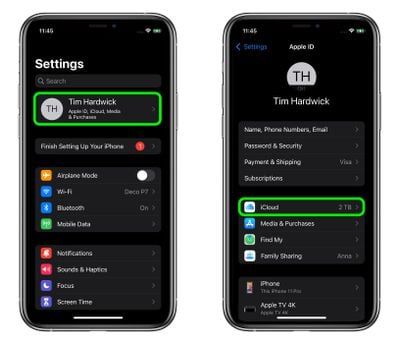
  1. Launch the Settings app on your iPhone or iPad
  2. Tap your Apple ID name at the top of the main settings menu.
  3. Tap iCloud.
    settings

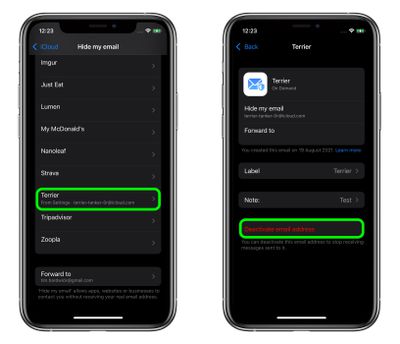
  4. Tap Hide My Email.
  5. Tap the email address in the list that you want to deactivate.
  6. Tap Deactivate email address.
  7. Tap Deactivate to confirm.
    settings

From now on, you won't receive emails sent to that address anymore. If you want to re-activate the address at any time, you'll find it in an "Inactive Addresses" section at the bottom of your active addresses list. Tap the address in question, then tap Reactivate address. Alternately, you can delete it completely by selecting Delete Address.

Paid ‌iCloud‌+ plans also include another premium feature called Private Relay, which ensures that all traffic leaving your device is fully encrypted, so that no third party between the website and your device can see the website being viewed. Check out our dedicated how-to for all the details.


Popular Stories

iCloud General Feature Redux

iCloud+ Subscribers Get Higher Apple Intelligence Usage Limits in iOS 27

Tuesday June 9, 2026 6:05 am PDT by
Certain Apple Intelligence features in iOS 27 will carry daily usage limits, with iCloud+ subscribers receiving higher allowances than free users. The company reiterated the details in its press release accompanying yesterday's Apple Intelligence announcements. Apple said the limits apply to features that rely on "powerful server models," with image generation cited as the primary example....


iCloud General Feature Redux

Apple's New Hide My Email Domain Makes It Easier to Block iCloud Aliases

Wednesday June 17, 2026 7:41 am PDT by
Apple's decision to move Hide My Email to a dedicated "private.icloud.com" domain appears to have the consequence of making it easier for platforms that want to block iCloud aliases to do so. Apple is unifying the email domains used by Sign in with Apple and iCloud+ Hide My Email under a single private.icloud.com domain later this summer. Sign in with Apple currently uses...
iCloud General Feature Redux

UK iCloud Users Could Claim £77 Each as Apple Case Heads to Trial

Tuesday June 23, 2026 1:49 am PDT by
A class action lawsuit accusing Apple of overcharging U.K. iCloud users has been certified to go ahead, putting the £3 billion ($3.9 billion) claim on track for a trial in October 2028. According to BBC News, the Competition Appeal Tribunal cleared consumer group Which? to bring the case on behalf of an estimated 40 million U.K. iPhone and iPad owners, each of whom could receive up to £77...

🔗 Related Apple News & Rumors

Stay updated with the latest Apple ecosystem news and verified rumors