How to Customize the Touch Bar on MacBook Pro - MacRumorsOpen MenuShow RoundupsShow Forums menuVisit ForumsOpen Sidebar
Skip to Content

How to Customize the Touch Bar on MacBook Pro

by

Does your MacBook Pro have an OLED Touch Bar along the top of the keyboard? Keep reading to learn how to customize it to your advantage. This article assumes your Mac is running macOS Ventura or later.
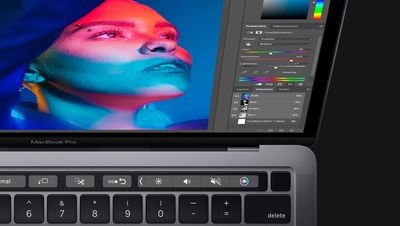
Touch Bar 13 Inch MacBook Pro
Since 2016, certain models of Apple's MacBook Pro have included a Touch Bar, a small touch-sensitive OLED display strip that displays virtual buttons. On MacBook Pro models that have a Touch Bar, the control strip replaces the top row of function keys, and it also has a Touch ID sensor integrated into the power button on the right.

When interacting with your Mac, you've probably noticed how the Touch Bar offers up contextual controls depending on what you're doing. You may see additional options displayed there for an app you're using, or you perhaps typing suggestions appear when you're entering text.

If the Touch Bar isn't really adding value to your Mac life, why not change its behavior? You can even switch up the layout to make it more functional. The following steps show you how it's done.

Changing the Touch Bar's Behavior

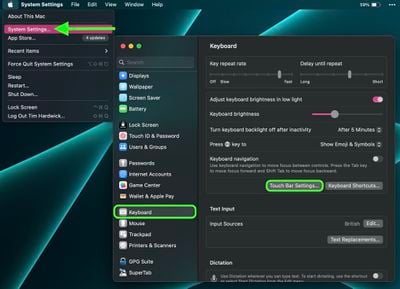
  1. Click the Apple () symbol in the menu bar and select System Settings....
  2. Scroll down the sidebar and select Keyboard.
  3. Click Touch Bar Settings....

settings

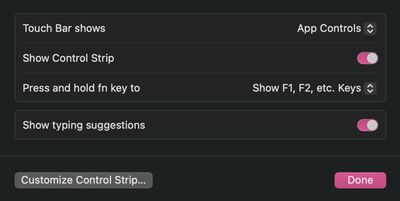
There are several changes you can make from this settings screen. Touch Bar Shows lets you switch between App Controls, Expanded Control Strip, F1, F2, etc. Keys, Quick Actions, and Spaces. The Show Control Strip toggle lets you decide whether you want access to the expandable strip of traditional Mac function key controls, which include things like volume, brightness, and media playback buttons.
settings
You can also choose what displays on the Touch Bar when you press the fn key on your keyboard, which is a convenient way of accessing more functionality. In the dropdown next to Press and hold fn key to you'll find options including App Controls, Expanded Control Strip, F1, F2, etc. Keys, Quick Actions, and Spaces. Lastly, the Show typing suggestions switch lets you toggle typing suggestions on and off.

How to Customize Your Mac's Touch Bar

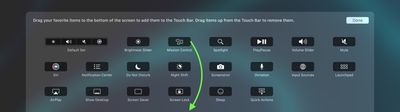
There are several buttons that you can add to the OLED strip that you might find useful to have displayed above the keyboard. Here's a full list of the buttons that you can choose to have displayed on the Touch Bar:

  • Brightness Slider
  • Mission Control
  • Spotlight
  • Play/Pause
  • Volume Slider
  • Mute
  • Siri
  • Notification Center
  • Do Not Disturb
  • Night Shift
  • Screenshot
  • Dictation
  • Input Sources
  • Launchpad
  • AirPlay
  • Show Desktop
  • Screen Saver
  • Screen Lock
  • Sleep
  • Quick Actions

Customizing the control strip's displayed buttons is the best way to get the most out of the Touch Bar because you can choose the features you use the most. Here's how to go about making your selection.

  1. Click the Apple () symbol in the menu bar and select System Settings....
  2. Scroll down the sidebar and select Keyboard.
  3. Click Touch Bar Settings....

  4. Click Customize Control Strip....
  5. Drag items to the bottom of the screen to add them to the Touch Bar. To remove an item from the Touch Bar, simply drag it up.
Touch Bar

Did you know that it's possible to take a screenshot of the Touch Bar on a MacBook Pro? Click the link learn how it's done.


Related Forum: MacBook Pro

Popular Stories

Home Hub Command Center with Dome Base Feature

Apple Smart Home Hub to Feature iMac G4-Style Design

Wednesday September 30, 2026 4:36 am PDT by
Apple's long-rumored smart home hub will have an iMac G4-style design and a host of unique features, Bloomberg's Mark Gurman reports. The smart home hub is said to feature a square 6-inch display, with variants that can be placed on a countertop or mounted on a wall. It features a single FaceTime camera on the front, with microphones and speakers in its connected base. Gurman described the...


HomePod minis on gradient feature 1 1

Three New Apple Smart Home Products Coming on October 13

Wednesday September 30, 2026 4:04 am PDT by
Apple plans to introduce a series of new smart home products on Tuesday, October 13, according to Bloomberg's Mark Gurman. Apple reportedly plans to debut its long-awaited smart home hub device, a new HomePod mini, and a new Apple TV on the date. The new HomePod mini and Apple TV are set to retain their existing designs, but tout faster chips to support Siri AI. The new HomePod mini will...
Apple TV Sans Remote Feature

New Apple TV 4K Leaked

Friday September 25, 2026 8:16 am PDT by
MacRumors contributor Aaron Perris has uncovered an image file from Apple for an unreleased Apple TV 4K, suggesting that a new model will finally be released soon. The image is specifically for an "Apple TV 4K (4th generation)" model. Apple TV 4K (4th generation) image (on a gradient) The image reveals that the Apple TV will have the same external design as the current model, with all of its...
Latest Stories
iPhone 18 Pro Aperture Control Goes Fully Manual in Halide 3.2
32 minutes ago
Apple Stores Receive 'Do Not Open' Boxes Ahead of Smart Home Products Launch
1 hour ago
iPhone 18 Pro Sales Jump in China Ahead of iPhone Duo Launch
2 hours ago
Apple TV Still Down for Some Users Following Apple Services Outage
2 hours ago
PSA: Apple Mail on Mac May Stop Syncing Microsoft 365 Accounts Today
3 hours ago
Apple's Smart Home Hub: Everything We Know So Far
13 hours ago
Apple's Home Hub Borrows From the iPhone Duo's StandBy Mode
14 hours ago
Apple Invites App Updated With Three New Features
18 hours ago
Apple Event on October 13?
19 hours ago
Apple Watch SE 3 vs. Series 12 Buyer's Guide: Which Should You Buy?
21 hours ago
iPad Mini 8 to Offer These 10 New Features
21 hours ago
DoorDash Unveils AI Food Ordering Through Apple's Messages App
23 hours ago
Amazon Takes Up to $150 Off Select M5 MacBook Air Models
23 hours ago
Apple Still Plans to Release a New Full-Sized HomePod
1 day ago
Apple Working to Expand HomeKit
1 day ago
Apple Smart Home Hub to Feature iMac G4-Style Design
1 day ago
Three New Apple Smart Home Products Coming on October 13
1 day ago
Apple Pay Now Available in India With Axis Bank Cards
2 days ago
OpenAI Launches Always-On 'Dots' Agents to Rival Meta's Muse
2 days ago
AirPods 5 Teardown: Batteries Removable, Case Still Tough
2 days ago
iPhone 18 Pro Owners Complain of Speaker Crackling or Popping
2 days ago
You Can 'Get Ready' for iPhone Duo Pre-Orders on October 12
2 days ago
Apple Pay Reportedly Launching in India Today
2 days ago
Apple Releases New AirPods Beta Firmware
2 days ago
Apple Shares New Guide for Using iOS 27 Parental Controls
2 days ago
Apple Creator Studio and Final Cut Camera Get New Features
2 days ago
Apple Explains Why It Removed ICE Tracking Apps Last Year
2 days ago
Amazon Expands $779.99 Apple Watch Ultra 4 Deal to More Models
2 days ago
Switch Siri AI for ChatGPT on Your Mac
2 days ago
Apple Says Emergency SOS via Satellite Now Available in Norway
2 days ago

🔗 Related Apple News & Rumors

Stay updated with the latest Apple ecosystem news and verified rumors