

How to Customize Grouped Notifications in iOS 12 - MacRumorsOpen MenuShow RoundupsShow Forums menuVisit ForumsOpen Sidebar
Skip to Content

How to Customize Grouped Notifications in iOS 12

by

iOS 12 introduces Notification Grouping, a long-awaited feature that groups all of the notifications from a single app together in one neat bundle that prevents the Lock screen from becoming overly cluttered.

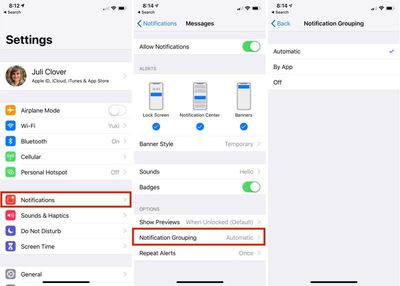
By default, all apps have an "Automatic" grouped notification setting, which groups up notifications by app, but does so intelligently. For example, if you have multiple iMessage conversations going on with people, the notifications might be grouped by app (Messages) but separated by person.
notificationgrouping
You can adjust your Notification Grouping settings to turn off grouped notifications entirely or to force your iOS device to sort all incoming notifications by app, regardless of whether or not certain notifications are coming from different people.

  1. Open up the Settings app.
  2. Choose "Notifications" from the main list of options.
  3. Find the app with the notifications you want to modify from the list, such as Messages, and tap it.
  4. Scroll down to Notification Grouping and tap it.
  5. Automatic is enabled by default. Select "By App" or "Off" to change it.

As mentioned above, selecting "By App" instead of "Automatic" will make sure that all incoming notifications from a specific app are grouped together rather than sometimes being intelligently separated out.

Selecting the "Off" option will disable Notification Grouping for the selected app entirely, which means your incoming notifications for that app will all come in individually, like they did in iOS 11.

There is no option to turn off Notification Grouping for all apps at once, so it's something that needs to be enabled on an app-by-app basis.

For more on all of the new notification features Apple is introducing in iOS 12, make sure to check out our iOS 12 Notifications guide.


Related Forum: iOS 12

Top Rated Comments

midkay Avatar
104 months ago
Stacks are great but I don’t like the “n more notifications” toggle. Let me pull down to fan them out and let go to spring them back into a stack. Or maybe force touch a stack to fan them. The toggle is narrow, sometimes too opaque and I often miss it.


I'm confused, you mean the '2 more notifications' text at the bottom of a notification group? You don't actually have to press on that text specifically, you can press anywhere on the card to expand the stack. Then there's a nice big 'show less' button to re-collapse the stack.
Score: 2 Votes (Like | Disagree)
twistedpixel8 Avatar
104 months ago
I'm confused, you mean the '2 more notifications' text at the bottom of a notification group? You don't actually have to press on that text specifically, you can press anywhere on the card to expand the stack. Then there's a nice big 'show less' button to re-collapse the stack.
How embarrassing... I thought you had to tap the text or it would launch the app. Thanks for clearing that up for me!
Score: 1 Votes (Like | Disagree)
SegPip Avatar
104 months ago
Grouped notifications is the shining light of iOS 12
Score: 1 Votes (Like | Disagree)

Popular Stories

Apple Event Logo

Apple Working on All-New Operating System

Wednesday July 29, 2026 11:39 am PDT by
Apple is developing an all-new operating system that is essentially a mix of tvOS, watchOS, and iOS, according to Bloomberg's Mark Gurman. In a report this week, he said the operating system will feature a grid of icons, widgets, and apps, along with customizable clock faces. The new software platform is intended for Apple's long-rumored smart home hub. With built-in facial recognition,...
imac video apple feature

Apple Made Its Second-Biggest Acquisition Ever This Year

Wednesday July 29, 2026 12:03 pm PDT by
Apple this year acquired Israeli startup Q.ai for close to $2 billion, according to the Financial Times. That would make this Apple's second-biggest acquisition ever, after it paid $3 billion for the popular headphone maker Beats in 2014. This is also the largest known Apple acquisition since the company purchased Intel's smartphone modem business and patents for $1 billion in 2019. Q.ai...
Dynamic Island iPhone 18 Pro Feature

iPhone 18 Pro: Twelve Changes Coming to Apple's Next Flagship

Thursday July 30, 2026 3:43 am PDT by
We're less than two months out from the launch of Apple's premium next-generation smartphone lineup, and while we're not expecting a dramatic change in terms of functionality, there are still several enhancements rumored to be coming to the iPhone 18 Pro and iPhone 18 Pro Max. One thing worth noting is that Apple is reportedly planning a major change to its iPhone release cycle this year,...

🔗 Related Apple News & Rumors

Stay updated with the latest Apple ecosystem news and verified rumors










































