

In iOS 26, currently in beta, creating a new task for Apple's Reminders app is now a much faster process, thanks to the introduction of a "New Reminder" control that lets you create tasks without ever opening the app.
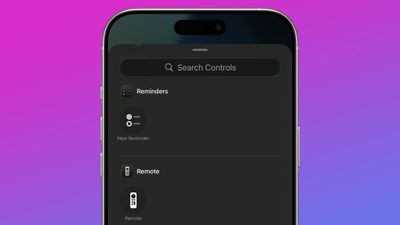
ios 26 reminders app control center
Whether you assign it to Control Center, your Lock Screen, or the Action button (on iPhone 15 Pro models and newer), this simple addition should make it a lot easier to record your reminders.

How the New Reminder Control Works

When you activate the New Reminder control, the Reminders app isn't actually opened. Instead, iOS 26 displays a compact popup panel that includes everything you need to create a task: you can select the Reminders List, add a note, the date, location, and a flag.
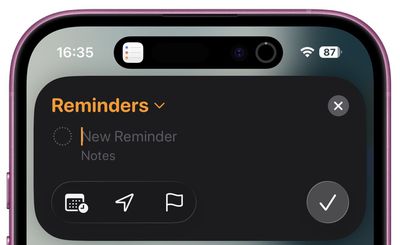
reminders popup ios
The interface also recognizes natural language for adding a due date, so you can append your reminder with "tomorrow at 3pm," and iOS will recognize it and suggest the appropriate reminder time in the Siri suggestions bar above the keyboard.

Basically, you can create detailed reminders containing all the necessary info without navigating through multiple screens in the full Reminders app.

Adding the Control to Control Center

To add the New Reminder control to Control Center, swipe down from the corner of the screen, long press a blank space, then tap Add Control. You'll find it in the Reminders section (it's the only control there).

Setting Up Lock Screen Access

For Lock Screen access, touch and hold your Lock Screen, tap Customize, then remove one of the two Lock Screen controls by tapping it. Tap the plus button left in its place, then select New Reminder from the available controls.

Assigning to the Action Button

If you have an iPhone 15 Pro or newer, the Action button provides the fastest access to new reminders. To set it up:

  1. Open Settings.
  2. Tap Action Button.
  3. Swipe to Controls and choose New Reminder from the list of available actions.
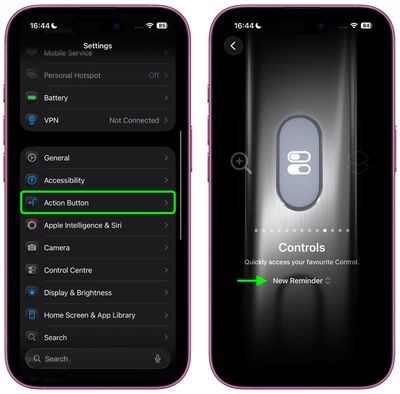
settings

That's all there is to it. Granted, it's an extremely simple addition, but the New Reminder control goes a long way to eliminate the friction usually involved in creating a task. Apple is expected to roll out iOS 26 to supported iPhones in September.


Top Rated Comments

Godspeed8230 Avatar
26 weeks ago
That's actually one of the few instances when I use Siri.
Score: 9 Votes (Like | Disagree)
Mac Fly (film) Avatar
26 weeks ago
Apple added reminders to Calendar, next up they should improve the feature and find a way to eliminate the Reminds app, in my opinion. Reminders is a feature not an app. And improve the Alarm Clock feature allowing Alarms to be set for future dates in addition to days, manually, and using Siri.

“Set an alarm for Jan 5, take down tree”

“Do you want it as a once-off alarm in Clock or a yearly reminder in Calendar?”

Just one alarm | Remind me yearly

Two choices, pick one. Simplicity and function.
Score: 3 Votes (Like | Disagree)
McWetty Avatar
26 weeks ago
I just use Siri. It’s one of the very few things she gets right 90%+ of the time.
Score: 3 Votes (Like | Disagree)
CapitalIdea Avatar
26 weeks ago

Apple added reminders to Calendar, next up they should improve the feature and find a way to eliminate the Reminds app, in my opinion. Reminders is a feature not an app. And improve the Alarm Clock feature allowing Alarms to be set for a future dates in addition to days, manually, and using Siri.

“Set an alarm for Jan 5, take down tree”

“Do you want it as a once-off alarm in Clock or a yearly reminder in Calendar?”

Just one alarm | Remind me yearly

Two choices, pick one. Simplicity and function.
You assume that all the tasks in the list have a specific date. I use reminders for tons of general to-do tasks with nonspecific timeframes.
Score: 2 Votes (Like | Disagree)
frosty001 Avatar
26 weeks ago

You assume that all the tasks in the list have a specific date. I use reminders for tons of general to-do tasks with nonspecific timeframes.
Yes. the problem is with me. I have not get my head round how best to use all of the options. I find when I use Siri (talk to the phone), I will say 'set a reminder to....' but if I am tying and want to set some tasks or things to do, then I am typically opening Notes.

I might be in the minority, but I think it's something that Apple could help with (streamlining). I am not VERY clear on what app is designed to be the best for what, etc.
Score: 2 Votes (Like | Disagree)
macjaffa Avatar
26 weeks ago

How do I get a reminder for MacRumors to share this article again once I am running ios26 this fall ?
You laugh but creating a reminder or action from arbitrary content or not so arbitary content like i dunno an email or a webpage is a HUGE gap missing from the reminders/calender app. It makes them useless for me since 99% of the time i want reminded aboit something i have just been sent or something i have just read.
Score: 2 Votes (Like | Disagree)

Popular Stories

Aston Martin CarPlay Ultra Screen

Apple's CarPlay Ultra to Expand to These Vehicle Brands Later This Year

Sunday February 1, 2026 10:08 am PST by
Last year, Apple launched CarPlay Ultra, the long-awaited next-generation version of its CarPlay software system for vehicles. Nearly nine months later, CarPlay Ultra is still limited to Aston Martin's latest luxury vehicles, but that should change fairly soon. In May 2025, Apple said many other vehicle brands planned to offer CarPlay Ultra, including Hyundai, Kia, and Genesis. In his Powe...
Apple Logo Black

Apple's Next Launch is 'Imminent'

Sunday February 1, 2026 12:31 pm PST by
The calendar has turned to February, and a new report indicates that Apple's next product launch is "imminent," in the form of new MacBook Pro models. "All signs point to an imminent launch of next-generation MacBook Pros that retain the current form factor but deliver faster chips," Bloomberg's Mark Gurman said on Sunday. "I'm told the new models — code-named J714 and J716 — are slated...
Apple MacBook Pro M4 hero

New MacBook Pros Reportedly Launching Alongside macOS 26.3

Sunday February 1, 2026 5:42 am PST by
Apple is planning to launch new MacBook Pro models with M5 Pro and M5 Max chips alongside macOS 26.3, according to Bloomberg's Mark Gurman. "Apple's faster MacBook Pros are planned for the macOS 26.3 release cycle," wrote Gurman, in his Power On newsletter today. "I'm told the new models — code-named J714 and J716 — are slated for the macOS 26.3 software cycle, which runs from...
iOS 26

iOS 26.3 and iOS 26.4 Will Add These New Features to Your iPhone

Tuesday February 3, 2026 7:47 am PST by
We are still waiting for the iOS 26.3 Release Candidate to come out, so the first iOS 26.4 beta is likely still at least a week or two away. Following beta testing, iOS 26.4 will likely be released to the general public in March or April. Below, we have recapped known or rumored iOS 26.3 and iOS 26.4 features so far. iOS 26.3 iPhone to Android Transfer Tool iOS 26.3 makes it easier...
14 inch MacBook Pro Keyboard

Apple Changes How You Order a Mac

Saturday January 31, 2026 10:51 am PST by
Apple recently updated its online store with a new ordering process for Macs, including the MacBook Air, MacBook Pro, iMac, Mac mini, Mac Studio, and Mac Pro. There used to be a handful of standard configurations available for each Mac, but now you must configure a Mac entirely from scratch on a feature-by-feature basis. In other words, ordering a new Mac now works much like ordering an...














