When you have an active FaceTime account, there may be certain circumstances when you don't want a particular email address to be registered with it.
For example, you may not want family and friends to contact you on FaceTime using your work email address, or you may want to keep your personal email separate from your work contacts.
That's why Apple has made it possible for you to change the email addresses that are registered with your FaceTime account. The following steps show you how it's done.
- Launch the Settings app on your iPhone or iPad.
- Scroll down and tap FaceTime.
- If you're not signed into FaceTime with your Apple ID, tap Use your Apple ID for FaceTime, then tap Sign In, or tap Use Other Apple ID and enter the credentials that you want to use.
- Tap on the checkmark to the left of the email address(es) that you want to de-register with FaceTime.
- Conversely, tap the email address(es) that you do want to register with FaceTime so that a checkmark appears.
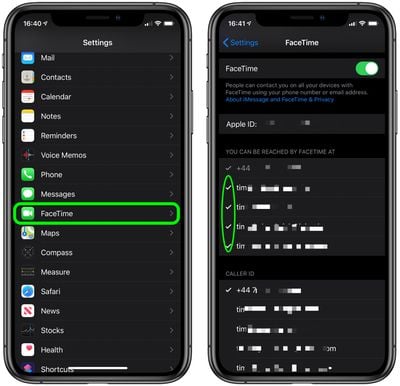
Note that FaceTime allows you to register different emails on different devices, so you could register your work email on your iPhone and your personal email with your iPad, for example. You can also add multiple email addresses so that you can be contacted from any one of them.