iOS 16: How to Change the Color of Your iPhone Lock Screen - MacRumorsOpen MenuShow RoundupsShow Forums menuVisit ForumsOpen Sidebar
Skip to Content

iOS 16: How to Change the Color of Your iPhone Lock Screen

by

In iOS 16, Apple has brought several personalization features to the iPhone Lock Screen that enable you to get just the wallpaper you want, including options to add widgets and change the font and style of the digital clock.
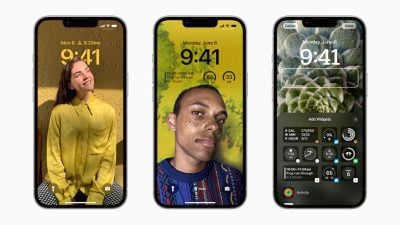
ios 16 lock screen customization
Of course, if all you want is a minimal colored wallpaper with nothing else going on, Apple has included this option too. The following steps show you how to change the color of your Lock Screen on an iPhone running iOS 16.

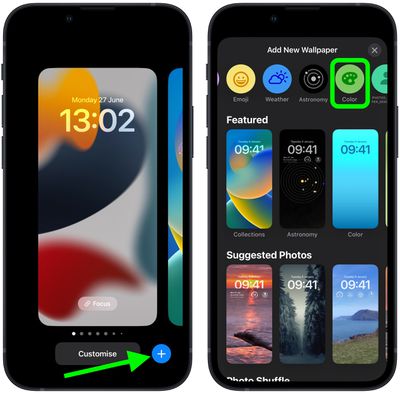
  1. Unlock your ‌‌‌iPhone‌‌‌ with Face ID or Touch ID, then press and hold the Lock Screen.
  2. Tap the blue + button, or swipe leftwards all the way to the end and then tap Add New.
  3. Tap the Color button in the top row of options.
    Lock Screen

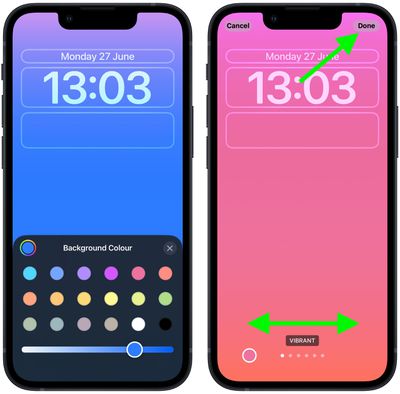
  4. Use the color switches to select a color for your Lock Screen. You can also use the slider to change the hue.
  5. Swipe left and right to preview the color styles available. They include Vibrant, Tone, Deep, Vapor, Bright, and Solid.
  6. When you're happy with the look and have added any widgets, tap Done in the top-right corner of the screen.
  7. To make the dynamic wallpaper appear on both your Lock Screen and Home Screen, tap Set as Wallpaper Pair in the pop-up. Otherwise, tap Customize Home Screen to do so separately.
  8. Tap the Lock Screen you just created in the wallpaper gallery to activate it.
    Lock Screen

You can customize the current Lock Screen at any time by invoking the gallery view from the Lock Screen with a long press, or by going into Settings -> Wallpapers.


Popular Stories

Apple Watch Ultra 2 Black Titanium

New Apple Watch Series 12 and Apple Watch Ultra 4 Features Revealed

Sunday August 30, 2026 7:54 am PDT by
Bloomberg's Mark Gurman today further outlined what to expect from the Apple Watch Series 12 and Apple Watch Ultra 4 set to be unveiled on September 9. While it was initially rumored that Touch ID may be coming to the Apple Watch this year, Gurman reiterated that he does not expect the Series 12 or Ultra 4 to have any major design changes compared to the current Series 11 and Ultra 3 models. ...


Mac mini vs Studio Feature Sans Text 1

Apple Caught Off Guard by AI Demand for Mac Mini and Mac Studio

Sunday August 30, 2026 8:52 am PDT by
Apple's unusually timed announcement of new Mac mini and Mac Studio models this week was driven by unexpectedly strong enterprise appetite for AI hardware, according to The Information. Apple normally releases new Mac models in the autumn, closer to October or November, making this week's announcement unusually early, falling just before the anticipated arrival of new iPhone models. The...
Apple Event Logo

Apple Unveiled Four New Products This Week

Wednesday August 26, 2026 5:54 pm PDT by
Apple on Tuesday unveiled a new Mac mini with M6 and M5 Pro chip options, a new Mac Studio with M5 Max and M5 Ultra chip options, a new version of the Polishing Cloth with a lower price, and updated Magic Keyboards for Macs. To learn more about these products, read our coverage below: Apple Announces New Mac Mini With M6 and M5 Pro Chips and More Apple Unveils New Mac Studio With M5 Max...

🔗 Related Apple News & Rumors

Stay updated with the latest Apple ecosystem news and verified rumors