

Apple Watch uses both Wi-Fi and Bluetooth to transfer data to the iPhone. It defaults to a Bluetooth connection whenever possible because it conserves power, but if your iPhone is not in Bluetooth range, Apple Watch will switch over to compatible Wi-Fi if it is available.
For Wi-Fi to work on Apple Watch, it needs to be 802.11b/g/n on a 2.4GHz band. It will not connect to the faster speed 5GHz Wi-Fi, nor will it connect to public networks requiring logins, subscriptions, or profiles. It will also not work if your paired iPhone has never connected to the local Wi-Fi network before. This is because Apple Watch cannot configure new Wi-Fi networks on its own. It can connect to networks that you have set up on the paired phone.
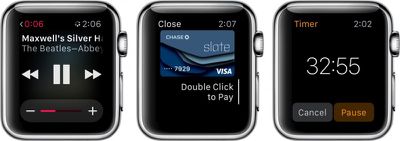
When your paired iPhone is out of range, and it is not connected to the same Wi-Fi network, there are a number of features that are still available:
- You can play music from a synced playlist. Add music via the Apple Watch app on your iPhone and sync Apple Watch by placing it on the charger. You can store up to 2GB of music.
- You can use the clock, alarm, timer, and stopwatch. All functions for each of those apps are available when your iPhone is out of range.
- You can track stand, move, and exercise actions through the Activity app. This information will sync with your iPhone when you are back in range.
- You can track workouts in the Workout app. It is a good idea to calibrate your Apple Watch first in order to get the most accurate reading.
- You can display photos from a synced photo album. Add albums via the Apple Watch app on your iPhone. Photos sync immediately.
- Use Apple Pay at participating retail stores to make purchases. When the payment kiosk is in range, open the Apple Pay app to make a transaction.
There are also a few additional things you can do if your paired iPhone is out of range but you are still on the same Wi-Fi network. For example, if your phone was at your desk, but you are five flights up in the same office building on the same network, or if you were on campus and you left your phone in your locker (assuming the Wi-Fi is compatible and doesn't require logins, subscriptions, or profiles).
- You can send and receive texts via iMessage.
- If you know someone else with an Apple Watch, you can send and receive Digital Touch messages.
- You can use Siri to check your calendar, set reminders, and more.
- You can check Weather, Email, Reminders, the Calendar app, and all native apps.
- Check your current location using Apple Maps.
- You can also access most third-party apps.
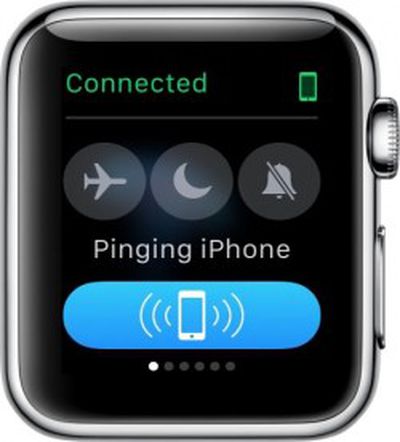 If you forget where you left your iPhone while wandering the halls, you can ping it using Apple Watch. Swipe up from the watch face and swipe to the first Glances screen. Then, tap the Ping button. This will activate a loud audio signal on your iPhone, even if the ringer is set to silent. If you use a long tap, it'll also cause the flash on the iPhone to trigger. This feature is great for times when you’ve lost your iPhone. Keep in mind that Apple Watch must be connected to your iPhone either via Bluetooth or Wi-Fi for this feature to work.
If, for some reason, your Apple Watch disconnects from your paired iPhone, follow our how-to guide to fix the problem.
Apple Watch works best when paired to your iPhone via Bluetooth. Data transfers between both devices are smoother, faster, and take up less energy. However, you can still work when your paired iPhone is not in Bluetooth range, as long as they are both on the same Wi-Fi network. An added bonus is that Apple Watch has about a half-dozen useful features that work, even when it is not connected to your iPhone at all.
















































Top Rated Comments
EDIT: It depends on what you mean by "sole communications device". You won't be able to make cellular phone calls. But you will be able to use iMessage and receive emails.
People are wrong about logins. The Watch can login to any network that your iPhone automatically logs in on... even without your iPhone. I've done quite a lot of testing of this.
This enables people who have the iPhone 5 (like me) and above to use Apple Pay.