How to Use Apple Cash on iPhone and iPad - MacRumorsOpen MenuShow RoundupsShow Forums menuVisit ForumsOpen Sidebar
Skip to Content

How to Use Apple Cash on iPhone and iPad

by

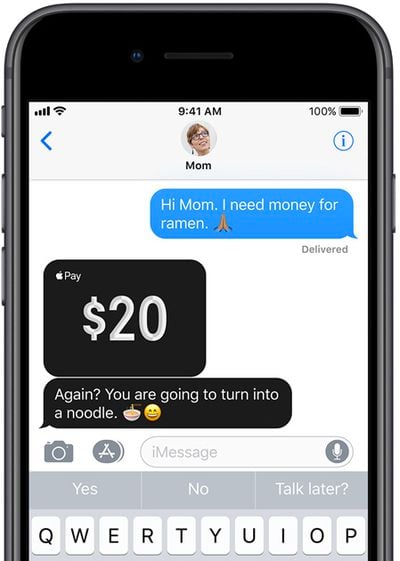
Apple Cash (formerly Apple Pay Cash) is Apple's peer-to-peer payments service. Once you've set up an Apple Cash card on your iPhone or iPad, it can be used to make and receive payments in Messages, or you can get Siri to send money to a friend or family member. This article shows you how.
apple pay cash 1
When someone sends you money via Apple Cash, it goes on your virtual Apple Cash card, which is stored securely in the Wallet app on your iPhone or iPad. You can use the money on it to send to someone, make purchases using Apple Pay in stores, within apps, and on the web. Alternatively, you can transfer the money on your Apple Cash card directly to your bank account.

Furthermore, if you've applied for Apple's own-branded credit card – called simply Apple Card – you can use Apple Cash to help pay off your Apple Card balance. You can also take advantage of Apple Card's "Daily Cash" rewards system, where Apple pays out cash back bonuses on a daily basis.

Sending and Requesting a Payment via Apple Cash

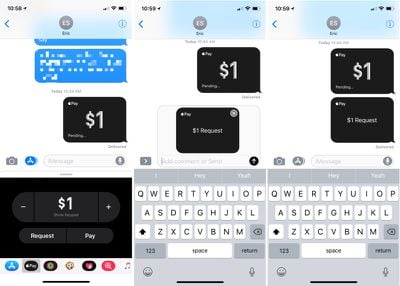
  1. Open a conversation in Messages.
  2. Tap the Messages App Store icon.
  3. Choose the "Apple Pay" icon.
  4. Tap the "+" or "-" buttons to enter an amount, or use the keyboard.
  5. Tap "Request" or "Pay."
  6. You'll have an option to preview your payment or request for payment.applepayrequestmoney
  7. Press the blue arrow button to send.

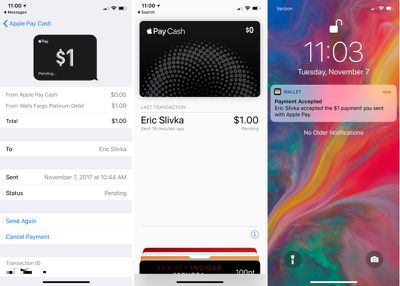
When sending a payment, the money you've sent will be listed as "pending" in the Wallet app until the person on the receiving end accepts. Once accepted, the payment will be listed in "Last Transaction" under the Apple Cash card in Wallet. While still pending, a payment can be cancelled.
applepaycashpending
Money that you're sending will be pulled from a linked debit/credit card or from the Apple Cash card itself if you've added funds to that card or received funds from other people. If you send money using the Apple Cash card or a debit card, there's no charge. For a credit card, there's a 3% fee.

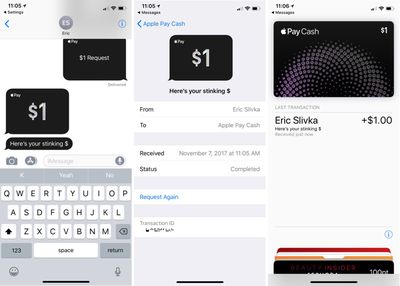
When accepting a payment, the cash will be added to your Apple Cash card in the Wallet app. From there, it can be used to make purchases where Apple Pay is accepted like any other card or it can be transferred to a connected bank account.
applepaycashreceived
Apple Cash works in any conversation with a single person. The option won't be available for group messages.

Sending Money via Siri

  1. Activate Siri.
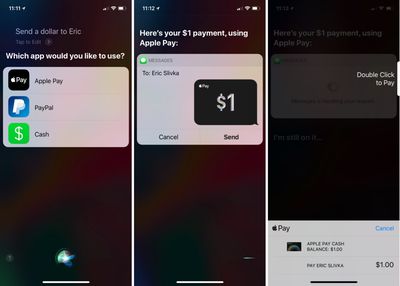
  2. Tell Siri to send a payment. Example: "Send $1 to Eric."
  3. If multiple payment apps are installed, you'll need to confirm that you want to use Apple Pay.
  4. Unlock your iPhone using Face ID or Touch ID. applepaycashsendingmoneysiri
  5. Tap "Send."
  6. Double click the side button to pay on iPhone X or put a finger on the Touch ID Home button to confirm payment on other devices.
Changing Apple Cash Settings

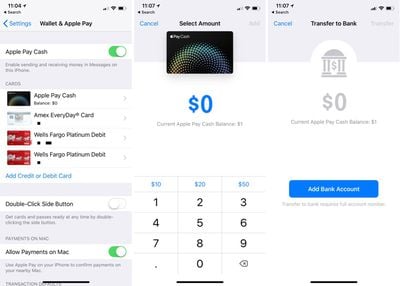
You can access your Apple Pay settings in the Settings app or through the Wallet app.

  1. Open Settings.
  2. Go to Wallet and Apple Pay.
  3. Tap on the "Apple Cash" card.

From this interface, you can add money to your Apple Cash card, transfer your cash to the bank (which requires adding a bank account) and choose to automatically or manually accept payments.
applepaycashbanktransfersettings

Verify Identity

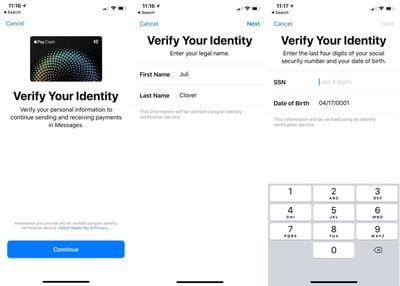
Once you've sent or received a combined $500 with Apple Cash, you will need to verify your identity. Identity Verification is available in the Settings app, but it may not be fully functional at this time.

  1. Open Settings.
  2. Go to Wallet and Apple Pay.
  3. Tap on the "Apple Cash" card.
  4. Choose "Verify Identity."

You will be asked to confirm your legal name and address, along with the last four digits of your social security number and date of birth. Apple will also ask questions related to your personal history and request a photo of a driver's license or state ID card.
applepaycashverify
Once your identity has been verified, you can have up to $20,000 on your Apple Cash card.

Apple Cash Limits

There are limits on the amount of money that you can send per day and per transaction, and the amount of money you can add to your Apple Cash card.

When adding cash, you must add a minimum of $10 per transaction, but you're not able to add more than $3,000. Over a 7-day period, you can add a maximum of $10,000 to your Apple Cash card.

When sending or receiving money, you can send/receive a minimum of $1 and a maximum of $3,000. Over the course of a 7-day period, you can send/receive up to $10,000.

Transferring money to your bank can be done at any time. A minimum of $1 can be transferred at a time, or less than a $1 if your total balance is under $1. Up to $3,000 can be transferred in a single transfer, and over 7 days, you can transfer up to $20,000 to your bank account from Apple Cash.

Apple Cash Requirements

To use Apple Cash, the following requirements must be met:

  • Both parties must be running iOS 11.2 or later.
  • An iPhone 6 or later must be used.
  • Two-factor authentication must be turned on.
  • You must be at least 18 years old.
  • You must be in the United States with a U.S. credit/debit card and social security number if verification is required.
  • An eligible credit or debit card must be available in Wallet.

Along with iPhones and iPads running iOS 11.2 or later, Apple Cash can also be used on the Apple Watch on devices that are running watchOS 4.2 or later. Sending money from an Apple Watch follows the same general process as the iPhone, with payments made and received through the Messages app.

Related Roundup: Apple Pay

Top Rated Comments

117 months ago
Drug dealer: "I got some kilos of cocaine."
Drug buyer: "I'll send the money to you" (press blue arrow) "okay...done."
Shhhh, it's called ramen! :p
Score: 5 Votes (Like | Disagree)
117 months ago
Sure , but it costs me nothing to send money via my Barclays app.

While I get emergencies , it's silly to use this for regular payments
I'm pretty sure it's free to use with a debit card, and the 3% is only if you try to use a credit card to fund a payment....

Score: 5 Votes (Like | Disagree)
Zombie Acorn Avatar
117 months ago
Hi Mom, need some money for ramen.

Mom: Im sending over your resume, get a job.
Score: 4 Votes (Like | Disagree)
Internet Enzyme Avatar
117 months ago
Rest in Peace to that $1 that the writer spent when creating this article.
Score: 4 Votes (Like | Disagree)
deany Avatar
117 months ago
Surprised anyone has any cash left.
Score: 3 Votes (Like | Disagree)
116 months ago
Anybody else not get the menu selector to enable Apple Pay Cash? I updated and I'm on an iPhone 7.
Score: 2 Votes (Like | Disagree)

Popular Stories

apple pay feature dynamic island

UK Proposes New Ways to Help Apple Pay Rivals

Tuesday October 20, 2026 9:57 pm PDT by
The UK's competition regulator has proposed changes to make it easier and cheaper for companies to offer alternatives to Apple Pay on the iPhone (via Reuters). The Competition and Markets Authority (CMA) says Apple's fees and restrictions make it too difficult for rivals to launch contactless payment apps. Its proposals would give developers more ways to access the iPhone's NFC technology,...
Apple MacBook Pro with PROLED XDR Display family lineup feature

Apple Announces OLED MacBook Pro With Touch Display

Wednesday October 28, 2026 10:11 am PDT by
Apple today announced a new high-end MacBook Pro, which is available in 14-inch and 16-inch sizes. The new device has a PROLED XDR display that supports touch gestures, and a glowing rear Apple logo. Pricing on the MacBook Pro starts at $2,899 for the 14-inch model and $3,399 for the 16-inch model. Apple says the MacBook Pro has the "world's best display in a pro laptop." The PROLED...
iPhone Duo Display Cracking

Apple Alerts Stores to iPhone Duo's Display Cracking Issue

Friday October 30, 2026 3:20 pm PDT by
In a memo shared with Apple Stores and Apple Authorized Service Providers this week, and later obtained by MacRumors, Apple provided technicians with guidance on how to diagnose and address the iPhone Duo's inner display cracking issue. If a customer reports the issue, Apple advised technicians to inspect the iPhone Duo and repair or replace it in accordance with their standard procedures....
Latest Stories
Apple Watch Ultra 4 Hits All-Time Low Price With Amazon's $99 Discount
1 hour ago
Reminder: Apple's Big Discount on Beats 360 Ear Cushions Ends Today
2 hours ago
Here's a New Tour of Apple's HomeView Software
2 hours ago
Apple Reveals New iPad Mini's Battery Capacity
3 hours ago
Top Stories: Apple's Big MacBook Pro, iPad mini and iMac Updates
4 hours ago
'Pluribus' Season 2 Reportedly Starts Production Today
11 hours ago
iPhone 18 Pro Sales Surge in China, Offsetting Decline in U.S. and Japan
11 hours ago
HomeView Software 27.2: Wallpapers, Control Center, and More
18 hours ago
Apple Alerts Stores to iPhone Duo's Display Cracking Issue
19 hours ago
iOS 27.3 Will Enable These Apple Intelligence Features in China
20 hours ago
Apple Says iOS 27.3 Beta Coming Next Week
20 hours ago
Apple's Flash Storage Suppliers Are Finally 'Getting Their Revenge'
21 hours ago
14 New Things Your iPhone Can Do in iOS 27.2
22 hours ago
iPhone Duo Review: One Week Later
23 hours ago
Samsung Mocks iPhone Duo Display Cracks in New Ad Campaign
1 day ago
The MacRumors Show: OLED MacBook Pro, iPad Mini 8, and More
1 day ago
MacBook Pro With Touch Display: 15 More Details Revealed
1 day ago
Russia Places Apple on State Surveillance Registry
1 day ago
Halloween Weekend Brings Discounts on Apple Accessories and Pre-Orders
1 day ago
Apple Has Released More Than 25 New Products in the Past Two Months
1 day ago
Local Code Launches as Free, Private AI Assistant Tool for Mac
1 day ago
Apple Acquires Ascend.io
1 day ago
HomePod Mini 2 Launches Today: All the New Features
1 day ago
AirTag 2 4-Pack Drops to New Low Price of $69.99
1 day ago
Rian Johnson's iPhone Camera App Goes Viral
1 day ago
Where Did All the iPhone Duos Go? Mostly to Apple's Stores
1 day ago
Apple's Touchscreen MacBook Pro Could Ship 1.5M Units in 2027
1 day ago
New Apple TV 4K and iPad Mini: RAM Amounts Revealed
2 days ago
Apple Executive Comments on New iPad Mini Lacking 120Hz Display
2 days ago
Here's a Hands-On Look at HomePod Mini 2's New Two-Tone Colors
2 days ago

🔗 Related Apple News & Rumors

Stay updated with the latest Apple ecosystem news and verified rumors