How to See What Your Friends Are Listening to on Apple Music - MacRumorsOpen MenuShow RoundupsShow Forums menuVisit ForumsOpen Sidebar
Skip to Content

How to See What Your Friends Are Listening to on Apple Music

by

If you're an Apple Music subscriber, you can share what you're listening to with friends and see what they're listening to on the streaming music service.
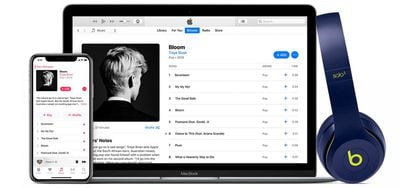
macos mojave itunes 12 9 apple music student membership hero
Before you can see what your friends are listening to in ‌Apple Music‌ you need to set up your profile and start sharing. Follow the first set of steps below to do so, and then continue onto the second series of steps to follow your friends.

How to Start Sharing

  1. Launch the Music app on your iPhone or iPad, or open iTunes on your Mac or PC.
  2. Select the For You tab.
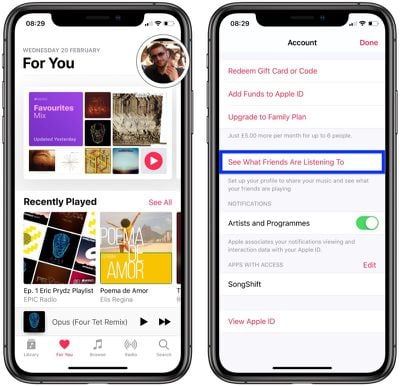
  3. Tap or click your profile picture in the upper right corner of the screen or iTunes window.
    how to start sharing in apple music

  4. Tap See What Friends Are Listening to; in iTunes, click Get Started.
  5. Follow the steps to set up your ‌Apple Music‌ profile and start sharing. After you've done so, your shared playlists and songs that you listen to will be displayed on your profile page.
How to See What Your Friends Are Listening to

  1. To find and follow your friends, open your profile page, scroll to the bottom and tap Follow More Friends, or click Find More Friends in iTunes.
  2. If your friends are already sharing music, tap (or click) Follow next to their name.
    see what friends are listening to on apple music

  3. To invite a friend to share, tap or click Invite.
  4. Return to the For You tab's first screen and you should see a new Friends Are Listening To section.
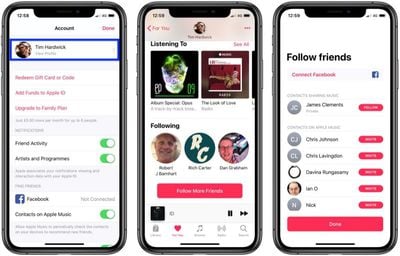
    1. Once sharing is set up, if you visit your profile in the "For You" section of ‌Apple Music‌, you can see all of the people you are following and those who are following you, and if you tap a person you can see their listening history. You'll also see recommendations for the songs and albums friends are listening to in the "For You" section of the iOS app or iTunes.

Popular Stories

apple music

Apple Music to Label AI-Generated Songs

Thursday August 20, 2026 4:41 pm PDT by
Apple sent emails to its music industry partners about the upcoming launch of a Made With AI label that Apple will apply to AI-generated content (via The Hollywood Reporter). Content tagged as being "materially generated using AI" will have a label visible to all Apple Music users. In March, Apple announced Transparency Tags, a system that lets music creators disclose when AI has been...


iOS 27 Next to iPhone

Here's When iOS 27 Rolls Out Today in Every Time Zone [Update: It's Out]

Sunday September 13, 2026 3:00 am PDT by
Update 10:04 a.m.: iOS 27 is rolling out now, though it may take a bit for all users to see it, so keep checking! Apple is about to release iOS 27, which will finally deliver more advanced Siri AI capabilities as well as a variety of other refinements, improvements, and new features to iPhones. It's Apple's biggest software update of the year, and Apple announced at Wednesday's iPhone event...
iOS 27 Icon iPhone

iOS 27 Available Today With These 8 New Features

Monday September 14, 2026 9:00 am PDT by
Update: Apple has released iOS 27. During its iPhone 18 Pro and iPhone Duo event last week, Apple announced that iOS 27 will be released widely on Monday, September 14. iOS 27 should be available around 10 a.m. Pacific Time / 1 p.m. Eastern Time today via the Settings app, under General → Software Update. Below, we have highlighted eight new features and changes coming with iOS...

🔗 Related Apple News & Rumors

Stay updated with the latest Apple ecosystem news and verified rumors