iOS 14: How to Enhance Speech, Movies, and Music When Listening on AirPods, AirPods Max, and Beats - MacRumorsOpen MenuShow RoundupsShow Forums menuVisit ForumsOpen Sidebar
Skip to Content

iOS 14: How to Enhance Speech, Movies, and Music When Listening on AirPods, AirPods Max, and Beats

by

In iOS 14, Apple continues to build out its extensive accessibility features, and here we're going to show you how you can use the new Headphone Accommodations to amplify certain sounds if you're having difficulty hearing them.
AirPods Pro lifestyle apple
Headphones Accommodations works with Apple and Beats headphones, and is designed especially for those who are hard of hearing: It's able to amplify soft sounds and adjust frequencies to make music, movies, calls, and more sound crisper and clearer.

Follow the steps below to activate the Headphones Accommodations feature in iOS 14 and later.

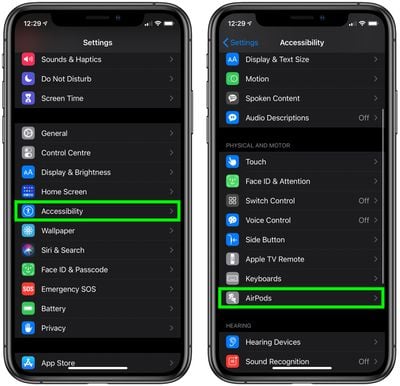
  1. Launch the Settings app on your iPhone or iPad.
  2. Tap Accessibility.
  3. Scroll down to the Physical and Motor menu and select AirPods.
    settings

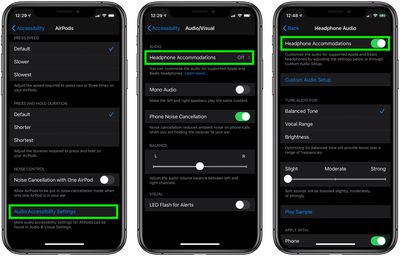
  4. Tap the Audio Accessibility Settings option in blue text.
  5. Tap Headphone Accommodations.
  6. Toggle the switch next to Headphone Accommodations to activate it and extend the menu of options.
    how to use headphone accommodations c

From here, you can access a range of options such as tuning audio for Balanced Tone, Vocal Range, or Brightness, and adjusting the volume of soft sounds to be louder.
accessibility
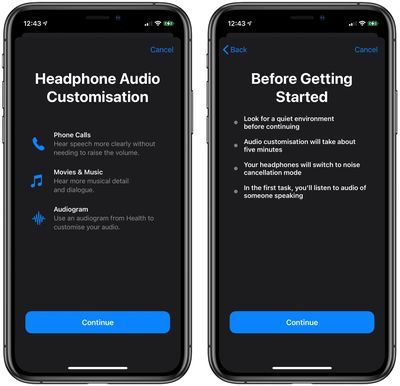
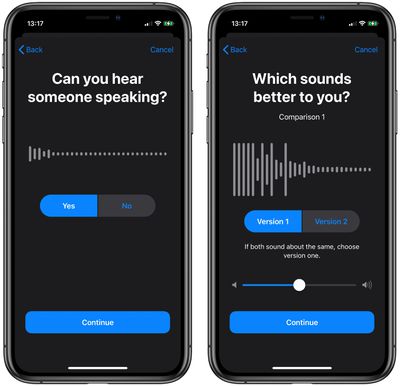
There's also a Custom Audio Setup that walks through a test with soft speaking and different music to determine whether you have specific audio preferences that should be compensated for with the Headphone Accommodations feature.
accessibility
Headphone Accommodations works with the Transparency mode on ‌AirPods Pro and AirPods Max‌ too, making quiet voices louder and tuning the sounds of the environment around you to meet your audio needs.


Top Rated Comments

80 months ago

I hate the word "enhance" when it comes to these audio processing features, a great way to instantly destroy all the hard work done by the artists to master these tracks. Listen to the music how it was intended to be

Agreed on original artist intent however this set of features is originally intended for people with hearing deficiencies. Which I think is great.

Score: 7 Votes (Like | Disagree)
80 months ago
As a person with moderate high frequency hearing loss, this is EXACTLY what I have been hoping Apple would do. Bravo!
Score: 7 Votes (Like | Disagree)
80 months ago
Good step in the right direction. For those with tinnitus, where high frequencies can agitate the condition, there needs to be something a little more manual, like an equalizer or an option to decrease higher frequencies.
Score: 6 Votes (Like | Disagree)
DoctorTech Avatar
80 months ago

I hate the word "enhance" when it comes to these audio processing features, a great way to instantly destroy all the hard work done by the artists to master these tracks. Listen to the music how it was intended to be
We don't all hear the same. I have some hearing loss from over exposure to loud noise over the past 30 years. My hearing is fine at lower frequencies but not so much at higher frequencies. This "enhancement" will allow me to hear the music as the artist intended by boosting volume of frequencies that I don't hear as well. I am REALLY looking forward to this feature!

I am hoping Apple will also make this feature available in MacOS and TVOS. I often watch YouTube and/or Apple TV on my laptop and/or television via my Apple TV box. The majority of the time, I am the only one in the room so it would be nice to put on by PowerBeats Pros and listen to enhanced audio of TV, movies and videos.
Score: 3 Votes (Like | Disagree)
Grohowiak Avatar
80 months ago
Sounds like a good old equalizer with auto settings.
Funny that till this day we have to use third party apps on iOS and Mac if we want to do this ourselves.
Score: 2 Votes (Like | Disagree)
The Stig Avatar
80 months ago
I’m on the latest public beta and I only have the regular AirPods, this setting for me is in accessibility > Audio/Visual > Headphone Accommodations
Score: 2 Votes (Like | Disagree)

Popular Stories

iOS 27 Next to iPhone

Here's When iOS 27 Rolls Out Today in Every Time Zone [Update: It's Out]

Sunday September 13, 2026 3:00 am PDT by
Update 10:04 a.m.: iOS 27 is rolling out now, though it may take a bit for all users to see it, so keep checking! Apple is about to release iOS 27, which will finally deliver more advanced Siri AI capabilities as well as a variety of other refinements, improvements, and new features to iPhones. It's Apple's biggest software update of the year, and Apple announced at Wednesday's iPhone event...
iOS 27 Icon iPhone

iOS 27 Available Now With These 8 New Features

Monday September 14, 2026 9:00 am PDT by
Update — 10 a.m. Pacific Time: Apple has released iOS 27. During its iPhone 18 Pro and iPhone Duo event last week, Apple announced that iOS 27 will be released widely on Monday, September 14. iOS 27 should be available around 10 a.m. Pacific Time / 1 p.m. Eastern Time today via the Settings app, under General → Software Update. Below, we have highlighted eight new features and...
Apple iCloud Plus expansion hero

iCloud+ Now Includes Apple TV, Apple Arcade, and Curated Apple Music Stations in Over 100 Countries

Tuesday September 15, 2026 1:43 am PDT by
Apple today announced a new subscription initiative that turns paid iCloud+ subscriptions into a broader services bundle in more than 100 countries. In select countries, Apple says every paid iCloud+ plan, including the cheapest 50GB tier, now includes Apple TV and Apple Arcade "at no additional cost," while family sharing extends the storage, TV and Arcade access to up to five people....

🔗 Related Apple News & Rumors

Stay updated with the latest Apple ecosystem news and verified rumors