

 When you open the Apple Watch Workout app, the main screen by default offers you 10 quick-start workout types that you can use to track your exercise. These include Walking, Running, Cycling, Elliptical, Rower, Stair stepper, HIIT, Swimming, and Wheelchair.
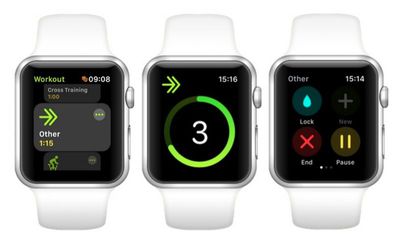
If you want to track a more specialized activity that isn't covered by these types, then you'll want to note the tenth option on the main screen, called Other. Selecting Other allows you to label your activity more accurately by choosing from over 60 pre-defined workout categories – you can find Apple's full list at the end of this article.
The neat thing about using the Other option is that once you've recorded a workout and given it a custom label, that workout type will subsequently appear in the main Workout screen as a quick-start option for the next time you need it.
How to Categorize an Activity in the Workout App
- Launch the stock Workout app on your Apple Watch.
- Using your watch's Crown, scroll down the list of activity types and tap the Other option to begin your workout, or tap the three circled dots at the upper right of the option's icon if you want to define a specific time or calorie goal before the workout starts.
- When you've completed the activity you want to track, swipe right on the metrics readout and tap End.

- Tap the grey Name Workout button near the top of the workout summary.
- Scroll through the alphabetical list and tap the category that best describes your workout. (Apple includes a convenient list of popular categories at the top.)
- With your activity now labeled, scroll down to the bottom of the workout summary screen and tap Done.

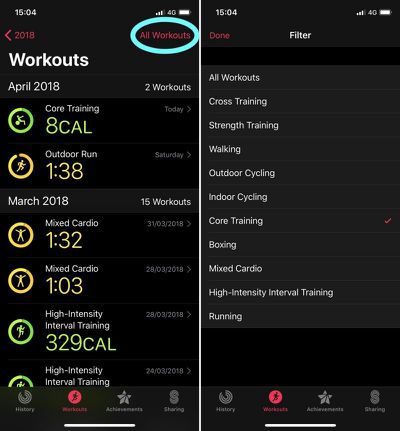
It's unclear whether using these additional categories affects the way Apple Watch's biometric sensors work (although we do know that using Other earns you the calorie or kilojoule equivalent of a brisk walk whenever sensor readings are unavailable). Either way, using specific labels ensures the Activity iOS app offers you a more informative exercise log, which makes it easier to filter to display specific workouts.
To learn how you can customize the Workout metrics for your chosen activity on Apple Watch, check out our how-to guide.
Full List of Apple Watch Workout Categories
- American Football
- Archery
- Athletics
- Australian Football
- Badminton
- Barre
- Baseball
- Basketball
- Bowling
- Boxing
- Climbing
- Core Training
- Cricket
- Cross-Country Skiing
- Cross Training
- Curling
- Dance
- Downhill Skiing
- Equestrian Sports
- Fencing
- Fishing
- Flexibility
- Functional Training
- Golf
- Gymnastics
- Hand Cycling
- Handball
- HIIT (stands for High Intensity Interval Training)
- Hiking
- Hockey
- Hunting
- Jump Rope
- Kickboxing
- Lacrosse
- Martial Arts
- Mind & Body
- Mixed Cardio
- Paddling
- Pilates
- Play
- Racquetball
- Rolling
- Rugby
- Sailing
- Skating
- Snow Sports
- Snowboarding
- Soccer
- Softball
- Squash
- Stairs
- Step Training
- Strength Training
- Surfing
- Table Tennis
- Tai Chi
- Tennis
- Track & Field
- USA Football
- Volleyball
- Water Fitness
- Water Polo
- Water Sports
- Wrestling
- Yoga














































Top Rated Comments
Well, at my age, I suppose that is all it takes.
Under "Downhill Skiing"
[doublepost=1523622752][/doublepost]
Meanwhile, I am debating what shall I categorize this: