Magnifier in iOS 14 Gets Overhauled UI and New Features, Can Be Added to Home Screen

In every version of iOS, Apple adds new Accessibility features and improves others, and iOS 14 is no exception. The Magnifier tool, designed by those with visual issues who need assistance, has new capabilities in iOS 14.
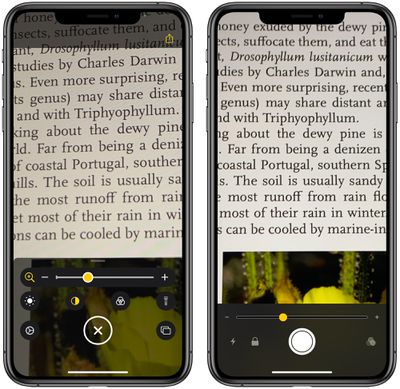
magnifier1

iOS 14 Magnifier interface on left, iOS 13 Magnifier interface on right

Updated Interface

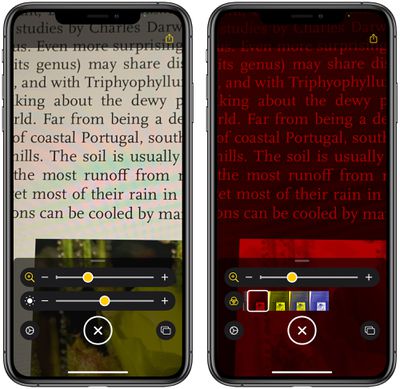
The app features an updated interface that makes controls more readily available and offers clarity on what each tool does. There are options for adjusting brightness and contrast, or adding a filter to change what's being magnified to a color that's easier for an individual to see.
magnifier2
All of the controls can be rearranged to best meet a user's needs, and the filter options can be customized so you can set the one that you need and toggle it on with a tap.

In a dark area, the flashlight can be toggled on with a tap, and the magnification level can be easily controlled with a slider bar. Many of these features were available in the prior version of the app, but multi-shot, an option for capturing more than one photo at once, is new.

Multi-Shot

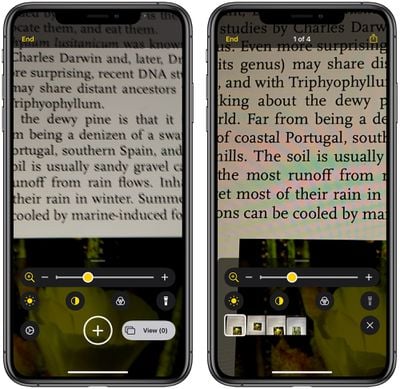
With a new multi-shot option, Magnifier users can take multiple photos at one time, capturing something like different pages of a menu, and then review them all at once, rather than having to take single shots that need to be reviewed one by one.
magnifier4

Adding Magnifier to Home Screen

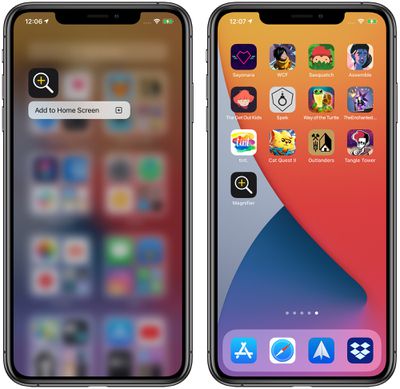
For frequent Magnifier users, an app icon to activate the Magnifier function can be added to the Home Screen by accessing the App Library, searching for Magnifier, and then dragging it over to one of the app pages or long pressing and choosing "Add to ‌Home Screen‌." The feature can continue to be accessed with a triple tap on the side button as well.
magnifier3
To find Magnifier in App Library, make sure it's turned on by opening up Settings, tapping on Accessibility, choosing Magnifier, and then toggling it to the on position.

More Accessibility Info

The changes to the Magnifier app are small but significant, making the app customizable for each user and streamlining the use process. Apple also added several useful new Accessibility features to iOS 14, such as Back Tap for manually activating some iPhone features and Sound Recognition for recognizing sounds like water running, sirens, alarms, and more. Additional detail on the new Accessibility features can be found in our iOS 14 roundup.


Related Forum: iOS 14

Popular Stories

Aston Martin CarPlay Ultra Screen

Apple's CarPlay Ultra to Expand to These Vehicle Brands Later This Year

Sunday February 1, 2026 10:08 am PST by
Last year, Apple launched CarPlay Ultra, the long-awaited next-generation version of its CarPlay software system for vehicles. Nearly nine months later, CarPlay Ultra is still limited to Aston Martin's latest luxury vehicles, but that should change fairly soon. In May 2025, Apple said many other vehicle brands planned to offer CarPlay Ultra, including Hyundai, Kia, and Genesis. In his Powe...
Apple Logo Black

Apple's Next Launch is 'Imminent'

Sunday February 1, 2026 12:31 pm PST by
The calendar has turned to February, and a new report indicates that Apple's next product launch is "imminent," in the form of new MacBook Pro models. "All signs point to an imminent launch of next-generation MacBook Pros that retain the current form factor but deliver faster chips," Bloomberg's Mark Gurman said on Sunday. "I'm told the new models — code-named J714 and J716 — are slated...
iOS 26

iOS 26.3 and iOS 26.4 Will Add These New Features to Your iPhone

Tuesday February 3, 2026 7:47 am PST by
We are still waiting for the iOS 26.3 Release Candidate to come out, so the first iOS 26.4 beta is likely still at least a week or two away. Following beta testing, iOS 26.4 will likely be released to the general public in March or April. Below, we have recapped known or rumored iOS 26.3 and iOS 26.4 features so far. iOS 26.3 iPhone to Android Transfer Tool iOS 26.3 makes it easier...
Apple MacBook Pro M4 hero

New MacBook Pros Reportedly Launching Alongside macOS 26.3

Sunday February 1, 2026 5:42 am PST by
Apple is planning to launch new MacBook Pro models with M5 Pro and M5 Max chips alongside macOS 26.3, according to Bloomberg's Mark Gurman. "Apple's faster MacBook Pros are planned for the macOS 26.3 release cycle," wrote Gurman, in his Power On newsletter today. "I'm told the new models — code-named J714 and J716 — are slated for the macOS 26.3 software cycle, which runs from...
iOS 26 Home Feature

Apple Gives Final Warning to Home App Users

Tuesday February 3, 2026 8:55 am PST by
In 2022, Apple introduced a new Apple Home architecture that is "more reliable and efficient," and the deadline to upgrade and avoid issues is fast approaching. In an email this week, Apple gave customers a final reminder to upgrade their Home app by February 10, 2026. Apple says users who do not upgrade may experience issues with accessories and automations, or lose access to their smart...

Top Rated Comments

Chester Stone Avatar
73 months ago
Why is the newer (iOS 14) graphic always on the left in your articles? ?

It's easier to understand progression by putting old on left, new on right, because our eyes are reading the words from your article left-to-right.

It's as if you post the new graphic for readers, then think, "Oh, I need to compare what this used to be like," and, as an afterthought, post the second image. But for those of us that didn't even know the original feature was there, we look at the two photos and can't tell old from new. (esp. if the new looks subjectively worse)

This is confusing for your readers. When you give your writing an edit pass, please think about how readers will consume it.
Score: 18 Votes (Like | Disagree)
zorinlynx Avatar
73 months ago
Magnifier is such a useful feature, I always wondered why it was hidden away so much. Glad to see it getting some attention and that it's being brought to the forefront!
Score: 7 Votes (Like | Disagree)
rk-apple Avatar
73 months ago
Every year I use magnifier more and more...
Score: 7 Votes (Like | Disagree)
MacCheetah3 Avatar
73 months ago

Magnifier opens on triple clicking my home button.

What replaced triple click on iPhones without home button?
Side button triple press.
Score: 2 Votes (Like | Disagree)
JosephAW Avatar
73 months ago
I'm still waiting for a live OCR where you wave your magnifier over part of a page of text and when it stitches the entire page together in memory it can read it back to you. That and object recognition. I have other apps that can do that now and also tell you what denomination of money you are holding.
Score: 1 Votes (Like | Disagree)
jpn Avatar
73 months ago

... I have other apps that can do that now and also tell you what denomination of money you are holding.
sounds good if yr app could work with minimal user input.

like:
1 open app
2 input how much you have in the foreign currency (this is the only user input)
3 wave iPhone above the currency to understand what currency it is
4 provides a graph of how that currency has changed over the course of a preset number of months
5 app converts the amount of foreign currency to a preset other currency (like USD or whatever).

worth: about USD 6 in app store.
will sell 100's of thousands.
Score: 1 Votes (Like | Disagree)