

iPhone Mirroring in macOS Sequoia and iOS 18: Everything You Need to Know - MacRumorsOpen MenuShow RoundupsShow Forums menuVisit ForumsOpen Sidebar
Skip to Content

iPhone Mirroring in macOS Sequoia and iOS 18: Everything You Need to Know

Apple is expanding how its cross-platform Continuity features work in 2024, introducing an iPhone Mirroring option in macOS Sequoia and iOS 18. As the name suggests, iPhone Mirroring lets you control your iPhone with your Mac by mirroring your iPhone's display to your Mac's display. You can manage your iPhone from your Mac with iPhone Mirroring, using your mouse, keyboard, and trackpad with iPhone apps, notifications, and more.

Subscribe to the MacRumors YouTube channel for more videos.

This guide walks through all of the iPhone Mirroring features and explains how it works.

iPhone Mirroring Basics

After upgrading to iOS 18 and macOS Sequoia, there's a new iPhone Mirroring app in the Dock, and that's how you start an iPhone Mirroring session.
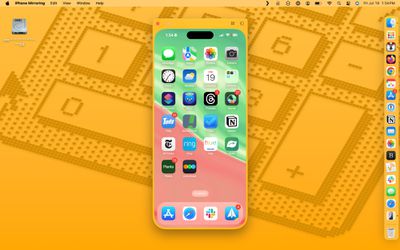
iphone mirroring interface

  1. From your Mac's Dock, click on the iPhone Mirroring app.
  2. Click on Continue at the pop-up informational screen.
  3. Select the iPhone that you want to use if you have more than one iPhone.
  4. Unlock your iPhone with a passcode to allow the connection.
  5. Click on Get Started.
  6. Use Touch ID on the Mac to authenticate (alternatively, enter your password).

When you start up iPhone Mirroring for the first time, you can opt to have it require authentication with every connection or to allow a connection automatically. If you choose automatic authentication, you will not need to authenticate with ‌Touch ID‌ or a password to use iPhone Mirroring when your Mac is unlocked.
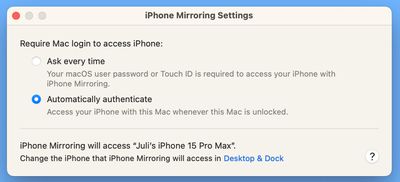
iphone mirroring settings
Otherwise, you will need to authenticate on your Mac each time you want to use iPhone Mirroring. Note that an iPhone needs to be locked while an iPhone Mirroring session is in progress, so you can't use your iPhone while it's being mirrored to your Mac.

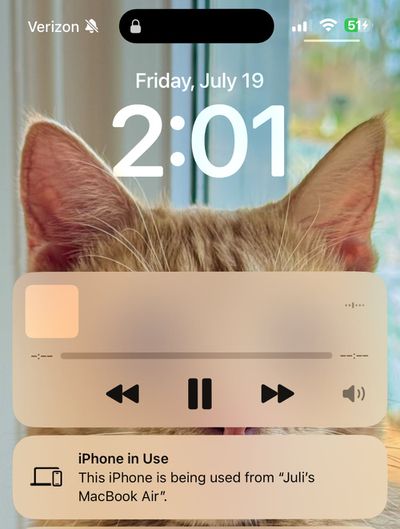
If your iPhone is not locked and you attempt to initiate iPhone Mirroring from your Mac, you will get a warning that the iPhone is in use.

There is no option for launching an iPhone Mirroring session from an iPhone -- it needs to be done from a Mac. While the iPhone Mirroring app icon should be in the Dock, if it's not there, you can get to it from the Launchpad or the Applications folder, because it is treated as a standard app.

iPhone Mirroring Interface

Your full iPhone interface is shown as a dedicated app on the Mac, with your wallpaper and app icons all visible and accessible. You can click in to any of your apps and use it on the Mac just like you would on the iPhone.
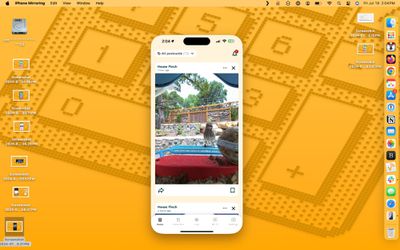
iphone mirroring mac 2
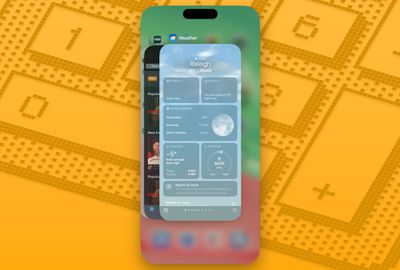
You can get to your Home Screen by clicking on the bottom bar, and swap between pages with the trackpad or with a click and drag gesture using a mouse. There are menu options for getting to the ‌Home Screen‌ and for bringing up the app switching interface, but most control is done within the iPhone Mirroring window.
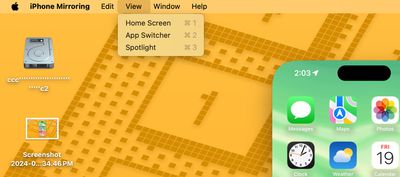
iphone mirroring menu options

iPhone Mirroring Requirements

To use iPhone Mirroring, you need a Mac that runs macOS Sequoia and that has an Apple silicon chip (M1 or later) or a T2 security chip. Macs with T2 security chips are Intel-based and include the following machines:

These Macs have Apple silicon chips:

  • 2020 and later ‌Mac mini‌
  • 2020 and later MacBook Air
  • 2021 and later ‌iMac‌
  • 2021 and later ‌MacBook Pro‌ (14 and 16 inch)
  • 2020 13-inch ‌MacBook Pro‌
  • 2022 and later Mac Studio
  • 2023 Mac Pro

Any iPhone that runs iOS 18 works with iPhone Mirroring.

  • All iPhone 15 models
  • All iPhone 14 models
  • All iPhone 13 models
  • All iPhone 12 models
  • All iPhone 11 models
  • iPhone XS and XS Max
  • iPhone XR
  • iPhone SE (2nd and 3rd gen)

Your iPhone and Mac need to be signed into the same Apple ID, and two-factor authentication must be enabled for the iPhone Mirroring feature to work. You will also need to turn on Bluetooth and Wi-Fi, and the two devices will need to be near each other.
iphone mirroring app switcher
During an iPhone Mirroring session, your Mac and your iPhone need to be close to one another, essentially in the same room.

Privacy and Security

You need to be signed into the same ‌Apple ID‌ on your iPhone and your Mac for iPhone Mirroring to work. While iPhone Mirroring is active, your iPhone does not need to be unlocked.
iphone in use notification
Your iPhone can remain tucked away in a pocket or a bag while you control it from your Mac, so no one can access it or see what you're doing with it. You do need to have your iPhone close enough to your Mac for there to be a Bluetooth connection, likely for security purposes.

Using a Mouse and Keyboard with iPhone

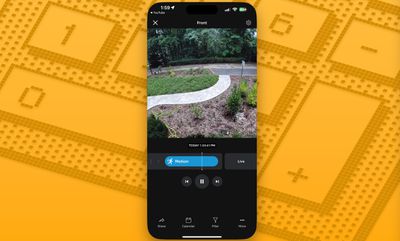
Your Mac's keyboard, trackpad, and mouse can be used with your iPhone, which is useful if you need to type something lengthy in an iPhone app.
iphone mirroring ring app

Audio, Camera, and Microphone

If you play a video on your iPhone while iPhone Mirroring is enabled, the audio comes through your Mac. You can't turn on the Camera app or use the microphone, though.

iPhone Notifications on Mac

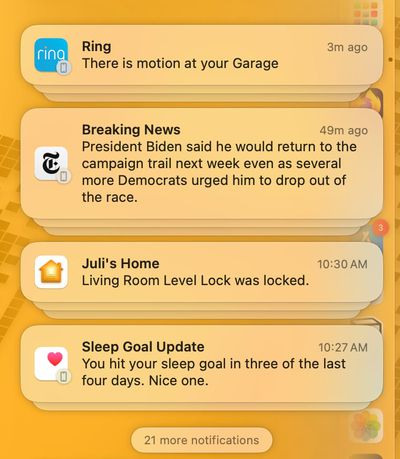
With iPhone Mirroring turned on, incoming iPhone notifications show up right alongside your Mac notifications in the Notification Center at the upper right hand corner of the Mac's display.
iphone mirroring notifications
iPhone notifications are denoted with a small iPhone icon, but they otherwise look like native Mac notifications.

You can click on a notification and open up the app on your iPhone, interacting with it directly from the Mac.

StandBy

While your iPhone is being mirrored to your Mac, it can be on a charger and in StandBy mode, displaying the time and other information.

Drag and Drop

Later this year, Apple plans to add iPhone Mirroring's best feature, file transfers. You will be able to transfer files, photos, and videos from your Mac to your iPhone and vice versa using drag and drop gestures.

Apple says that it will work just like dragging files from one Mac app to another.

While drag and drop has yet to be implemented, you can sort of work around this by using AirDrop to move photos and files from your iPhone to your Mac, initiating AirDrop from the iPhone without having to unlock it.

Resizing

There are three size options for iPhone Mirroring. You can have it mirror the display size of your iPhone or set it to be one size bigger or one size larger, with these options available from the iPhone Mirroring settings options.
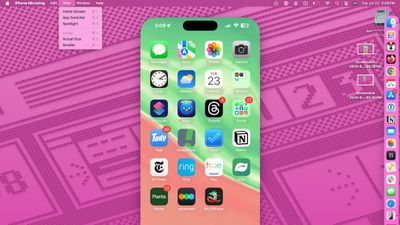
iphone mirroring larger smaller
If an app or a game is displayed in landscape orientation, the window will shift into landscape.
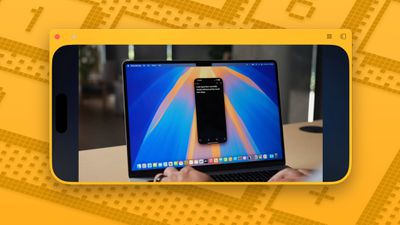
iphone mirroring landscape mode

Home Screen Management

You can click and hold on an area of the iPhone's ‌Home Screen‌ while iPhone Mirroring is activated to bring up jiggle mode, which allows you to then rearrange your iPhone apps, delete them, and add and manage widgets.
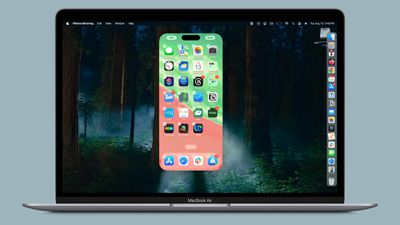
iphone mirroring jiggle mode

iPhone Mirroring Limitations

iPhone Mirroring will not work if the Mac is using AirPlay to stream music or video content to another device, or if Sidecar is enabled with an iPad. Continuity Camera cannot be enabled either, so if you're using your iPhone as a webcam for your Mac, you can't use iPhone Mirroring at the same time.

Attempting to watch movies and TV shows from some apps like Hulu and Netflix does not work, with the iPhone Mirroring app showing just a blank black screen, likely due to DRM restrictions.

You cannot access the Control Center or the Notification Center with iPhone Mirroring, nor can you manage the Lock Screen.

Read More

For more on the new features that Apple is adding in iOS 18, we have a dedicated iOS 18 roundup.

Related Forums: iOS 18, iPadOS 18, macOS Sequoia

Popular Stories

Apple HomeView lineup feature1

Apple Announces 'HomeView' Smart Home Hub

Tuesday October 13, 2026 6:00 am PDT by
Apple today announced the "HomeView," an all-new kind of smart home hub featuring a 7-inch Liquid Retina display and Siri AI. Apple's senior vice president of Worldwide Marketing Greg Joswiak said: Apple HomeView is designed to be shared by everyone in the home yet feel completely personal to each user. It recognizes your face to shift from a household screen to your own experience,...
Apple TV 4K 4th Generation feature4

New Apple TV 4K Announced With A19 Chip, Updated Siri Remote, More

Tuesday October 13, 2026 6:08 am PDT by
Apple today announced the fourth-generation Apple TV 4K, with key features including an A19 chip, Siri AI support, an updated Siri Remote that has Find My support with Precision Finding, built in far-field microphones, support for surround sound with four HomePods in front and rear pairs, and more. The A19 chip in the new Apple TV 4K delivers up to 50% faster CPU performance and up to twice...
iOS 26 Home Feature

RIP, homeOS

Tuesday October 13, 2026 9:39 am PDT by
MacRumors was first to reveal the name "HomeView" last week, after discovering a trademark filing from a secretive shell company that we correctly suspected was linked to Apple. Apple was likely behind a "homeOS" trademark filing as well, but the company ultimately decided to stick with generic "HomeView software" naming, just like it refers to the HomePod's operating system as "HomePod...

Top Rated Comments

jclo Avatar
29 months ago

I don't plan on ever owning a smartphone of any kind.
Leaving the house is my only disconnect from technology.
That said, using my iPad on Apple TV makes more sense.
(I do want to see the rest of your tabby Juli.)

Gents, get your minds out of the gutter.
Cat tax:


He's a big fan of Macs. Been using them since he was a baby.


Attachment Image

Attachment Image
Score: 25 Votes (Like | Disagree)
Capeto Avatar
29 months ago
Juli, I gotta ask about your hard drive name.
Score: 18 Votes (Like | Disagree)
klasma Avatar
29 months ago

Can the phone be turned to landscape?
Counterintuitively, you have to turn your Mac to portrait.
Score: 14 Votes (Like | Disagree)
jclo Avatar
29 months ago

2018 and later MacBook Pro (13 and 15 inch) AND 16
Good point, fixing that!

Can the phone be turned to landscape? I have some iPhone only apps that only work on landscape?
If there's an iPhone app that requires landscape, it will automatically go to landscape mode. So in YouTube for example, if I play a video and then expand it to take up the full screen, it will swap over to landscape mode. I can't manually put it in landscape mode, though.

Juli, I gotta ask about your hard drive name.
It was a name decided on by my cat.

How do you take a screenshot

Could this happen with the Apple Watch too in the future?
You can take a Mac screenshot of the iPhone on your Mac, but not an iPhone screenshot, as far as I'm aware.

Does it work with iPadOS too?
No, it's iPhone only.

I'm disappointed to hear this won't work while using Continuity Camera. Any indication that this limitation is part of it being a beta or that's just how it'll always be?
I'm not sure on this. When you try to use it with Continuity Camera on, it pops up an error message telling you that it doesn't work with it, so I'm not sure either way.

"Privacy and Security

You need to be signed into the same Apple ID on your iPhone and your Mac for iPhone Mirroring to work. While iPhone Mirroring is active, you do not need to have your iPhone with you, and it does not need to be unlocked."


wow, really????
This is bad wording on my part. Your iPhone doesn't need to be like on your person, but it does need to be nearby. Like in the same room. I'm going to update that.
Score: 12 Votes (Like | Disagree)
kaishockz Avatar
29 months ago
Does not work in EU !!!!!
Score: 11 Votes (Like | Disagree)
29 months ago

Do people leave their phones in the other room and instead of getting up to get it they lazily can now log in from 15 feet away?
Think you underestimate people and the nature of technology itself.

Half of what tech is, is just making things easy for you, even if it's saving a fraction of a second.

It's why we have Touch/FaceID instead of typing a password to unlock our phone, saves us 2 seconds.
It's why people get a watch, see notifications on their wrist instead of simply getting up to get their phone.
No need to carry around a camera or music player when you have both on the phone now.
Save 3 seconds by unlocking your car door with a key instead of inserting it.
Paying with a tap on your watch instead of reaching in your back pocket for your credit card.
Same logic with wireless of anything, it's simply convenience.
Same goes with social media apps (TikTok's easy to use app), UI, etc.

We live in an age where every fraction of a second matters, where not having to move around to do something matters, etc, etc.

So yes, having my phone on my Mac which is what I'm on 10 hours a day is a game changer, increases my productivity. I can simply set my iPhone now on a MagSafe charger all day, horizontally, so it can show me a calendar/time/widgets at a glance.
Score: 10 Votes (Like | Disagree)
Latest Stories
The MacRumors Show: Was HomeView Worth the Wait?
19 minutes ago
Apple Refers to HomeView as 'HomePodDevice' in Legal Document
44 minutes ago
Apple Pre-Orders Kick Off With First Discounts on HomeView and Apple TV 4K
2 hours ago
Developers Question Scope of Potential Apple Antitrust Settlement
3 hours ago
iPhone Duo Resold for $5,000 on eBay After Selling Out
3 hours ago
Massive Discounts Hit 2026 MacBook Pro With Up to $800 Off
3 hours ago
iPhone Duo is Sold Out for Christmas as Shipping Estimates Slip to 2027
3 hours ago
Didn't Pre-Order an iPhone Duo Yet? Wait Times Are Significant Now
4 hours ago
First Apple TV 4K Pre-Order Discount Arrives at Amazon
4 hours ago
iPhone Duo Pre-Order Deals: The Best Carrier Offers From AT&T and T-Mobile
4 hours ago
iPhone Duo Now Available to Pre-Order From Apple
5 hours ago
iPhone 18 Pro vs. iPhone Duo Buyer's Guide: Which Should You Choose?
7 hours ago
Apple Store Down Ahead of iPhone Duo Pre-Orders
7 hours ago
Oops, Apple's Website Just Hinted at iPad Mini 8
16 hours ago
OLED MacBook Pro Won't Get M7 Chips Until Late 2027
18 hours ago
Apple Pledged $25 Million to Trump's White House Ballroom
20 hours ago
Touchscreen MacBook Pro Could Launch on November 6
21 hours ago
New Withings Users Must Pay $99/Year for Apple Health Syncing
21 hours ago
Meta and Apple Bring Muse Spark Open AI Model to Mac Studio
23 hours ago
iPad Mini 8: Apple Has Tested Both 60Hz and 120Hz ProMotion Displays
23 hours ago
Apple TV 4K 2022 vs. 2026 Buyer's Guide: All Differences Compared
1 day ago
Apple CEO John Ternus on Early Foldables: 'Kind of Cheap and Crappy'
1 day ago
Greg Joswiak Says Apple Isn't Focused on Making AI for 'Lunatic Fringe'
1 day ago
Amazon Offers $120 Discount on AirPods Max 2, $50 Off AirPods Pro 3
1 day ago
Apple CEO John Ternus Featured on Cover of TIME Magazine: 'New Era'
1 day ago
Apple Announces Deadline to 'Get Ready' to Pre-Order the iPhone Duo
1 day ago
MKBHD is 'Not Convinced' About Apple's New HomeView, Here's Why
1 day ago
Apple's Wall-Mounted HomeView Ships Without a Power Adapter
1 day ago
Rare Apple-1 With Steve Jobs Letter Sells for $1.15 Million
1 day ago
Apple Now Inviting Media to October 28 'Launch Experience'
1 day ago

🔗 Related Apple News & Rumors

Stay updated with the latest Apple ecosystem news and verified rumors









































