iOS 26: What's New With the Podcasts App - MacRumorsOpen MenuShow RoundupsShow Forums menuVisit ForumsOpen Sidebar
Skip to Content

iOS 26: What's New With the Podcasts App

The Podcasts app didn't get as many iOS 26 updates as some of Apple's other apps, but there are some design changes and feature tweaks that are worth knowing about.
iOS 26 Podcasts Glass Feature

Liquid Glass

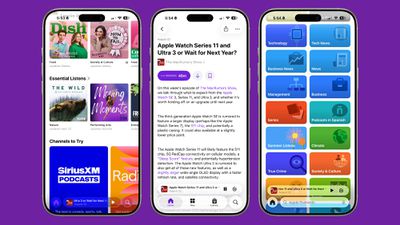
Like all of Apple's apps, the Podcasts app adopts the new Liquid Glass design language. UI elements have a glass-like, translucent look that let the background art shine through.
ios 26 podcasts design
Buttons have a more rounded design and the navigation bar no longer takes up the entire bottom of the app. The Browse tab is now the New tab, and the Search tab has the search bar at the bottom of the display.

There's also an updated Liquid Glass icon that looks like several stacked layers of glass.

Updated Speed Controls

‌iOS 26‌ includes options to change the playback speed of a podcast. When you're playing a show, tap on the "1x" button in the corner and you'll be able to change the speed. Apple offers multiple playback speeds ranging from 0.5x to 3x. In iOS 18, you could only select from four fixed speed options: 1.25x, 1.5x, 1.75, and 2x.

ios 26 podcasts speed
To change the playback speed, tap one of the preset options or drag a finger over one of the options to bring up a dial that allows for more granular 0.1x adjustments.

Enhance Dialogue

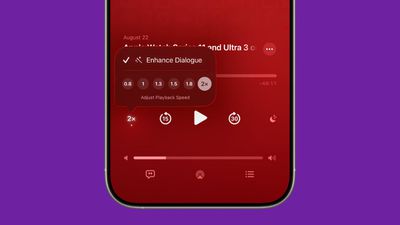
The Podcasts app includes an Enhance Dialogue feature that is designed to isolate voices so they sound clearer amid any background noise.
ios 26 enhance dialogue podcasts
To use Enhance Dialogue, play a show in the Podcasts app. From there, open up the fullscreen playback controls, tap the "1x" playback speed button, and choose the Enhance Dialogue option.

Per-Show Settings

The Podcasts app will remember your Enhance Dialogue and playback speed preference for each individual podcast, so it doesn't need to be turned on every time you listen and settings won't affect other podcasts.

Read More

More on the features that are available in ‌iOS 26‌ can be found in our iOS 26 roundup.

Related Roundups: iOS 26, iPadOS 26
Related Forum: iOS 26

Popular Stories

Jon Prosser Rainbow

YouTuber Jon Prosser Responds to Apple's Lawsuit Over iOS 26 Leaks

Thursday July 2, 2026 6:42 pm PDT by
Jon Prosser today responded to Apple's lawsuit over iOS 26 leaks, with the YouTuber placing much of the blame on his acquaintance Michael Ramacciotti. As a refresher, Apple sued Prosser and Ramacciotti in July 2025 over alleged theft of the company's trade secrets. Apple alleged that the duo coordinated to break into former Apple software engineer Ethan Lipnik's development iPhone, in order ...

iOS 26

Apple Seeds Fourth iOS 26.6 and iPadOS 26.6 Betas to Developers

Monday July 6, 2026 10:17 am PDT by
Apple today seeded the fourth betas of upcoming iOS 26.6 and iPadOS 26.6 updates to developers for testing purposes, with the software coming a week after Apple seeded the third betas. Registered developers can download the betas from the Settings app on the iPhone or iPad by going to the General section and selecting Software Update. With iOS 27 set to launch in September, Apple is...
iOS 26

Apple Seeds Fourth Public Betas of iOS 26.6, macOS Tahoe 26.6 and More

Tuesday July 7, 2026 1:16 pm PDT by
Apple today provided public beta testers with the fourth betas of iOS 26.6, iPadOS 26.6, macOS Tahoe 26.6, watchOS 26.6, and tvOS 26.6, with the software coming a day after Apple seeded the betas to developers. After signing up to beta test the software updates on Apple's beta site, public beta testers can download the new software using the Software Update section in the Settings app on...

Top Rated Comments

12 months ago

How hard would it be for them to add a REPEAT function so we can loop a podcast? Too advanced for them?
Not knocking your needs, but realistically, how many people actually want to put a podcast episode on loop?
Score: 6 Votes (Like | Disagree)
12 months ago

Not knocking your needs, but realistically, how many people actually want to put a podcast episode on loop?
Sleep stuff. For whatever reason, some spoken or soundscape “simulated environment” noise tracks are as podcasts rather than being available in Apple Music. Now, why should THAT fact make it so I have no way to put the thing I’m listening to on repeat? I’m listening to a thing. It’s digital. I want it to repeat.
Score: 4 Votes (Like | Disagree)
nutmac Avatar
12 months ago
Better than nothing but I want Overcast's shorter silences (Smart Speed) and clear consistent volume (Voice Boost) features.
Score: 4 Votes (Like | Disagree)
Starfia Avatar
12 months ago
So Apple has updated the Podcasts app with Liquid Glass.

Fascinating. 🤔
Score: 4 Votes (Like | Disagree)
12 months ago
Can’t see Apple caring unless they launch Apple Podcasts +
Score: 3 Votes (Like | Disagree)
12 months ago

You’ve seen the ambient music options in control center? Just checking
Yes. Those samples are as short as 4 seconds in some cases. Literally. Anyway, if someone puts up a podcast of 30 minutes of forest sound or whatever, I’d like to be able to repeat it. It’s literally 2025.
Score: 3 Votes (Like | Disagree)

🔗 Related Apple News & Rumors

Stay updated with the latest Apple ecosystem news and verified rumors