

iOS 18: What's New With Safari - MacRumorsOpen MenuShow RoundupsShow Forums menuVisit ForumsOpen Sidebar
Skip to Content

iOS 18: What's New With Safari

iOS 18 includes updates for many of Apple's built-in apps, and Safari is no exception. Apple's browser has some useful new features for more quickly getting to the information that you want most from websites.
iOS 18 Safari Feature
This guide highlights everything that's new in Safari.

Highlights

Highlights detects relevant information on a webpage that you're visiting and surfaces it for you so you can find pertinent details without having to scour a page.

ipados 18 safari highlights
When a Highlight is available on a webpage, you'll see a small purple sparkle over the tool icon in the browser bar, along with a quick flash to the Highlight data that's available. If you tap on the icon with the sparkle, Safari will show you key website information like location, hours, and directions.

Information that's shown in Highlights depends on the website you're visiting. For stores, hotels, and other places you might want to go to, Safari provides directions. For other websites, you might see links to learn more about people, music, movies, and TV shows.
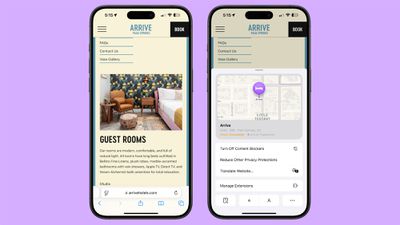
ios 18 safari highlights
Highlights is available in U.S. English at the current time, and you won't see it on all websites. Highlights can be disabled by opening up the Safari section of the Settings app and toggling it off.

Reader Mode

Safari updated Reader Mode to provide a table of contents for long articles and also a quick summary of what's on the page.
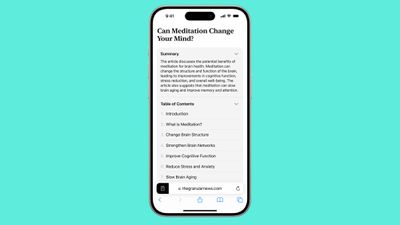
ios 18 safari reader mode
The new Reader Mode features give users a way to get to a specific part of an article as well as an overview of what's in an article in order to decide whether it's worth continuing to read.

New Reader Mode options are available in English (Australia), English (Canada), English (Ireland), English (New Zealand), English (South Africa), English (UK), and English (U.S.)

Design Changes

Apple updated the design of the Safari tools that can be accessed through the URL bar. The tool icon is now a box with two lines, and tapping it brings you into full overlay window that's at the bottom of the display.
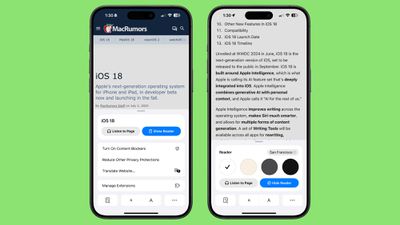
ios 18 safari design changes
Not all tools are displayed at once anymore, with Apple prioritizing those people might want most like translate, Reader Mode, Privacy Protections, and font size. Tapping on the ellipsis at the bottom of the interface shows the rest of the Safari settings like Show IP Address, Request Desktop Website, and Hide Toolbar.

Apple has also changed the design of the tab management page, with a unified toolbar for separate sections and tab groups.

New Quick Access Options

Some of the features that used to be tucked away in the Share Sheet are now more readily available through the Safari toolbar.
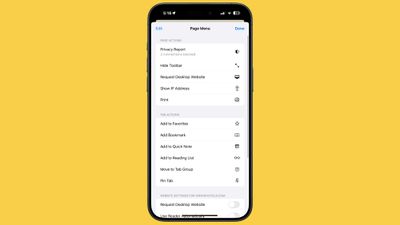
ios 18 safari menu options
New options include the following:

  • Print
  • Add to Favorites
  • Add Bookmark
  • Add to Quick Note
  • Add to Reading List
  • Move to Tab Group
  • Pin Tab
  • Camera Access
  • Microphone Access
  • Location Access
  • Open Links in Profile

The Page Menu can be edited so that you can customize which tools go in your list of favorites for quicker access.

All of these options are still available through the Share Sheet as well.

Distraction Control

Safari includes Distraction Control, a feature that cuts down on distracting elements on webpages like sign-in windows, cookie preference popups, GDPR notices, newsletter signup banners, autoplay videos, and more.

ios 18 distraction control
Distraction Control can be used to hide static content on a page, but it is not an ad blocker and cannot be used to permanently hide ads. An ad can be temporarily hidden, but the feature was not designed for ads, and an ad will reappear when it refreshes. It was not created for elements on a webpage that regularly change.

To use Distraction Control, go to the Page Menu and select Hide Distracting Items. You can select an area on the page that you want to hide, and static content that you select will remain hidden. It is a good way to eliminate the pesky popovers that show up when browsing online stores, reading articles, and more. iPhone, iPad, and Mac users need to opt in to hiding elements on the page, and Apple says that nothing is hidden that is not proactively selected.

Subscribe to the MacRumors YouTube channel for more videos.

When hiding a cookie banner or GDPR popup with Distraction Control, the function is the same as closing a banner without submitting website preferences at all.

Your Distraction Control settings are on-device and will not sync from device to device, so you will need to hide website elements on each one of your devices. You can use the "Show Hidden Items" option by going to the Safari search field to instantly see all hidden elements on a webpage.

Passwords

With a new dedicated Passwords app, Safari logins, passwords, and passkeys are filled in automatically if you have your information saved to the app.
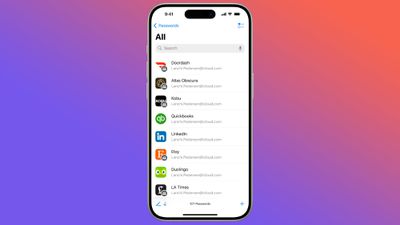
ios 18 passwords app
The Passwords app has the same functionality as the Passwords section in the Settings app, it's simply been split out into a standalone app for easier access. Safari can automatically save login and password information to the Passwords app, and everything syncs cross-device. Passwords can even be accessed on Windows PCs.

Locked Apps

Apps like Safari can be locked and hidden, requiring Face ID or Touch ID authentication to access them. Locking an app goes a step further than the protected private browsing feature that Apple introduced in an earlier version of iOS, as the entire Safari browser can be locked.
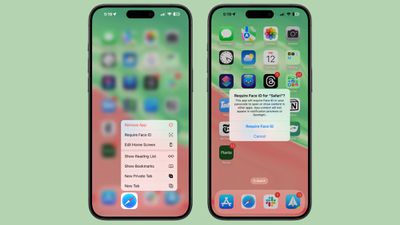
ios 18 locked apps
To open a locked app, you need to authenticate, so someone who has your unlocked phone still won't be able to see your browser if you lock Safari. Hiding an app locks it and removes it from the Home Screen, tucking it away in a secret Hidden apps folder in the App Library.

Read More

For more on the new features that Apple is adding in iOS 18, we have a dedicated iOS 18 roundup.

Related Forums: iOS 18, iPadOS 18

Popular Stories

Apple HomeView lineup feature1

Apple Announces 'HomeView' Smart Home Hub

Tuesday October 13, 2026 6:00 am PDT by
Apple today announced the "HomeView," an all-new kind of smart home hub featuring a 7-inch Liquid Retina display and Siri AI. Apple's senior vice president of Worldwide Marketing Greg Joswiak said: Apple HomeView is designed to be shared by everyone in the home yet feel completely personal to each user. It recognizes your face to shift from a household screen to your own experience,...
Apple TV 4K 4th Generation feature4

New Apple TV 4K Announced With A19 Chip, Updated Siri Remote, More

Tuesday October 13, 2026 6:08 am PDT by
Apple today announced the fourth-generation Apple TV 4K, with key features including an A19 chip, Siri AI support, an updated Siri Remote that has Find My support with Precision Finding, built in far-field microphones, support for surround sound with four HomePods in front and rear pairs, and more. The A19 chip in the new Apple TV 4K delivers up to 50% faster CPU performance and up to twice...
iOS 26 Home Feature

RIP, homeOS

Tuesday October 13, 2026 9:39 am PDT by
MacRumors was first to reveal the name "HomeView" last week, after discovering a trademark filing from a secretive shell company that we correctly suspected was linked to Apple. Apple was likely behind a "homeOS" trademark filing as well, but the company ultimately decided to stick with generic "HomeView software" naming, just like it refers to the HomePod's operating system as "HomePod...

Top Rated Comments

DocMultimedia Avatar
30 months ago
I'm really looking forward to the Passwords app.

Score: 5 Votes (Like | Disagree)
30 months ago

If they’d just fix all the endless problems with the world’s worst browser and not make any feature changes, the entire human race would celebrate.

I find Safari perfect for my needs with no problems at all.
Score: 4 Votes (Like | Disagree)
sniffies Avatar
30 months ago
Still no favicons in bookmarks though.

macOS Safari has had them since 2003.
Score: 4 Votes (Like | Disagree)
30 months ago
There should be a porn mode

With custom quick action options… such as blank window, mute sound and clear all history 😂

I think we all know the motivation for Retina displays. Porn pushes technology and retina displays were made in response to the demand for super high resolution images and their display. QuickTime was also a response to porn. Anyone wanna QuickTime was a thing in the 90s

Seriously, adult content has pushed tech and also software. Whether you like it or not.
Score: 3 Votes (Like | Disagree)
QuarterSwede Avatar
30 months ago

If they’d just fix all the endless problems with the world’s worst browser and not make any feature changes, the entire human race would celebrate.
Ahhh, so you’ve used Chrome too.
Score: 3 Votes (Like | Disagree)
needsomecoffee Avatar
30 months ago
Why does Apple not support Progressive Web Apps the same between iOS and MacOS. I just tested the new PWA "Add to Dock" feature in MacOS and was severly disappointed to find that the "app" is really just an optimized link to the web page. No HTML/CSS/JS files are downloaded. If you are off-line, the PWA will not work. Both iPhone and iPad Safari apps properly download the web page files as described in the manifest, and work just fine off-line. Why is MacOS different ??
Score: 2 Votes (Like | Disagree)
Latest Stories
iPhone Duo is Sold Out for Christmas as Shipping Estimates Slip to 2027
18 minutes ago
Didn't Pre-Order an iPhone Duo Yet? Wait Times Are Significant Now
1 hour ago
First Apple TV 4K Pre-Order Discount Arrives at Amazon
1 hour ago
iPhone Duo Pre-Order Deals: The Best Carrier Offers From AT&T and T-Mobile
1 hour ago
iPhone Duo Now Available to Pre-Order From Apple
1 hour ago
iPhone 18 Pro vs. iPhone Duo Buyer's Guide: Which Should You Choose?
4 hours ago
Apple Store Down Ahead of iPhone Duo Pre-Orders
4 hours ago
Oops, Apple's Website Just Hinted at iPad Mini 8
13 hours ago
OLED MacBook Pro Won't Get M7 Chips Until Late 2027
15 hours ago
Apple Pledged $25 Million to Trump's White House Ballroom
17 hours ago
Touchscreen MacBook Pro Could Launch on November 6
18 hours ago
New Withings Users Must Pay $99/Year for Apple Health Syncing
18 hours ago
Meta and Apple Bring Muse Spark Open AI Model to Mac Studio
20 hours ago
iPad Mini 8: Apple Has Tested Both 60Hz and 120Hz ProMotion Displays
20 hours ago
Apple TV 4K 2022 vs. 2026 Buyer's Guide: All Differences Compared
21 hours ago
Apple CEO John Ternus on Early Foldables: 'Kind of Cheap and Crappy'
22 hours ago
Greg Joswiak Says Apple Isn't Focused on Making AI for 'Lunatic Fringe'
23 hours ago
Amazon Offers $120 Discount on AirPods Max 2, $50 Off AirPods Pro 3
23 hours ago
Apple CEO John Ternus Featured on Cover of TIME Magazine: 'New Era'
1 day ago
Apple Announces Deadline to 'Get Ready' to Pre-Order the iPhone Duo
1 day ago
MKBHD is 'Not Convinced' About Apple's New HomeView, Here's Why
1 day ago
Apple's Wall-Mounted HomeView Ships Without a Power Adapter
1 day ago
Rare Apple-1 With Steve Jobs Letter Sells for $1.15 Million
1 day ago
Apple Now Inviting Media to October 28 'Launch Experience'
1 day ago
iPhone Duo's A20 Pro Chip Benchmarked Ahead of Launch
2 days ago
10 HomeView Features You Might Have Missed
2 days ago
Apple Becomes Second Company to Close Above $5 Trillion
2 days ago
Which Apple Home Devices Get Siri AI, and When
2 days ago
Apple's Long-Delayed HomeView Was Already Being Tested in 2024
2 days ago
Apple Intelligence Coming to China in December With iOS 27.3
2 days ago

🔗 Related Apple News & Rumors

Stay updated with the latest Apple ecosystem news and verified rumors







































