

Apple's iOS 17 upgrade brings notable new communication features, adding functionality to the Phone app and the FaceTime app. The Phone app lets you customize what people see when you call them, while FaceTime gains video messages and the option to take FaceTime calls on the Apple TV.
This guide highlights everything new with the Phone and FaceTime apps in iOS 17.
Phone
Contact Posters
Apple started letting you choose the name and photo that you want to share with others in the Messages app, and now sharing extends to the Phone app. You can create a Contact Poster that other people see when they call you.
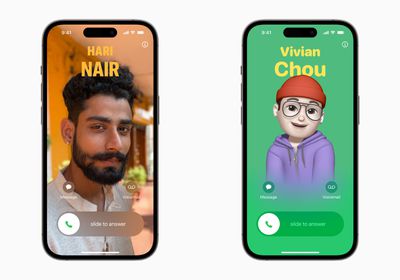
Contact Posters are created in the Contacts app by tapping on your own name, selecting the Contact Photo & Poster option, and tapping on the Edit button.
You can choose to share a photo, a Memoji, or just your initials, and this is what people will see when you call them. To go along with the photo, you can also customize font size, style, and color. Note that you cannot change your name from this interface - that needs to be done by changing your contact info.
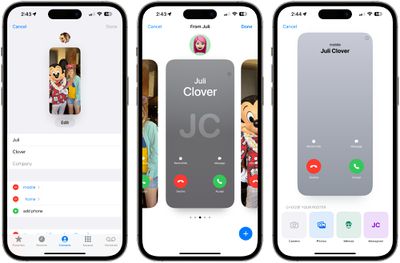
There are several filters that can be applied to images, including black and white, duotone, and color wash in the color of your choice. You can edit the crop of the photo, and customize your Contact Poster independently of your shared Messages image.
Contact Posters can be shared with your contacts automatically, or you can be prompted to share with anyone who calls you so no one sees your custom imagery without your permission.
Contacts App
To account for Contact Posters, the design of the Contacts app has been tweaked. When you tap on a contact, you'll now see that their contact image, Memoji, or initials take up a much larger portion of the screen. This also counts for contacts where you've assigned an image.
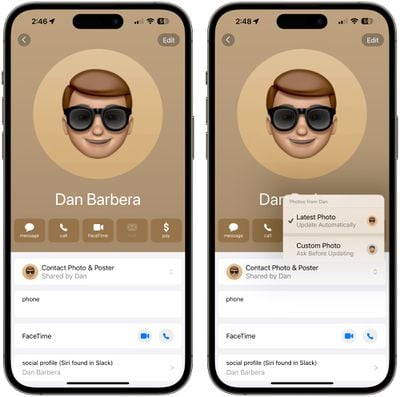
You'll have an option to tap on the Contact Photo and Poster option underneath the person's name to choose to update to the latest info automatically when your contact changes something like their profile photo, or turn on manual updates so you're prompted for the update.
Live Voicemail
Live Voicemail is a new feature that allows the iPhone to transcribe a voicemail as it's being left, so you can pick up the phone if it turns out to be something important.
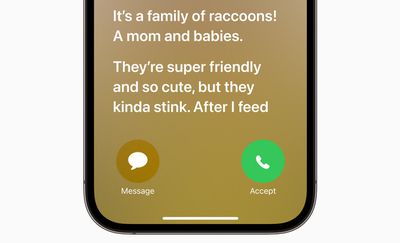
The voicemail is displayed right on your Lock Screen as the person on the other end speaks, which can help you avoid missed calls if it turns out an unknown number is a call from your doctor or another important person.
Live Voicemail can be somewhat confusing to people who are not familiar with the feature. Apple's default Live Voicemail wording tells people that "the person you're calling may pick up," which has led to instances where people have called iOS 17 users and waited for several minutes for the person with Live Voicemail to answer. It's essentially not clear that it's a standard voicemail sequence.
This can be avoided with a custom greeting recorded by opening up the Phone app, tapping on Voicemail, and then tapping on Greeting to make a new recording.
Live Voicemail can also be turned off in the Settings app by going to Phone > Live Voicemail and toggling it off.
Updated Call Log
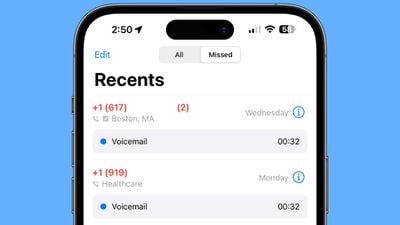
A small but useful update to the call log lets you know if a missed call resulted in a voicemail. If so, you can tap that voicemail from the Recents interface.
Dual-SIM Upgrades
Those who use the Dual-SIM feature now have an option to create different ringtones for each SIM, and choose a SIM when calling back an unknown number. There's also an option to sort incoming messages based on SIM.
FaceTime
Audio and Video Messages
When you FaceTime someone and they aren't able to answer, you can leave a video or audio message depending on the call method you used. If you were using FaceTime video, you can leave a video message, and if you were using FaceTime audio, you can leave an audio message.

After the missed call, you'll see a "Record Video" option, which will allow you to create a message. You'll see a preview of your video, and the option to re-record if it didn't turn out well. Once sent, the video message is in the FaceTime missed call log, where the person can watch the video and call you back.
Note that there is an option for people to save video messages to their Camera Roll, so keep that in mind when sending a video to someone.
FaceTime Reactions
The Messages app has had reactions that trigger with certain words for some time now, and in iOS 17, Apple is bringing reactions to FaceTime. Rather than being triggered by words, though, the reactions are triggered by gestures.

Gestures trigger on-screen effects like hearts, balloons, confetti, fireworks, and more, with the effects flooding the display over the FaceTime window.
- Heart - Heart emoji
- Thumbs up - Thumbs up emoji
- Two thumbs up - Fireworks
- Single thumbs down - Thumbs down emoji
- Two thumbs down - Cloud
- Peace sign with one hand - Balloons
- Peace sign with two hands - Confetti
- "Rock on" sign with two hands - Laser
While the reactions are triggered with gestures, you can also long press on your picture in FaceTime to bring up a list of options.
These reactions work by default in FaceTime, and third-party apps can adopt the effects as well.
FaceTime on Apple TV
With iOS 17 and tvOS 17, you can use FaceTime on the Apple TV. There's a new FaceTime app on tvOS 17, but to use it, you need an iPhone running iOS 17 or an iPad running iPadOS 17 to serve as the camera because the Apple TV doesn't have its own camera.

You can start a FaceTime call on the Apple TV or start one on the iPhone and hand it off to the Apple TV. It's basically the same as FaceTime on an iPhone, iPad, or Mac, but with a much larger display. The iPhone will need to be placed near the TV for capturing your video, and the person you're FaceTiming with will be shown on the TV.
Center Stage is available to keep you in the frame as you move around, and you can handoff a call from the Apple TV to an iOS device if you need to move to another room, and vice versa.
Read More
More information on all of the new features in the iOS 17 update can be found in our iOS 17 roundup.




















