

iOS 17.3 Beta: All the New Features So Far - MacRumorsOpen MenuShow RoundupsShow Forums menuVisit ForumsOpen Sidebar
Skip to Content

iOS 17.3 Beta: All the New Features So Far

Apple started testing the iOS 17.3 and iPadOS 17.3 betas in December, and while we are not expecting these updates to be as feature rich as iOS and iPadOS 17.2, there are some notable features that have been found so far.
iOS 17
This guide aggregates everything that is coming in the iOS 17.3 update, and we'll update it throughout the beta testing period.

Stolen Device Protection

Earlier this year, there were news reports about a slate of iPhone thefts where the thief spied on a victim to learn the device passcode before stealing the phone, leading to drained bank accounts and an untraceable iPhone.
ios stolen device protection
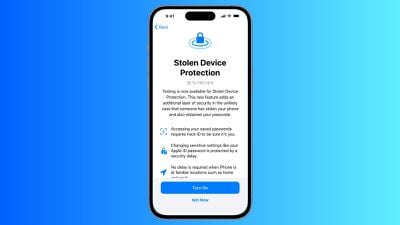
As a solution, Apple introduced Stolen Device Mode in iOS 17.3 to add extra security. If someone should obtain both your iPhone and your passcode, this feature prevents total catastrophe. With Stolen Device Mode enabled, accessing passwords in iCloud Keychain, turning off Lost Mode, erasing content, and making purchases in Safari requires biometric authentication with Face ID or Touch ID.

Certain actions such as changing an Apple ID password require ‌Face ID‌ and have a one-hour security delay. So if you (or someone else) tried to change your ‌Apple ID‌ login, you would need both ‌Face ID‌ authentication and then an hour wait period before the password could be updated. These wait periods are waived when you are in a trusted location like home or work.

As outlined in our report on the feature, here are actions that require biometric authentication when the Stolen Device Protection is activated:

  • Viewing/using passwords or passkeys saved in ‌iCloud‌ Keychain
  • Applying for a new Apple Card
  • Viewing an ‌Apple Card‌ virtual card
  • Turning off Lost Mode
  • Erasing all content and settings
  • Taking certain Apple Cash and Savings actions in Wallet
  • Using payment methods saved in Safari
  • Using your iPhone to set up a new device

Note that these actions do not have a passcode backup, so you can't use a passcode to skirt ‌Face ID‌ or ‌Touch ID‌. Actions that require biometric authentication and have a one-hour security delay include the following:

  • Changing your ‌Apple ID‌ password
  • Updating select ‌Apple ID‌ account security settings, including adding or removing a trusted device, trusted phone number, Recovery Key, or Recovery Contact
  • Changing your iPhone passcode
  • Adding or removing ‌Face ID‌ or ‌Touch ID‌
  • Turning off Find My
  • Turning off Stolen Device Protection

Stolen Device Protection is available on all iPhones that are able to run iOS 17, which includes the iPhone XS and newer. It is an opt-in feature that can be turned on in the Settings app by going to ‌Face ID‌ & Passcode and toggling on Stolen Device Protection.

Collaborative Apple Music Playlists

Apple first tested collaborative Apple Music playlists in iOS 17.2, but the feature was removed before the software was released.
apple music collaborative playlists
Collaborative ‌Apple Music‌ playlists are back in the iOS 17.3 beta, suggesting Apple just needed a little bit more time to work out the kinks.

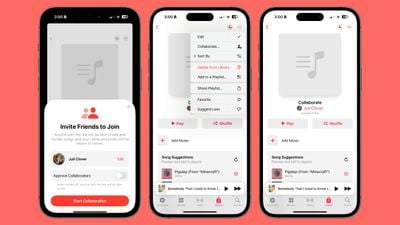
In iOS 17.3, you can take any of your existing playlists or create a new one and then invite others to join in to add songs and listen to the playlist. You can invite friends, family members, and others who share your musical preferences, and there doesn't appear to be a limit on how many people can contribute.

We have a MacRumors collaborative music playlist available for those who want to join in and share music with other MacRumors readers.

To use the collaboration feature, go to a playlist in the ‌Apple Music‌ app and then tap on the person icon. You will be able to generate a link that you can send to others, and everyone who is invited can access the playlist. There is an option to approve each person that joins, and leaving this off just opens it up to anyone with the link.

The person who created the playlist can remove people, remove songs, and turn off collaboration at any time.

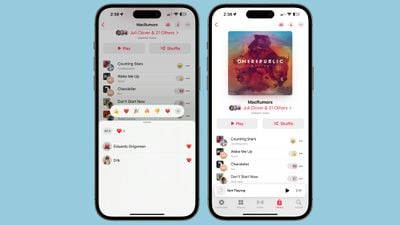
Apple in iOS 17.3 added a neat emoji reaction feature that allows listeners to add an emoji to any song that's playing to express their feelings about it. There are standard quick access emoji options like a heart and thumbs up, but with the "+" button, any emoji can be added.
apple music collaborative playlist emoji
When you're listening to a song in the playlist that has emoji reactions, those emoji animate as the song begins to play.

Release Date

iOS 17.3, iPadOS 17.3, macOS 14.3, tvOS 17.3, and watchOS 10.3 are all expected to see a public release sometime around January. Beta testing will be slightly delayed by the Christmas and New Year's holidays.


Related Forums: iOS 17, iPadOS 17

Popular Stories

Apple Watch Ultra 2 Black Titanium

New Apple Watch Series 12 and Apple Watch Ultra 4 Features Revealed

Sunday August 30, 2026 7:54 am PDT by
Bloomberg's Mark Gurman today further outlined what to expect from the Apple Watch Series 12 and Apple Watch Ultra 4 set to be unveiled on September 9. While it was initially rumored that Touch ID may be coming to the Apple Watch this year, Gurman reiterated that he does not expect the Series 12 or Ultra 4 to have any major design changes compared to the current Series 11 and Ultra 3 models. ...


Mac mini vs Studio Feature Sans Text 1

Apple Caught Off Guard by AI Demand for Mac Mini and Mac Studio

Sunday August 30, 2026 8:52 am PDT by
Apple's unusually timed announcement of new Mac mini and Mac Studio models this week was driven by unexpectedly strong enterprise appetite for AI hardware, according to The Information. Apple normally releases new Mac models in the autumn, closer to October or November, making this week's announcement unusually early, falling just before the anticipated arrival of new iPhone models. The...
Apple Event Logo

Apple Unveiled Four New Products This Week

Wednesday August 26, 2026 5:54 pm PDT by
Apple on Tuesday unveiled a new Mac mini with M6 and M5 Pro chip options, a new Mac Studio with M5 Max and M5 Ultra chip options, a new version of the Polishing Cloth with a lower price, and updated Magic Keyboards for Macs. To learn more about these products, read our coverage below: Apple Announces New Mac Mini With M6 and M5 Pro Chips and More Apple Unveils New Mac Studio With M5 Max...

Top Rated Comments

36 months ago

Allow me to MOVE photos to different albums instead of making a copy elsewhere. So dumb!!
Albums aren’t like file folders. Albums are just a way to view a set of photos. Similar to the way Tags work. So you also don’t have copies in each album. You can think of it as the source image is “tagged” as being part of multiple albums.
Score: 11 Votes (Like | Disagree)
Englishmike2 Avatar
36 months ago

But that’s dumb in my opinion. For instance my dog. Say I take 200 pics of him and I want to create an album called “Tralfaz”. I should be able to move all 200 pics to that album and that’s the only place they appear. Instead, Apple has me duplicating images/videos to another folder taking up double the space. Kind of like mail. I have two accounts, I can move mail to one or the other and if I go all inboxes, I see it all. Rename “Recents” to all images and let me make albums. Android has it right.
Doesn’t use double the space.
Score: 6 Votes (Like | Disagree)
gank41 Avatar
36 months ago

How about they fix iCloud fort starters ... dodgy, misrepresented & unethical money grabbing POS.
What’s wrong with iCloud?
Score: 5 Votes (Like | Disagree)
Iwavvns Avatar
36 months ago

Oh look here….a guy that never wants something to work differently than it does. Just buys and accepts [emoji849]
Well, first of all I research products before I buy them. And, if they don’t work as expected after I start using them then I change my habits to work with the product or I take it back and find something else, crying is not going to fix the problem.
Score: 4 Votes (Like | Disagree)
slomtbr Avatar
36 months ago

I’d wish there would be a ”lost mode” in addition to Stolen mode…
https://support.apple.com/guide/icloud/use-lost-mode-mmfc0f0165/icloud
Score: 4 Votes (Like | Disagree)
Iwavvns Avatar
36 months ago

But that’s dumb in my opinion. For instance my dog. Say I take 200 pics of him and I want to create an album called “Tralfaz”. I should be able to move all 200 pics to that album and that’s the only place they appear. Instead, Apple has me duplicating images/videos to another folder taking up double the space. Kind of like mail. I have two accounts, I can move mail to one or the other and if I go all inboxes, I see it all. Rename “Recents” to all images and let me make albums. Android has it right.
What would happen if you dropped all of your expectations and just used the service the way it actually works? it sounds like this would be less stressful, no?
Score: 4 Votes (Like | Disagree)

🔗 Related Apple News & Rumors

Stay updated with the latest Apple ecosystem news and verified rumors







































